机械通风系统的设计:修订间差异
跳转到导航
跳转到搜索
无编辑摘要 |
无编辑摘要 |
||
| 第96行: | 第96行: | ||
# 使用''<IS_TS id=btCheckFlow/>'' 功能,检查系统部件的连接是否正确(快捷键:Shift + F2) ,如有必要: | # 使用''<IS_TS id=btCheckFlow/>'' 功能,检查系统部件的连接是否正确(快捷键:Shift + F2) ,如有必要: | ||
#* 将特定的''<IS_TS id=rpNawiewnik/>'' / ''<IS_TS id=rpWywiewnik/>'' 分配给与其实际相连的''<IS_TS id=rpRozdzielaczWentZasilanie/>'' / ''<IS_TS id=rpRozdzielaczWentPowrot/>''。<br/>[[File:末端装置的指定.png|900 px|left|thumb|12.指定给相应的分/集风箱]]<br clear="all"/> | #* 将特定的''<IS_TS id=rpNawiewnik/>'' / ''<IS_TS id=rpWywiewnik/>'' 分配给与其实际相连的''<IS_TS id=rpRozdzielaczWentZasilanie/>'' / ''<IS_TS id=rpRozdzielaczWentPowrot/>''。<br/>[[File:末端装置的指定.png|900 px|left|thumb|12.指定给相应的分/集风箱]]<br clear="all"/> | ||
#* 将特定的''<IS_TS id=rpRozdzielaczWentZasilanie/>'' / ''<IS_TS id=rpRozdzielaczWentPowrot/>'' 分配给与其实际相连的''<IS_TS id=RekuperatorWent/> / <IS_TS id=CentralaWent/>'' <br/>[[File: | #* 将特定的''<IS_TS id=rpRozdzielaczWentZasilanie/>'' / ''<IS_TS id=rpRozdzielaczWentPowrot/>'' 分配给与其实际相连的''<IS_TS id=RekuperatorWent/> / <IS_TS id=CentralaWent/>'' <br/>[[File:新风机的指定.png|900 px|left|thumb|13. 指定给相应的<IS_TS id=RekuperatorWent/> / <IS_TS id=CentralaWent/>.]]<br clear="all"/> | ||
#* 将特定的''<IS_TS id=CzerpniaWent/> / <IS_TS id=WyrzutniaWent/>'' 分配给与其实际相连的''<IS_TS id=RekuperatorWent/> / <IS_TS id=CentralaWent/>'' <br/>[[File: | #* 将特定的''<IS_TS id=CzerpniaWent/> / <IS_TS id=WyrzutniaWent/>'' 分配给与其实际相连的''<IS_TS id=RekuperatorWent/> / <IS_TS id=CentralaWent/>'' <br/>[[File:取风口排风口的指定.png|900 px|left|thumb|14. <IS_TS id=CzerpniaWent/> / <IS_TS id=WyrzutniaWent/> 的指定.]]<br clear="all"/> | ||
# 使用''<IS_TS id=View3D/>'' | # 使用''<IS_TS id=View3D/>'',检查系统安装的正确性。<br/><br/> | ||
===进行系统计算=== | |||
# 通过单击''<IS_TS id=sObliczenie/>'' 工具中的[[File:Icon vent.png|25 px]],开始 ''<IS_TS id=InstalacjeWentylacyjne/>'' ; | |||
# 在''<IS_TS id=ErrorModuleTitle/>'' 窗口中检查诊断出的各种信息; | |||
# 如有以下情况发生: | |||
#* 出现错误:'''''<IS_TS id=WentylatorNieZapewniaWymaganejWydajnosci/>''''' | |||
#** 选择其他类型带有合适参数的 ''<IS_TS id=WentCentralaRekuperator/>'' ; | |||
#* 出现警告:'''''<IS_TS id=CentralaRekuPressureLessThanPrequiredPressure/>''''' | |||
#** 选择其他类型带有合适参数的''<IS_TS id=WentCentralaRekuperator/>''; | |||
#* 出现警告'''''<IS_TS id=errAirFlowSpeedOutOfRange/>''''' ; | |||
#** 增加''<IS_TS id=KanalyWentylacyjne/>'' 的''<IS_TS id=strPoleSrednice/>'' / ''<IS_TS id=pcstrSizes/>''; | |||
#** 选择其他类型的''<IS_TS id=rpNawiewnik/>'' / ''<IS_TS id=rpWywiewnik/>'' ,并给出连接和安装额外风管的机会; | |||
#** 增加并连接更多''<IS_TS id=rpNawiewnik/>'' / ''<IS_TS id=rpWywiewnik/>'', | |||
#** 修改''<IS_TS id=''<IS_TS id=strVmaxWithUnit/>''; | |||
#* 出现警告'''''<IS_TS id=SumaVsuRoznaOdSumaVex/>''''' : | |||
#** 更改''<IS_TS id=strs_expidISFPomieszczenieEN_PrzeplywPowietrzaNawiewanego/>'' 值和''<IS_TS id=strs_expidISFPomieszczenieEN_PrzeplywPowietrzaWywiewanego/>'' 。 | |||
#* 出现警告'''''<IS_TS id=errAirFlowSpeedOutOfRange/>''''' : | |||
#** 选择其他类型的''<IS_TS id=rpNawiewnik/> / <IS_TS id=rpWywiewnik/>'' ,并给出连接额外风管的机会, | |||
#** 在''<IS_TS id=DataEditorTable/>'' 中修改''<IS_TS id=LiczbaPodlaczonychKanalow/>'' <br/>[[File:Mechanical ventilation installations number of con ducts.png |900 px|left|thumb|15. <IS_TS id=LiczbaPodlaczonychKanalow/>.]]<br clear="all"/> | |||
#** 增加更多的''<IS_TS id=rpNawiewnik/> / <IS_TS id=rpWywiewnik/>'' 。 | |||
===Running the calculations=== | |||
# Start the calculation of the ''<IS_TS id=InstalacjeWentylacyjne/>'' by clicking [[File:Icon vent.png|25 px]] in the ''<IS_TS id=sObliczenie/>'' section of the toolbar; | |||
# Сheck messages in the ''<IS_TS id=ErrorModuleTitle/>'' window; | |||
# In the case of occurrence: | |||
#* the error '''''<IS_TS id=WentylatorNieZapewniaWymaganejWydajnosci/>''''' is indicated: | |||
#** choose other type of ''<IS_TS id=WentCentralaRekuperator/>'' with appropriate parameters; | |||
#* the warning '''''<IS_TS id=CentralaRekuPressureLessThanPrequiredPressure/>''''' is detected: | |||
#** choose other type of ''<IS_TS id=WentCentralaRekuperator/>'' with appropriate parameters; | |||
#* the warning '''''<IS_TS id=errAirFlowSpeedOutOfRange/>''''' appears: | |||
#** increase the ''<IS_TS id=strPoleSrednice/>'' / ''<IS_TS id=pcstrSizes/>'' of the ''<IS_TS id=KanalyWentylacyjne/>'', | |||
#** select other types of ''<IS_TS id=rpNawiewnik/>'' / ''<IS_TS id=rpWywiewnik/>'' with the opportunity of connecting and placing additional air ducts, | |||
#** add and connect more ''<IS_TS id=rpNawiewnik/>'' / ''<IS_TS id=rpWywiewnik/>'', | |||
#** modify ''<IS_TS id=''<IS_TS id=strVmaxWithUnit/>''; | |||
#* the warning '''''<IS_TS id=SumaVsuRoznaOdSumaVex/>''''' is displayed: | |||
#** correct the values of ''<IS_TS id=strs_expidISFPomieszczenieEN_PrzeplywPowietrzaNawiewanego/>'' and ''<IS_TS id=strs_expidISFPomieszczenieEN_PrzeplywPowietrzaWywiewanego/>''. | |||
#* the warning '''''<IS_TS id=errAirFlowSpeedOutOfRange/>''''' appears: | |||
#** select other types of ''<IS_TS id=rpNawiewnik/> / <IS_TS id=rpWywiewnik/>'' with the opportunity of connecting additional air ducts, | |||
#** modify ''<IS_TS id=LiczbaPodlaczonychKanalow/>'' in the ''<IS_TS id=DataEditorTable/>'' <br/>[[File:Mechanical ventilation installations number of con ducts.png |900 px|left|thumb|15. <IS_TS id=LiczbaPodlaczonychKanalow/>.]]<br clear="all"/> | |||
#** add more ''<IS_TS id=rpNawiewnik/> / <IS_TS id=rpWywiewnik/>''. | |||
2026年9月11日 (五) 10:08的版本
| 产品 | InstalSystem 5 |
| 文章类型 | 设计课程 |
| 版本的最新内容 | 2024-07-29 |
课程内容
本文介绍了基于现成部件为住宅建筑开展通风系统计算 的基本设计方法。
模块和程序的配置
InstalSystem 5 需带有如下模块:
- 住宅建筑的机械通风。
视频教程
欢迎观看我们的视频教程,视频中有对本文所述的功能进行讲解和介绍的内容
项目文件
本课程中使用的项目文件:住宅建筑中的机械通风系统设计(本课程的示范案例)。
初始状态
该项目文件包含模板文件中配置的完整默认参数。建筑结构已根据DWG布局进行了详细说明。
设计步骤 - 方法1 - 使用虚拟连接进行快速设计
打开项目文件
- 创建新项目时,从列表中选择包含通风系统默认参数的模板,或者,
- 导入包含带有建筑结构的项目文件 - 至少包含正确的坐标、楼板厚度和手动创建的房间.
定义项目的一般参数
在一般参数 窗口,填写默认参数:
- 项目范围 - 选择项目范围: 通风系统计算 。
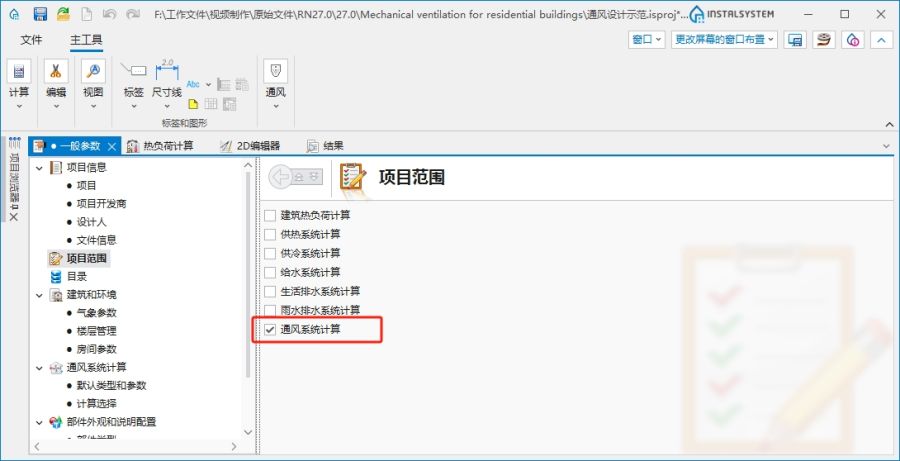
1. 项目范围. - 目录 – 选择必要的目录并将其移动到项目可用的产品目录 表中。为了加快选择速度,可以使用过滤器。更多信息,见: 使用项目中的目录和目录数据。
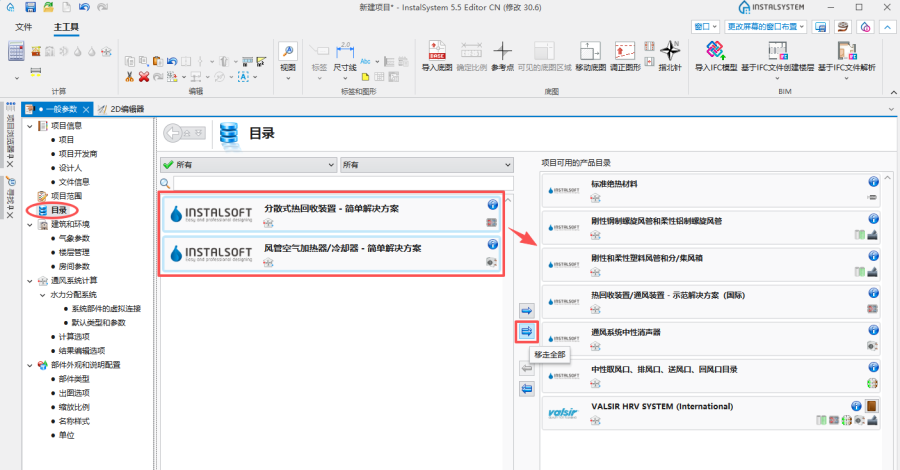
2. 目录. - 一般参数编辑:
- 楼层管理:
- 创建适当数量的楼层 / 子楼层 (通过IFC解析或手动创建);
- 为通风系统计算,设定楼层参数:
- 选择通风输配系统的方式:
- 在上方楼板之下,
- 在下方楼板之上;
- 如果必要,修改安装部件距离楼板的 默认距离 。
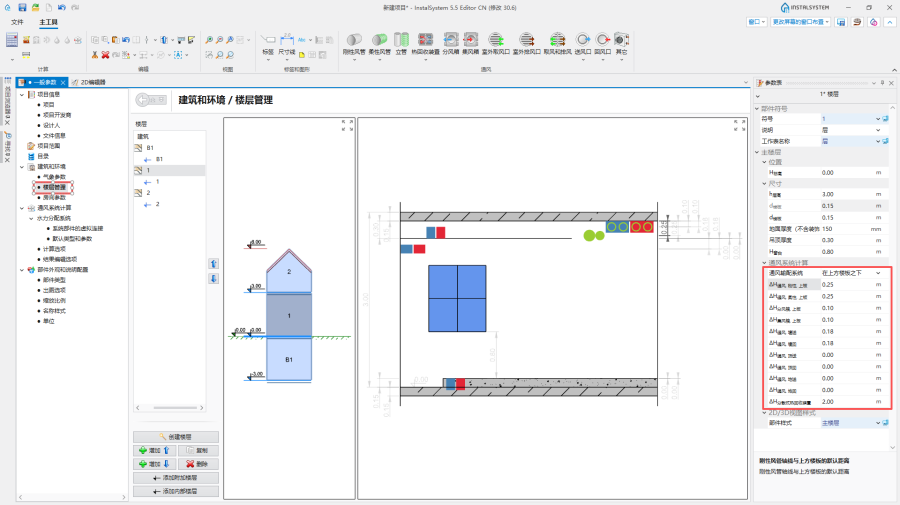
3. 为通风系统计算 设置楼层参数
- 选择通风输配系统的方式:
- (可选项) 房间参数 - 为项目中需要通风的每个房间或所选择的房间类型 ,设定如下参数:
- 排风量 (V回), 送风量 (V送) 或最小通风换气次数 (n最小);
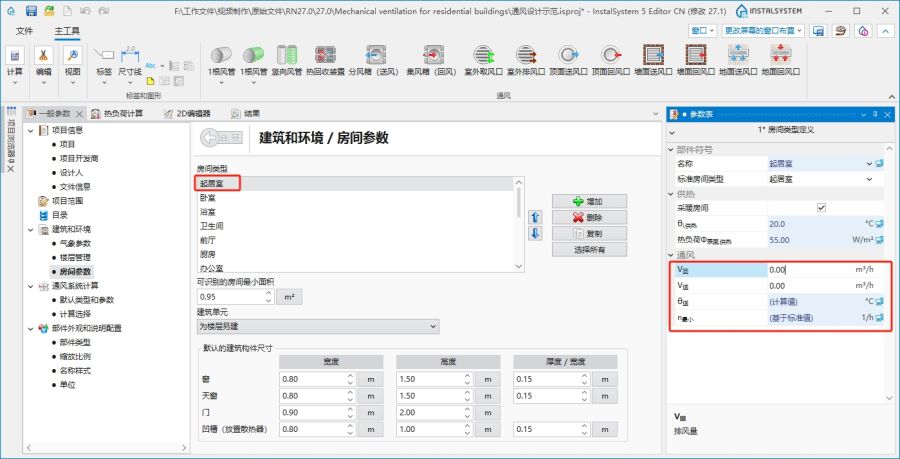
4. 一般参数 房间参数
- 排风量 (V回), 送风量 (V送) 或最小通风换气次数 (n最小);
- 系统部件的虚拟连接:
- 勾选未绘制图形连接时,创建假想的连接,
- 如果希望在材料清单中包括预估的风管长度,勾选列出假想的部件,
- 如有必要,修改柔性假想风管的长度系数 和刚性假想风管的长度系数,
- 选择确定连接到送/回风口的风管数量 的方法,
- 根据通风系统部件的安装位置,选择部件之间虚拟连接要使用的柔性风管 或刚性风管 。
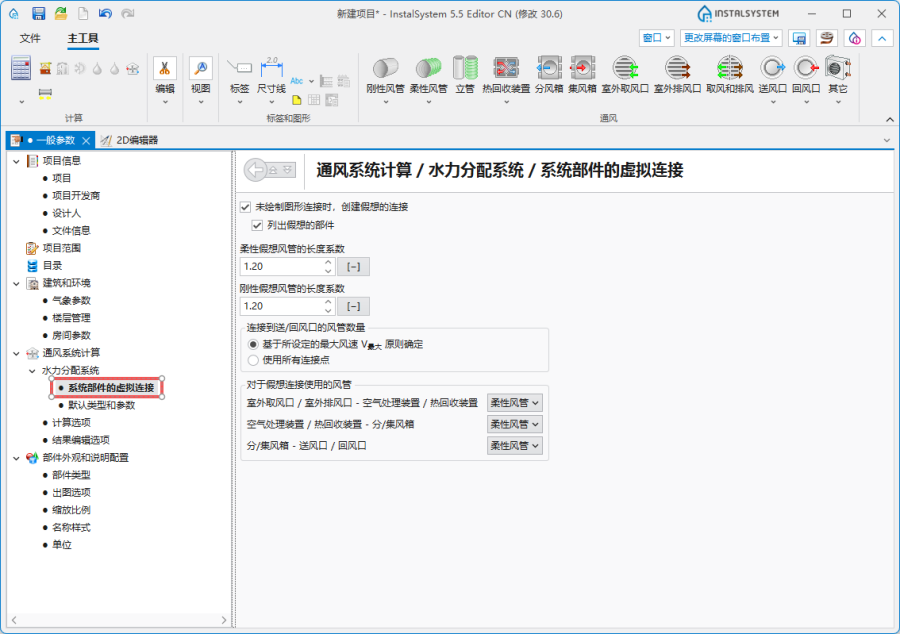
5. 系统部件的虚拟连接.
- 通风系统计算 / 默认类型和参数 – 附加默认类型:
- 默认的管材类型和绝热材料: 刚性风管;
- 默认的管材类型和绝热材料: 柔性风管;
- 默认类型: 其它部件:
- 空气处理装置 / 热回收装置 / 分散式热回收装置,
- 分风箱 / 集风箱,
- 墙面送风口 / 墙面回风口, 顶面送风口 / 顶面回风口, 地面送风口 / 地面回风口,
- 管道消音器,
- 取风和排风;
- 热回收效率: 根据目录参数, 根据热损失参数 或用户指定;
- (可选) 在系统的不同位置指定和调整 V最大 [m/s] 的默认值。
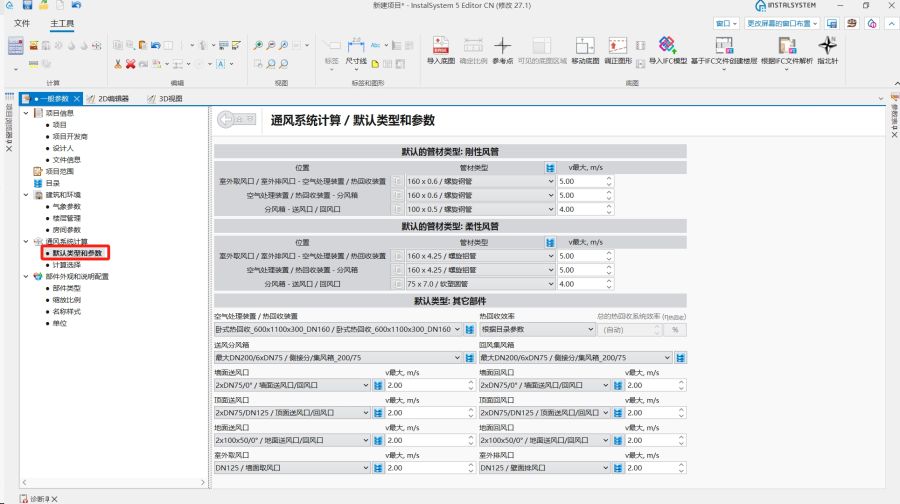
6. 默认类型和参数.
- 通风系统计算 / 计算选项:
- 选择通风量的确定方法;
- (可选) 开启检查每人的最小新风量 功能;
- (可选) 检查室外设计温度(θ室外);
- (可选) 设置送风/回风前允许的静压差 (Δp静);
- (可选) 调节送风口后所需的最小正静压;
- (可选) 调节回风口前所需的最小负静压;
- (可选) 开启允许风机档位选择超出推荐范围 功能.
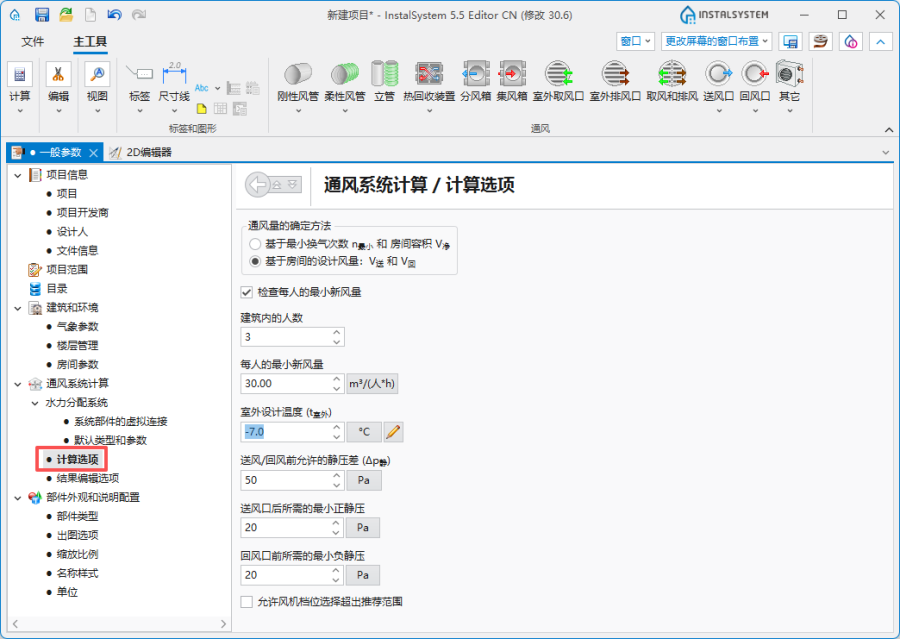
7. 计算选项.
- 楼层管理:


系统装置的编辑
编辑参数
在建筑 编辑器内为每个特定房间 ,在其参数表 中设置或修改排风量 (V回), 送风量 (V送) 或最小通风换气次数 (n最小) 。

编辑系统
使用捕捉 和定向线 模式,进行插入和图形的编辑操作。
- 选择通风 编辑器.
- 插入通风 部件:
- 热回收装置,
- 分风箱 和集风箱;
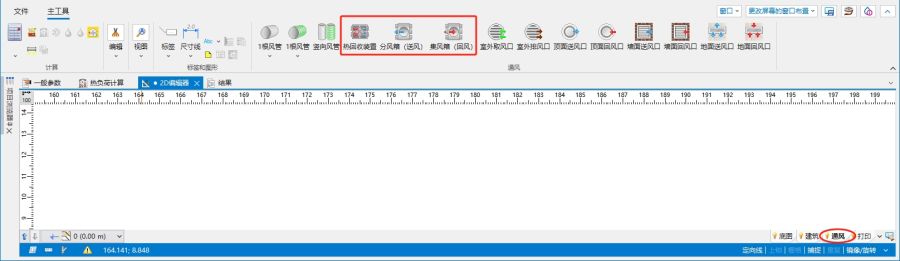
9. 插入热回收装置 、分风箱 和集风箱
- 插入通风 末端装置,如有必要,指出旋转角度 :
- 室外取风口,
- 室外排风口,
- 新风末端(格栅、送风散流器),
- 回风末端(格栅、室内吸风口);
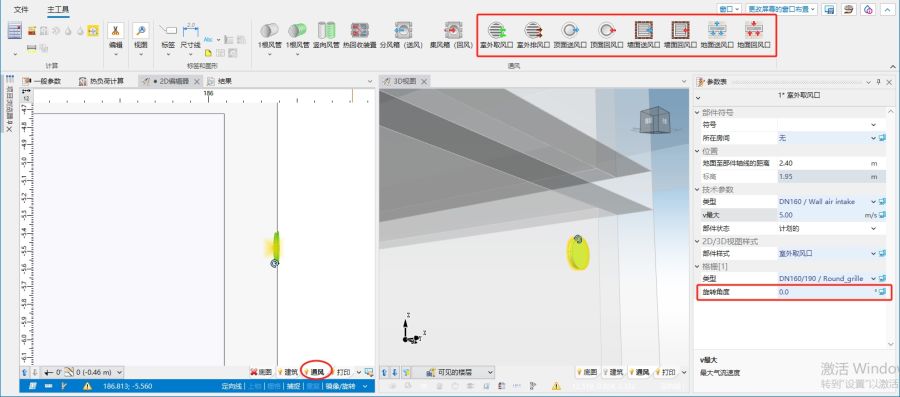
10. 插入通风末端并设定旋转角度.
送风末端和排风末端可自动插入到指定的V回 和V送 不为零值的房间,或通过选择适宜的通风末端图标并点击平面图上的目标位置进行手动插入。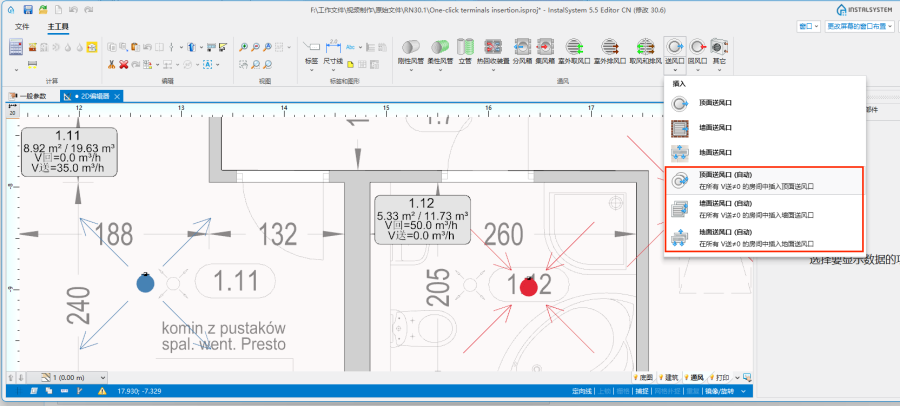
11. 送风口 的自动插入.


检查系统安装的正确性
- 使用检查连接 功能,检查系统部件的连接是否正确(快捷键:Shift + F2) ,如有必要:
- 将特定的送风口 / 回风口 分配给与其实际相连的分风箱 / 集风箱。
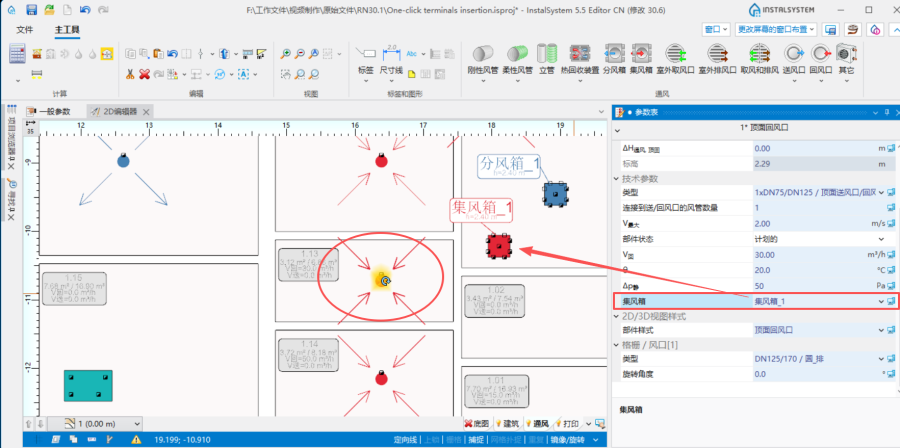
12.指定给相应的分/集风箱 - 将特定的分风箱 / 集风箱 分配给与其实际相连的热回收装置 / 空气处理装置
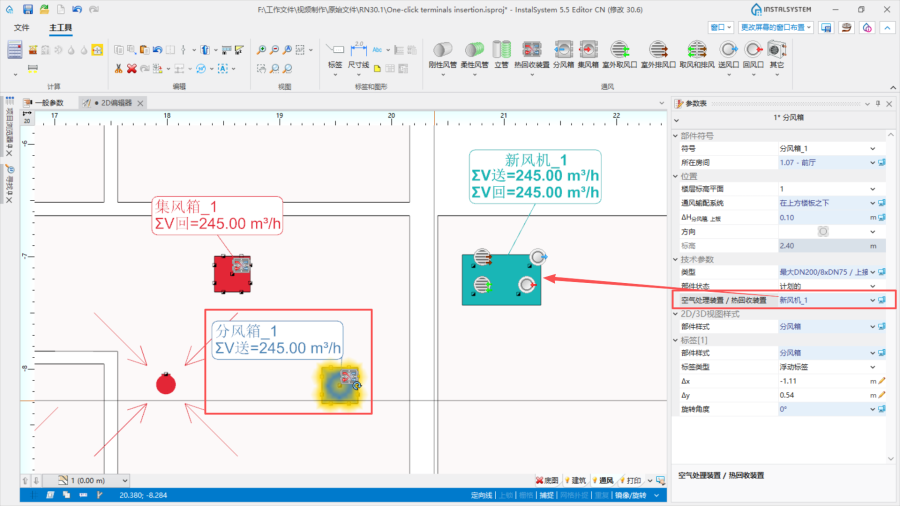
13. 指定给相应的热回收装置 / 空气处理装置. - 将特定的室外取风口 / 室外排风口 分配给与其实际相连的热回收装置 / 空气处理装置
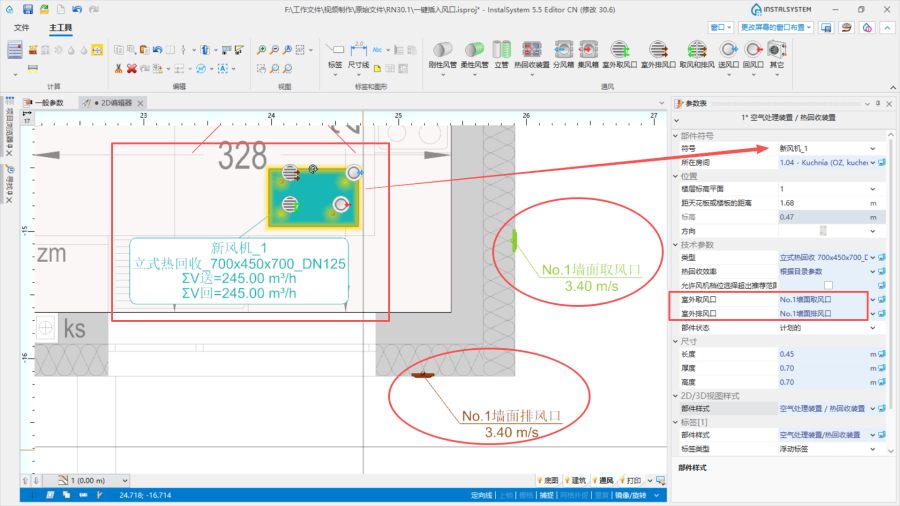
14. 室外取风口 / 室外排风口 的指定.
- 将特定的送风口 / 回风口 分配给与其实际相连的分风箱 / 集风箱。
- 使用3D视图,检查系统安装的正确性。


进行系统计算
- 通过单击计算 工具中的
 ,开始 通风系统计算 ;
 - 在诊断 窗口中检查诊断出的各种信息;
- 如有以下情况发生:
- 出现错误:风机无法提供所需的气流。V̇=%s[m3/h],V̇最小=%s[m3/h],V̇最大=%s[m3/h]
- 选择其他类型带有合适参数的 空气处理装置 / 热回收装置 ;
- 出现警告:风机压力(%s) < 系统所要求的(%s)
- 选择其他类型带有合适参数的空气处理装置 / 热回收装置;
- 出现警告超过最大空气流速(%s m/s>%s m/s) ;
- 增加风管 的Diameters / 尺寸;
- 选择其他类型的送风口 / 回风口 ,并给出连接和安装额外风管的机会;
- 增加并连接更多送风口 / 回风口,
- 修改V最大 [m/s];
- 出现警告送排风量不平衡(ΣV送 =%s m3/h,ΣV回) = %s m3/h) :
- 更改V送 值和V回 。
- 出现警告超过最大空气流速(%s m/s>%s m/s) :
- 选择其他类型的送风口 / 回风口 ,并给出连接额外风管的机会,
- 在参数表 中修改连接到送/回风口的风管数量

15. 连接到送/回风口的风管数量. - 增加更多的送风口 / 回风口 。
- 出现错误:风机无法提供所需的气流。V̇=%s[m3/h],V̇最小=%s[m3/h],V̇最大=%s[m3/h]


Running the calculations
- Start the calculation of the 通风系统计算 by clicking in the 计算 section of the toolbar;
- Сheck messages in the 诊断 window;
- In the case of occurrence:
- the error 风机无法提供所需的气流。V̇=%s[m3/h],V̇最小=%s[m3/h],V̇最大=%s[m3/h] is indicated:
- choose other type of 空气处理装置 / 热回收装置 with appropriate parameters;
- the warning 风机压力(%s) < 系统所要求的(%s) is detected:
- choose other type of 空气处理装置 / 热回收装置 with appropriate parameters;
- the warning 超过最大空气流速(%s m/s>%s m/s) appears:
- increase the Diameters / 尺寸 of the 风管,
- select other types of 送风口 / 回风口 with the opportunity of connecting and placing additional air ducts,
- add and connect more 送风口 / 回风口,
- modify V最大 [m/s];
- the warning 送排风量不平衡(ΣV送 =%s m3/h,ΣV回) = %s m3/h) is displayed:
- correct the values of V送 and V回.
- the warning 超过最大空气流速(%s m/s>%s m/s) appears:
- select other types of 送风口 / 回风口 with the opportunity of connecting additional air ducts,
- modify 连接到送/回风口的风管数量 in the 参数表
15. 连接到送/回风口的风管数量. - add more 送风口 / 回风口.
- the error 风机无法提供所需的气流。V̇=%s[m3/h],V̇最小=%s[m3/h],V̇最大=%s[m3/h] is indicated:
- 插入立管;
- 插入管道消音器;
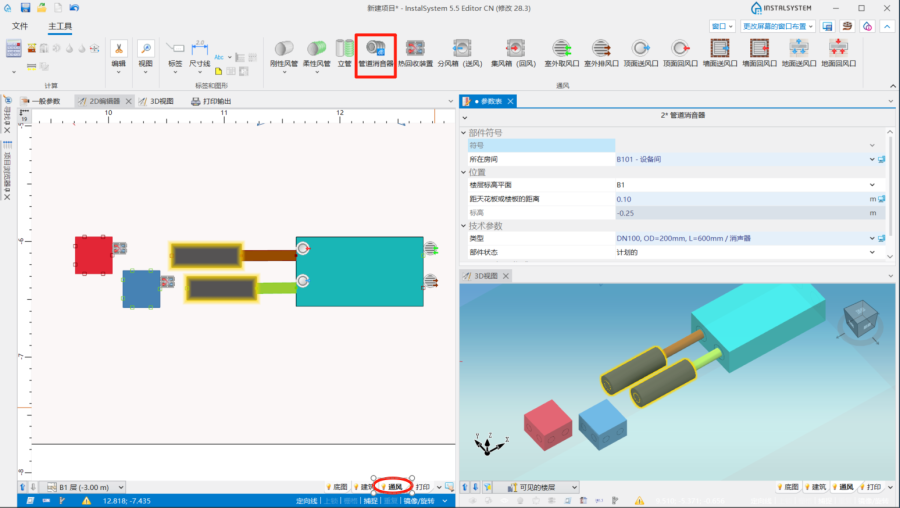
10. 插入管道消音器. - 使用刚性风管 或柔性风管 连接系统部件。

编辑部件参数
如有必要,可在参数表 窗口中修改通风 部件参数,特别是:
- 通风 末端的类型 ;
- 通风 末端的V送 / V回 ;
- 热回收装置 距天花板或楼板的距离 / 标高 ;
- 分风箱 和集风箱 距天花板或楼板的距离 / 标高 ;
- 管道消音器'距天花板或楼板的距离 / 标高;
- 风管 距天花板或楼板的距离 / 标高 ;
- 风管 的管材类型 。
- 绝热材料 的类型和绝热所在位置。 注: 在计算 过程中,绝热材料 的厚度是根据管道在空调或非空调空间中的位置 自动确定的。
检查系统安装的正确性
- 使用检查连接 功能(快捷键:Shift+F2),检查系统部件连接的正确性;
- 使用3D视图 ,检查系统安装的正确性;
- 根据外部因素,如穿墙或与其它设施的碰撞,调整风管 的布置。
进行系统计算
- 通过单击计算 中的,开始 通风系统计算 ;
- 在诊断 窗口中检查诊断出的各种信息;
- 如有必要,请检查并调整系统安装,如:
- 如果通风管道 超过最大空气流速(%s m/s>%s m/s) ,则增加通风管道的直径/尺寸;
- 如果通风末端 超过最大空气流速(%s m/s>%s m/s) ,则增加送风口 / 回风口 的尺寸或增加更多风管 和送风口 / 回风口;
- 送排风量不平衡(ΣV送 =%s m3/h,ΣV回) = %s m3/h) ,更正V送 和V回 。
检查计算结果
- 计算后,应通过3D视图 直观地检查系统布置;
- 如果计算过程中出现错误,则布局可能不可靠;
- 每个通风 部件的参数都可借助部件的标签和包含基本参数的提示直接在图中查看。
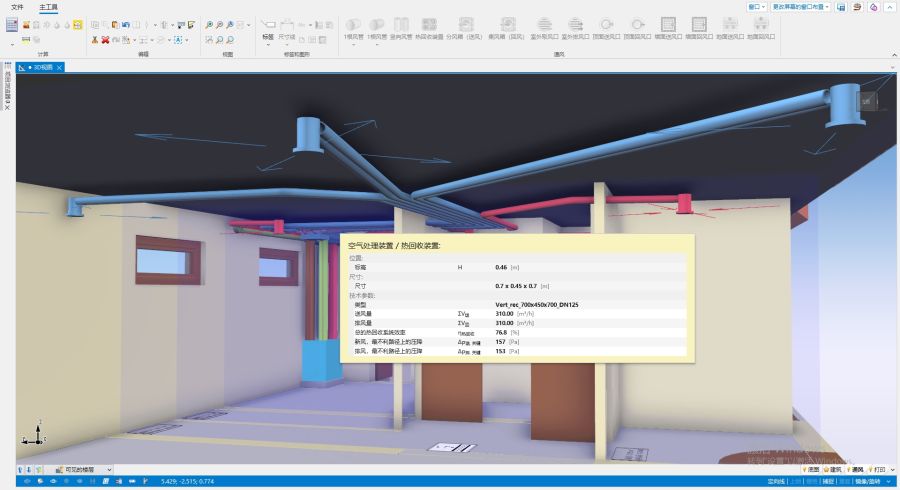
9. 在3D视图 窗口中检查

结果表格
使用结果 窗口中的计算表格,检查系统安装的参数,包括:
- 新风/再循环气流路径 和排风气流路径 - 表格显示了每个特定安装部件的气流路径、风量和压力损失。
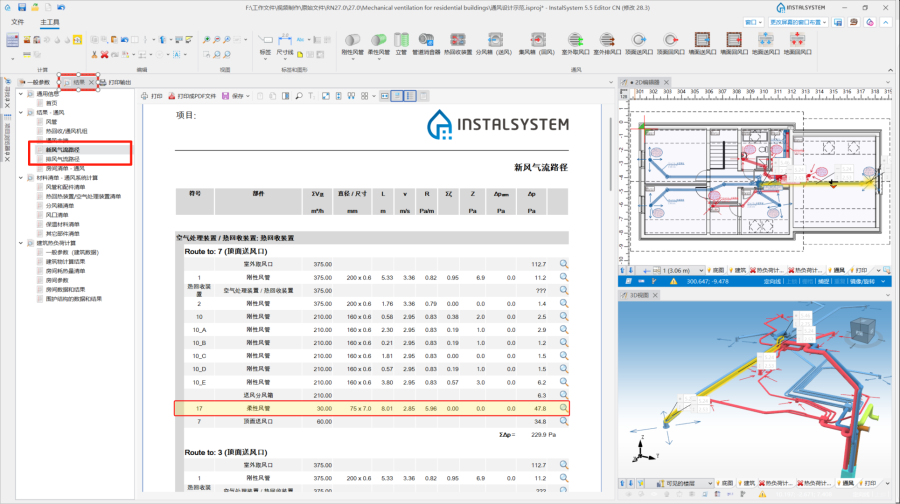
10. 结果 - 通风.

结果 表格中显示的每个安装部件都可通过使用 图标,在活动窗口中找到它们。
更多信息,见: 查看和打印计算结果。
图纸的输出和打印
- 如果要将通风安装部件的结果包含在图纸中打印输出,必须插入适当的标签。更多信息,见: 输出 / 打印结果和图纸.
- 打印和/或导出已完成的图纸。更多信息,见: 输出 / 打印结果和图纸。