如何绘制带天井的建筑:修订间差异
跳转到导航
跳转到搜索
| 第22行: | 第22行: | ||
==解决方案== | ==解决方案== | ||
===使用<IS_TS id=rsPomieszczenie/> 和 <IS_TS id=ObrysBud/> 部件=== | ===使用<IS_TS id=rsPomieszczenie/>和<IS_TS id=ObrysBud/> 部件=== | ||
在[[建筑结构的准备 - 房间布置图]] | 在[[建筑结构的准备 - 房间布置图]]一文中提供了有关使用''<IS_TS id=rsPomieszczenie/>'' ''<IS_TS id=PomieszczenieReczne/>'' 和''<IS_TS id=ObrysBud/>'' 创建建筑结构的相关信息。 | ||
</br> | </br> | ||
==== | ====方法 1:使用封闭的C-形<IS_TS id=rsPomieszczenie/> 部件==== | ||
# | # 在建筑内部天井周围插入一个封闭的C-形''<IS_TS id=rsPomieszczenie/>'' ,使房间边缘不重叠。</br>[[File:C_room.png|900 px|left|thumb|1. Closed C-shaped <IS_TS id=rsPomieszczenie/>.]]<br clear="all"/> | ||
# | # 在设计的图形中再添加一''<IS_TS id=ObrysBud/>'' 部件 | ||
# In order to verify whether the edges of the ''<IS_TS id=rsPomieszczenie/>'' do not overlap, launch ''<IS_TS id=BuildingStructureCalculation/>''. | # In order to verify whether the edges of the ''<IS_TS id=rsPomieszczenie/>'' do not overlap, launch ''<IS_TS id=BuildingStructureCalculation/>''. | ||
# Insert a ''<IS_TS id=rsPomieszczenie/>'' ''<IS_TS id=PomieszczenieReczne/>'' component to cover the area of the patio in the building. | # Insert a ''<IS_TS id=rsPomieszczenie/>'' ''<IS_TS id=PomieszczenieReczne/>'' component to cover the area of the patio in the building. | ||
2022年7月29日 (五) 04:37的版本
| 产品 | InstalSystem 5 |
| 文章类型 | 提示和技巧 |
| 版本的最新内容 | 2022-06-24 |
问题说明
在InstalSystem 5 中,有几种设计带有天井的建筑的方法,从而可以最佳地适应创建此类的建筑结构。本文将进一步详细介绍创建带天井的建筑的步骤。
解决方案
使用房间和建筑外轮廓 部件
在建筑结构的准备 - 房间布置图一文中提供了有关使用房间 手动 和建筑外轮廓 创建建筑结构的相关信息。
方法 1:使用封闭的C-形房间 部件
- 在建筑内部天井周围插入一个封闭的C-形房间 ,使房间边缘不重叠。
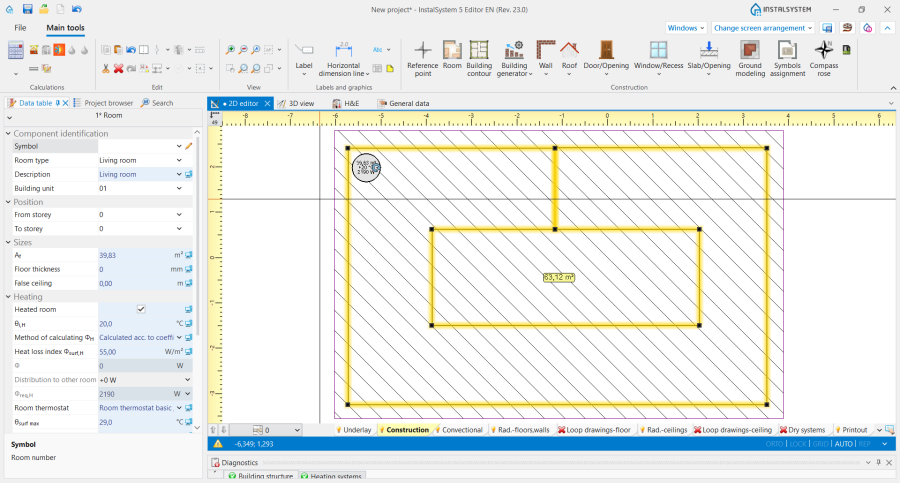
1. Closed C-shaped 房间. - 在设计的图形中再添加一建筑外轮廓 部件
- In order to verify whether the edges of the 房间 do not overlap, launch 建筑结构计算.
- Insert a 房间 手动 component to cover the area of the patio in the building.
- Launch 自动生成墙、楼板和屋顶.
- Remove the 墙 component left over after the manual C-shaped room.
- Over the patio area cut out an 屋顶开洞 and connect it using any two edges with the outer edge of the 屋顶.
- Optionally cut out an 楼板开洞 that covers the patio area.
- Run 建筑结构计算 again.

Method 2: outline the patio using manually placed walls
- Insert a 房间.
- Add a 建筑外轮廓 component to the design.
- Launch 自动生成墙、楼板和屋顶.
- Launch 建筑结构计算.
- Using the 墙 components, draw the patio into the existing 房间 and launch 建筑结构计算 again.
- Over the patio area cut out an 屋顶开洞 and connect it using any two edges with the outer edge of the 屋顶.
- Optionally cut out an 楼板开洞 that covers the patio area.
- Run 建筑结构计算 again.
Using manually drawn walls
Information on creating a building structure using the 墙, 屋顶 and 楼板 components is provided in the article: Preparation of building structure - Complete building structure.
- Outline the shape of the room and patio using the 墙 components.
- Add 屋顶 and 楼板 components to the design.
- Launch 建筑结构计算.
- Over the patio area cut out an 屋顶开洞 and connect it using any two edges with the outer edge of the 屋顶.
- Optionally cut out an 楼板开洞 that covers the patio area.
- Run 建筑结构计算 again.
- Attention! It is also possible to leave an empty space above the patio and draw a 屋顶 in the form of two perfectly abutting roof slopes.
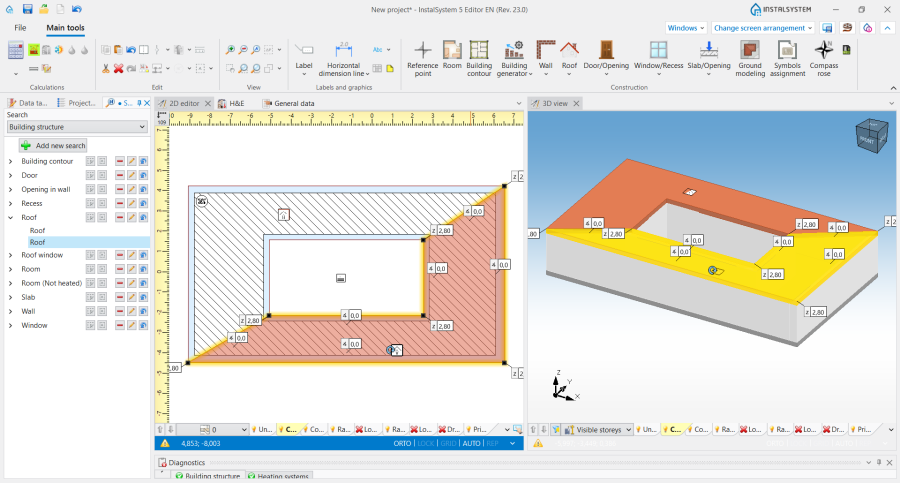
2. Roof slopes in a building with a patio.
