线性热桥和点热桥:修订间差异
跳转到导航
跳转到搜索
| 第69行: | 第69行: | ||
#*** 更改''<IS_TS id=strpnDzialkaIDOpisu/>'' 并添加''<IS_TS id=sOpis/>''。 | #*** 更改''<IS_TS id=strpnDzialkaIDOpisu/>'' 并添加''<IS_TS id=sOpis/>''。 | ||
=== | ===场景 IV - 点热桥的计算方法=== | ||
# | # 编辑默认 参数: | ||
#* | #* 在''<IS_TS id=rsDanogi/>'' 窗口,''<IS_TS id=ObliczeniaCieplneBudynku/>'' ,''<IS_TS id=rsDanog_Normy/>'' 中,对于''<IS_TS id=strs_enumidISFOZCDaneOgolneEN12831_MetodaUwzglednianiaMostkowCieplnych/>'' ,选择''<IS_TS id=rsEN12831_MetodaUwzglednianiaMostkowCieplnychLiniowe/>'' 。 '''''注:''''' 这种方法仅适用于EN标准。 | ||
# | # 点热桥的定义: | ||
#* | #* 在进行了''<IS_TS id=sObliczenie/>'' 后,''<IS_TS id=ScopeOZC_MC_Short/>'' (''<IS_TS id=ScopeOZC_MC/>'') scope with the representation of thermal bridges will be available in ''<IS_TS id=GraphicalEdit/>'' and on ''<IS_TS id=View3D/>''. Open ''<IS_TS id=ProjectBrowser/>'', ''<IS_TS id=ObliczeniaCieplneBudynku/>'', ''<IS_TS id=rsDefinicjeMostkow/>'', ''<IS_TS id=rsTypMostka_MostkiPunktowe/>''. Select point thermal bridge type from the offered list; | ||
#* The data of the selected type will be available in the ''<IS_TS id=DataEditorTable/>'': | #* The data of the selected type will be available in the ''<IS_TS id=DataEditorTable/>'': | ||
#** ''<IS_TS id=sNazwa/>'', | #** ''<IS_TS id=sNazwa/>'', | ||
2025年6月11日 (三) 03:21的版本
| 产品 | InstalSystem 5 |
| 文章类型 | 功能和工具 |
| 版本的最新内容 | 2025-04-22 |
说明
本文介绍了建筑热负荷计算中线性热桥和点热桥的计算方法。
在程序中的位置
热桥计算方法 的选择可以在一般参数 窗口的计算标准和选项 中找到。

应用举例
场景 I - 线性热桥简化的计算法
- 编辑默认参数:
- 在一般参数 窗口,建筑热负荷计算, 计算标准和选项 中,对于热桥计算方法,选择简化的。 注: 此方法适用于EN标准;
- (可选) 为热桥修正的方式 设置自动模式 。这将把建筑结构/建筑(房间视图)表格上所有的ΔUtb (热桥修正) 设置为自动模式,并使用如下默认值:
- ΔUtb = 0.05 W/(m2·K) - 对于外部围护结构 (外墙, 外窗, 外门, 户外地板, 屋顶) 以及对于与大地接触的围护结构 (地下部分墙体, 接地地板);
- ΔUtb = 0.00 W/(m2·K) - 对于内部围护结构 (内墙, 内部地板, 内门, 内窗).
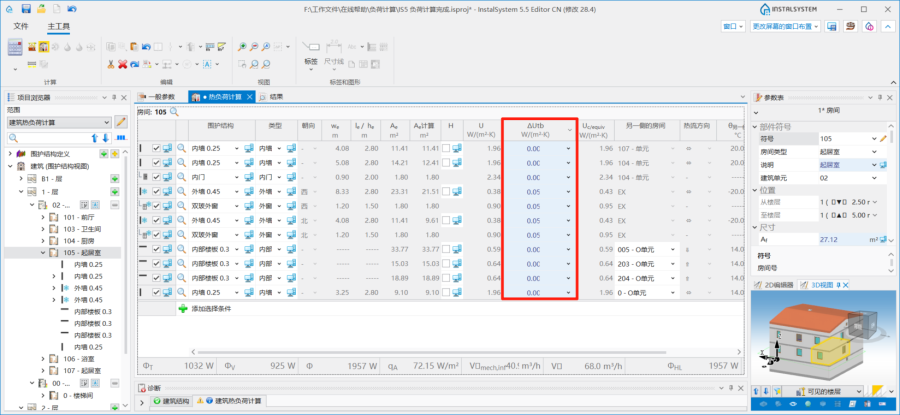
2. 处于自动模式 状态的ΔUtb
- (可选项) 针对DIN标准,引入了ΔU
- 编辑房间参数:
- 在建筑结构 / 建筑(房间视图)表格中,选择确定ΔUtb (热桥修正) 的方法:
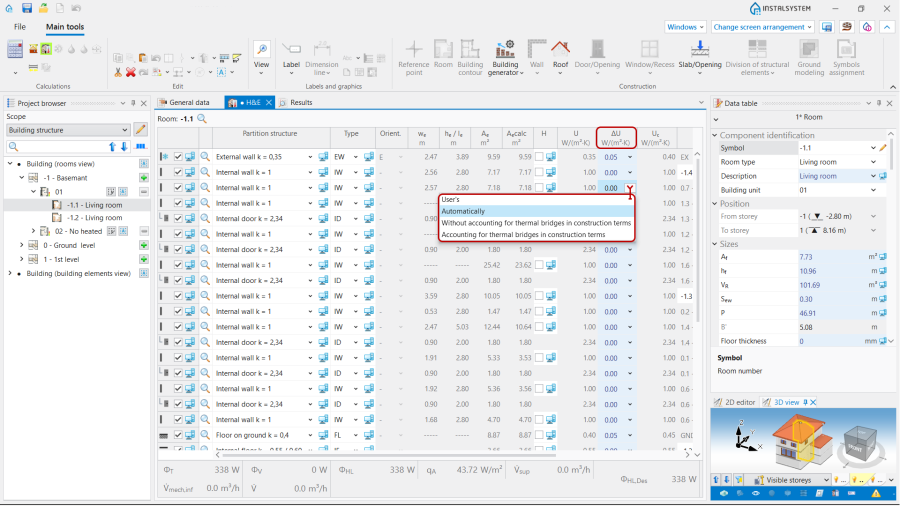
3. 热桥修正.
- 用户的 - 允许自己设置补偿值;
- 自动 - 根据自动 模式初始化该默认值;
- 在结构方面中没有考虑热桥 - ΔUtb = 0.05 W/(m2·K);
- 在结构方面考虑热桥 - ΔUtb = 0.1 W/(m2·K).
- 在建筑结构 / 建筑(房间视图)表格中,选择确定ΔUtb (热桥修正) 的方法:


场景 II - 依据 EN 12831 方法核算线性热桥
- 编辑默认参数:
- 在一般参数 窗口,建筑热负荷计算,计算标准和选项 中,对于热桥计算方法 ,选择依据 EN 12831 。注: 本方法仅用于EN标准。
- 编辑房间参数:
- 在建筑结构 / 建筑(房间视图) 表格中,选择确定ΔUtb (热桥修正) 的方法,类似于场景 I - 线性热桥简化的计算法。
场景 III - 自动 - 基于传热模型 方法核算线性热桥
- 编辑默认参数:
- 在一般参数 窗口,建筑热负荷计算, 计算标准和选项 中,对于热桥计算方法 ,选择 自动 - 基于传热模型 。 注: 本方法仅适用于EN标准:
- 定义线性热桥的默认类型:
- 在进行了计算 后,在2D编辑器 和3D视图 中,就会出现展示热桥的热负荷计算(TB) (传热计算中的热桥) 窗口。 打开项目浏览器, 建筑热负荷计算, 热桥的定义 ,可为每种类型的线性热桥,从所提供的可视化的变量中选择其中一个,并在其参数表 中,勾选对此类型使用默认参数 的复选框,将其设为默认参数。注: 每种热桥类型都要定义一个默认参数。
一旦线性热桥被定义,就可在2D或3D视图以及参数表 中查看其说明:- 名称,
- 热桥类别,
- 热桥定义 (来自可视化的变量),
- Ψ, W/(m·K) (线性热桥的传热系数).
- (可选) 复制现有的热桥定义并修改其参数,将它指定为默认值;
- (可选) 创建一个新的热桥定义,手动完成其参数,从列表中选择一个热桥类别并将其指定为默认值;
- (可选) 删除选定的用户热桥定义。
- 在进行了计算 后,在2D编辑器 和3D视图 中,就会出现展示热桥的热负荷计算(TB) (传热计算中的热桥) 窗口。 打开项目浏览器, 建筑热负荷计算, 热桥的定义 ,可为每种类型的线性热桥,从所提供的可视化的变量中选择其中一个,并在其参数表 中,勾选对此类型使用默认参数 的复选框,将其设为默认参数。注: 每种热桥类型都要定义一个默认参数。
- 进行计算, 从而自动检测线性热桥并将其纳入建筑热负荷计算;
- 查看自动识别的线形热桥,如有必要,可手动编辑它们。
- 打开项目浏览器, 建筑热负荷计算, 热桥视图. 该树显示了相关分支中按类型分组的房间内的线性热桥。可以使用选择所有 功能或通过框选当前楼层中指定类型的部件 来选择房间内给定类型的所有热桥。也可以使用CTRL/SHIFT进行多选;
- 所选热桥将展示在2D编辑器 和3D视图 中的 热负荷计算(TB) 视图窗口中。
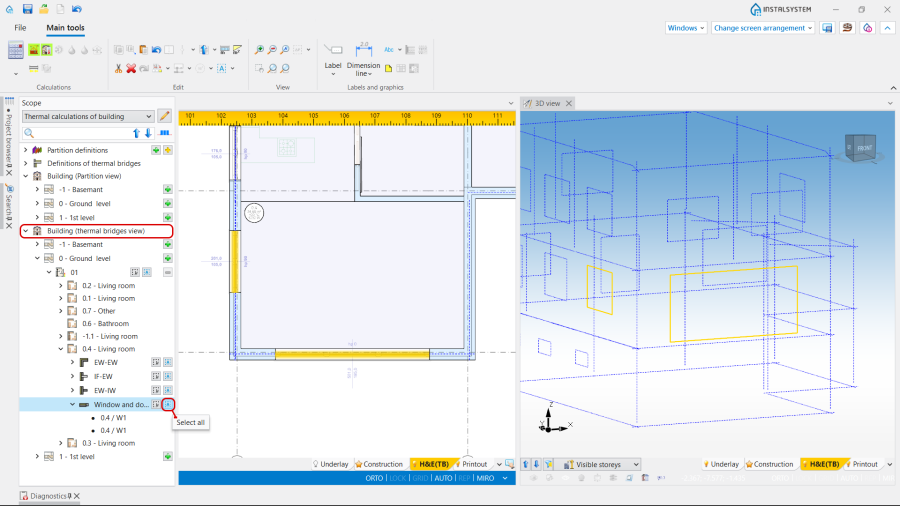
4. 热桥视图. - 在2D编辑器 或3D视图 中的热负荷计算(TB) 选项内,直接点击线性热桥的图形来选择它们;
- 可以使用热桥的定义 中的选择按钮定义特定类型的线性热桥;
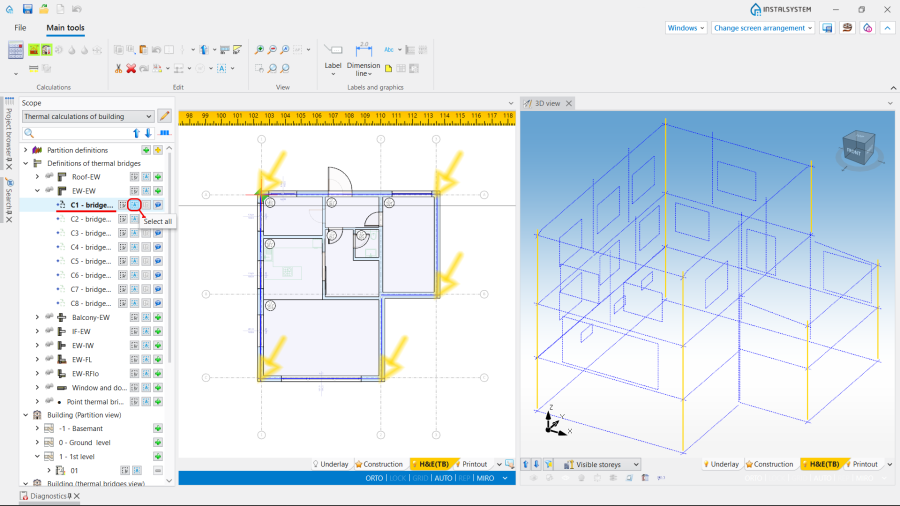
5. 选择某一定义类型的线性热桥。 - 手动编辑自动分配的热桥:
- 对于所选热桥,可用的操作如下:
- 手动更改热桥定义,
- 手动更改线性热桥的I ( 热桥的长度)。
- 不勾选计算时考虑 复选框;
- 更改部件样式 并添加说明。
- 对于所选热桥,可用的操作如下:


场景 IV - 点热桥的计算方法
- 编辑默认 参数:
- 在一般参数 窗口,建筑热负荷计算 ,计算标准和选项 中,对于热桥计算方法 ,选择自动 - 基于传热模型 。 注: 这种方法仅适用于EN标准。
- 点热桥的定义:
- 在进行了计算 后,热负荷计算(TB) (传热计算中的热桥) scope with the representation of thermal bridges will be available in 2D编辑器 and on 3D视图. Open 项目浏览器, 建筑热负荷计算, 热桥的定义, 点热桥. Select point thermal bridge type from the offered list;
- The data of the selected type will be available in the 参数表:
- 名称,
- 说明,
- 点传热值 (点传热值),
- 包含点热桥的围护结构定义 - when opening the field the definition grouped for the partitions will be available. This is possible to select one or more partition definitions,
- 说明 with two variants to choose from: 围护结构每平方米 and 每个围护结构,
- 点热桥的数量. Note: The correction of this field is also possible after making 计算.
- (Optionally) Copying an existing 热桥定义 and modifying its data as above (e.g. to include the same bridge in different 外墙 definitions);
- (Optionally) Creating a new bridge definition, manually filling in the above data;
- (Optionally) Deletion of selected user definitions of bridges.
- Perform 计算, resulting in automatic detection of point thermal bridges and their inclusion in the 建筑热负荷计算;
- Overview of automatically recognized point thermal bridges and make manual edits, if necessary:
- Open 项目浏览器, 建筑热负荷计算, 热桥视图. After deploying the tree at the 房间 level, an expandable 点热桥 branch is available below the branches with linear thermal bridge types,
- The сhosen bridges are presented in the 2D编辑器 window and 3D视图 on a separate edit scope 热负荷计算(TB).
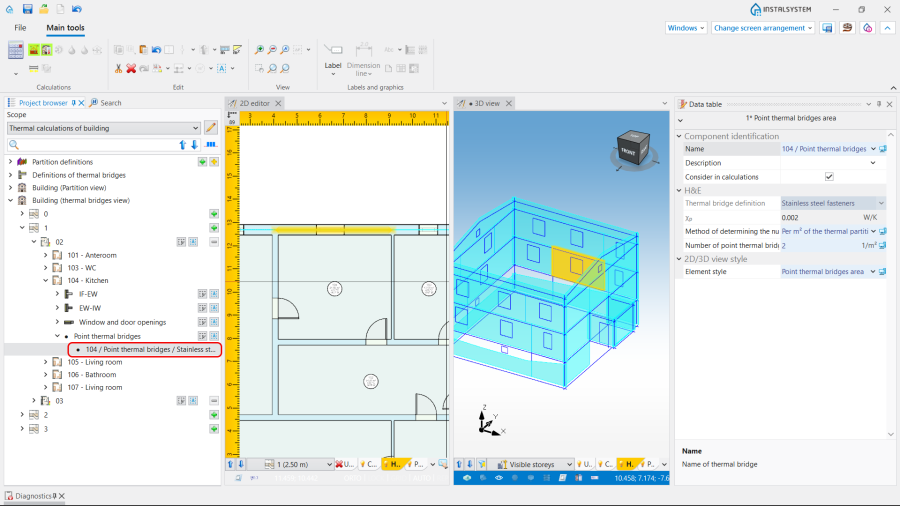
6. 点热桥. - Manual editing of the point bridge area data:
- The operations, available for the selected thermal bridge, are the following:
- Change of 确定点热桥数量的方法, status AUTO / MANUAL (
 /
/  ):
):
- AUTO allows to determine the 点热桥的数量 according to bridge definition.
- MANUAL gives the possibility to change the default method and to define individually the 点热桥的数量 to be taken into account (via the fields 围护结构每平方米 or 每个围护结构).
- Unchecking check box 计算时考虑;
- Change of 部件样式 and addition of 说明.
- Change of 确定点热桥数量的方法, status AUTO / MANUAL (
- The operations, available for the selected thermal bridge, are the following:


