输出 / 打印结果和图纸
说明
The program enables exporting project drawings and results into a number of file formats (JPG, PDF, DWG, XLS and many more) and printing them. Exporting to DWG/DXF files is effected by means of a dedicated function, whereas exporting to many other file formats is done with functions used for outputting to a printer. It takes on the form of printing to a file of selected type. 该程序可项目图纸和结果为。出口的DWG / DXF文件是由一个专门的功能受影响,而出口到许多其他的文件格式是用于输出到打印机的功能。它以打印的形式对选定类型的文件进行打印.。
Location in the program
- The 输出 DXF/DWG 文件 function is available on the 主工具 bar when the 打印 editing scope is enabled. The function enables exporting graphics from the project file to a DXF/DWG file.
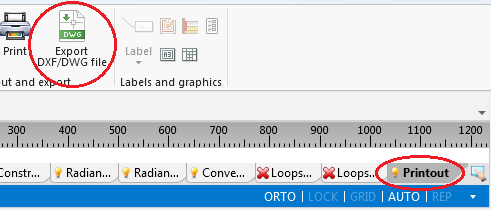
1. 输出 DXF/DWG 文件 - Outputting to a printer and to other file formats is effected in the 打印输出 window. The 打印 function, available on the 主工具 bar when the 打印 editing scope is enabled, switches the program to that window. Alternatively this can be done by calling this window from the 窗口 menu on the 主工具 bar.
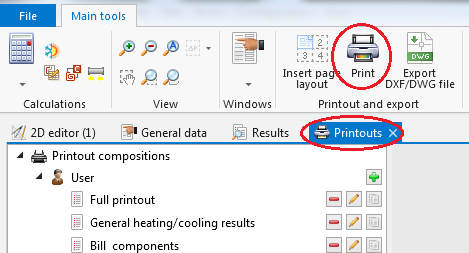
2. 打印 - The 插入页面布局 icon, available on the 主工具 bar when the 打印 editing scope is enabled, allows placing a 打印页面 component in a drawing. Every such component in the project is a new definition of the scope of printout / export of graphics.
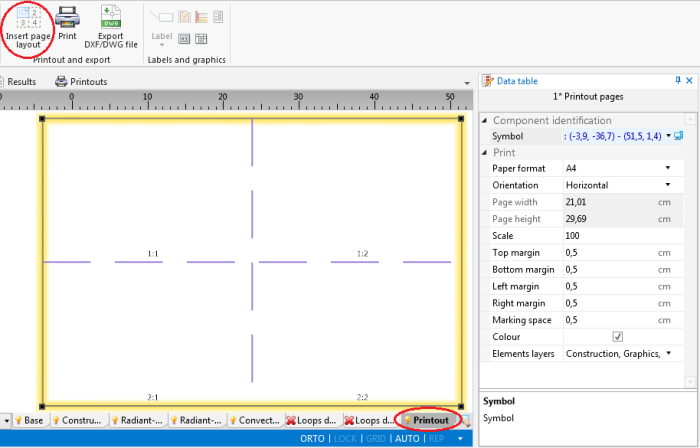
3. 插入页面布局


Location in the program
- The 输出 DXF/DWG 文件 function is available on the 主工具 bar when the 打印 editing scope is enabled. The function enables exporting graphics from the project file to a DXF/DWG file.
1. 输出 DXF/DWG 文件 - Outputting to a printer and to other file formats is effected in the 打印输出 window. The 打印 function, available on the 主工具 bar when the 打印 editing scope is enabled, switches the program to that window. Alternatively this can be done by calling this window from the 窗口 menu on the 主工具 bar.
2. 打印 - The 插入页面布局 icon, available on the 主工具 bar when the 打印 editing scope is enabled, allows placing a 打印页面 component in a drawing. Every such component in the project is a new definition of the scope of printout / export of graphics.
3. 插入页面布局