建筑结构的准备 - 屋顶建模 - 天窗的创建
| 产品 | InstalSystem 5 |
| 文章类型 | FUNCTION AND TOOL |
| 版本的最新内容 | 2024-11-19 |
Description
The article describes the path of modeling 天窗. The element can be created with the use of tools related to the 屋顶 creation and directly with the use of 天窗 element.
天窗 is only to be inserted within the scope of the existing 屋顶, the 天窗 may not protrude beyond the outline of the roof, if necessary, the roof may be artificially drawn/remodeled for the purpose of using this function or to create a given part of the building.
天窗 is completed with vertical partitions created automatically after the Building Structure Calculation is performed, walls of a specific shape and dimension are created resulting from the position between the two elements. The walls are bounded from above by the dormer roof and from below by the roof slope.
天窗 is inserted on an existing 屋顶 which has no errors after the 建筑结构计算 has been carried out.
The default 天窗 is inserted as a flat dormer - the program sets the maximum ordinates (from that particular point on the roof plane) to make it a horizontal dormer by default.
Dormer is inserted on an existing roof which has no errors after the Building Structure Calculation has been carried out.
The program considers the cubic capacity of the room with the 天窗 inserted.
The attached projects provide solutions for the most common cases of 天窗 creation.
Location in the program
- Icons of components and of functions for 屋顶 modeling are available in the 2D编辑器 window on the 主工具 bar, section 建筑, 屋顶 tab, when 建筑 editing is enabled.
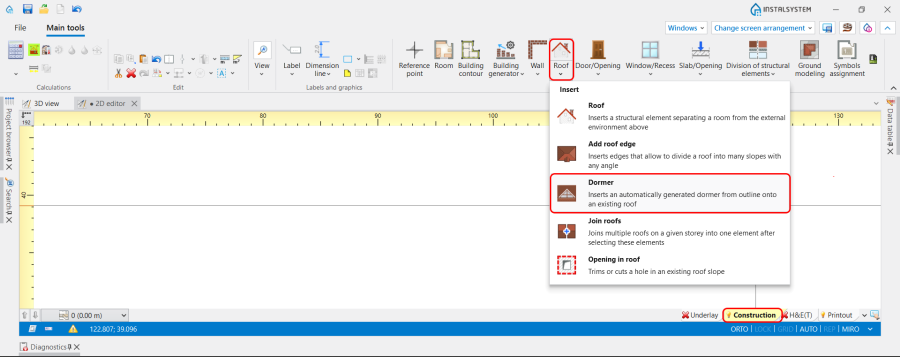
1. 天窗 location.

Example of use
Roof-operated 天窗
天窗 is modelled as part of the 屋顶. Created with the 添加屋顶边缘 function. 更多信息,见: Add roof edge.
For multi-storey 屋顶 it is required to use also the function 修剪楼板(由屋顶部件).更多信息,见: Trim slab by roof element.
Note: Particular attention must be paid to the correct modelling of knee walls.
Sample project: Roof-operated Dormer, isproj
天窗 flush with the front wall
Modelling of 天窗 flush with the front wall is a common solution:
- Insert 天窗;
- Use the 添加屋顶边缘 function to insert edges if necessary;
- Specify the elevations or slopes;
- Insert 窗.
Sample project: Dormer flush with the front wall, isproj
天窗 extending beyond the outline of the building
- Use 墙 and 楼板 elements to create the part extending beyond the building contour; 更多信息,见: Inserting walls ,Inserting slabs.
- 屋顶 should be completely covered over the protruding part of the building;
- Insert 天窗 over the protruding part of the building. Steps to perform are: Dormer flush with the front wall.
Sample project: Dormer extending beyond the outline of the building, isproj
天窗 covering several rooms
Steps to perform are: Dormer flush with the front wall or Dormer extending beyond the outline of the building.
Sample project: Dormer covering several rooms, isproj

If a 天窗 covers several rooms and there are other physical walls between the dormer's outermost side walls - these are cut not through the roof proper but through the dormer's roof.
Multi-storey 天窗 extending beyond the outline of the building
Steps to perform are: Dormer extending beyond the outline of the building.
Note: In this case multi-storey 房间 should be used. 更多信息,见: Multi-storey rooms.
Sample project: Multi storey Dormer extending beyond the outline of the building, isproj

Dormer covers multi-storey rooms.
天窗 located below the storey on which the 屋顶 is inserted (multi-storey 屋顶)
天窗 may be located below the storey on which the roof is inserted. Such 天窗 should be placed on the storey on which the roof is located, even though the dormer is located on a lower storey.
Note: To create storeys of different levels in the same building, use additional storey levels. 更多信息,见: Create additional and internal storey levels.
Can be created like Roof operated Dormer or Dormer flush with the front wall.

Dormer located below the storey on which the Roof is inserted, isproj
天窗 located in a building with 附加楼层
The principle of creating such 天窗 is identical to the other cases. 天窗 can be placed either on the 屋顶 of the main storey or on the 屋顶 part defined by the 附加楼层 above.
Sample project: Dormer located in a building with Additional storey level, isproj

Additional information
- 天窗 has a smaller label than the 屋顶 element, it is distinguished on the 2D plan by dashed red lines and a darker shade of red.
- 天窗 wall has a main longitudinal edge marking (hotpoints at the corners) and always faces the outside of the building - the thickness of the automatically generated dormer walls can only be changed from the inside of the rooms. It is recommended that the thickness of these walls is consistent with the value of the internal vertical walls on which it is based.
- 天窗 relieves the requirement to cut an opening in the roof at the place of its insertion.
- Partitions such as windows, doors or wall openings can be inserted on the dormer walls.
- The user has the option to impose his own value - the thickness for the dormer roof.