BIM - 将IFCSpace部件解析为InstalSystem 5软件包中的房间
| 产品 | InstalSystem 5 |
| 文章类型 | 功能和工具 |
| 版本的最新内容 | 2022-06-10 |
说明
InstalSystem 5 提供了一种工具,可以将ifcSpace 对象解析为原生的房间 手动 部件,以这种方式解析的房间可用于:
- 设计一个系统,其中房间的热负荷由用户指示或指定。更多信息,见: 建筑结构的准备 - 房间布置图
- 建筑热负荷计算或建筑物能源性能证书的起草,首先将部件房间 手动 转换为房间 自动,更多信息,见: 建筑结构的准备 - 完整的建筑结构 。
在将ifcSpace 对象解析为房间 手动 类型的构件之前,必须确保已从IFC文件中正确创建了楼层布置。对楼层错误的解析,也将导致设计空间内对房间 手动 构件标高的错误解析。
更多信息,见: BIM - 基于导入的IFC模型参数创建楼层
此外,在执行解析时,用户可以使用在InstalSystem 5 中的如下的标准工具来协助基于IFC模型的设计过程,即:* 寻找 窗口
- 项目浏览器 窗口
- 参数表 窗口
- 2D编辑器 和3D视图 窗口。
有关上述工具的使用以及如何导航IFC模型的详细信息,请参阅:BIM - 在InstalSystem 5软件包中导入和管理IFC模型。
网络研讨会
欢饮观看我们网络研讨会上的视频,该视频中也有对本文所述的功能进行讲解和介绍的内容。
在程序中的位置
- 基于IFC文件创建房间 图标位于2D编辑器 和3D视图 窗口,当进入底图 编辑器后,在主工具 的工具栏,基于IFC文件解析 选项卡内。
The 基于IFC文件创建房间 icon is located in the 2D编辑器 and 3D视图 windows on the 主工具 bar in the 底图 section in 基于IFC文件解析 group when the 底图 editing scope is enabled.

Examples of use
Selecting ifcSpace objects to be interpreted
- Before launching 基于IFC文件创建房间, the objects to be subjected to this function must be selected. The selection can be made using:
- the 寻找 window for the 底图 scope with the use of predefined groups of IFC component types or by user-defined search criteria. 更多信息,见: Search components in the project,
- the 2D编辑器 or 3D视图 window with the 底图 editing scope enabled - directly by clicking the selected components,
- the 项目浏览器 window. 更多信息,见: BIM - Import and management of IFC models in InstalSystem 5 package.
- Components can be interpreted individually or in groups. For example: selecting an entire group of ifcSpace rooms and choosing the function 基于IFC文件创建房间 will create native components 房间 手动 from all ifcSpace components belonging to the selected group.
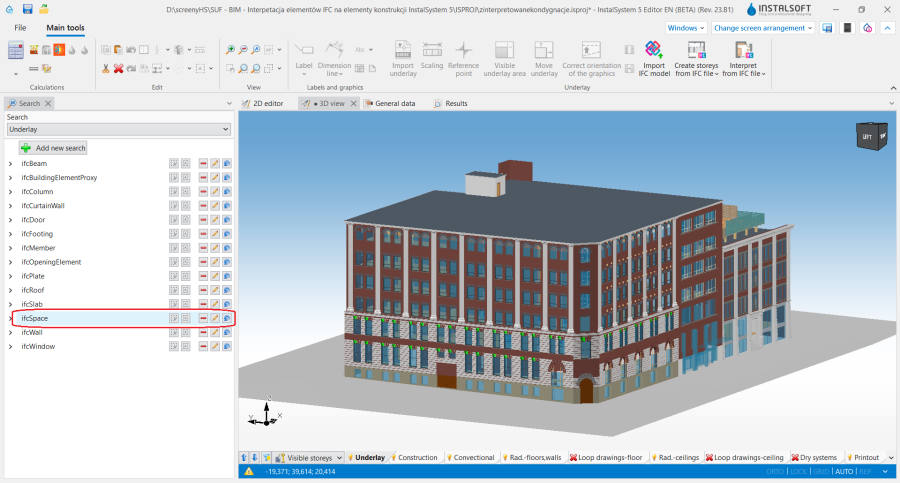
2. Selecting a group of components with the use of the 寻找 window. - Components unchecked in the 项目浏览器 window, apart from not being displayed in the 2D编辑器 and 3D视图 windows, are also not subject to interpretation. This mechanism can be used when:
- some of the rooms are to be interpreted at a later stage, e.g. when structural components are interpreted storey by storey,
- the model has defined ifcSpace objects that are redundant in terms of the designed system or objects that are duplicated,
- some of the rooms are to be completed manually at a later stage of the design work.
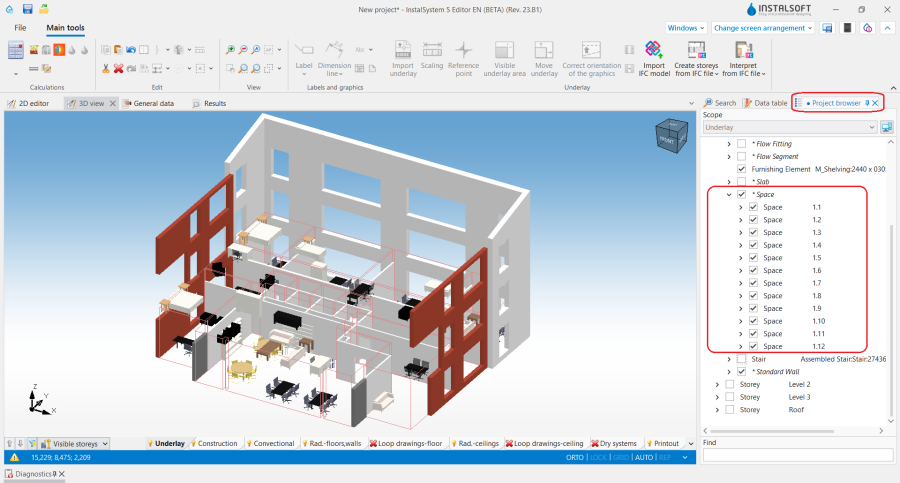
3. Hiding ifcSpace objects on storeys that are not interpreted.


Interpretation of rooms
- After performing the 基于IFC文件创建房间 operation, switch to the 建筑 editing scope and carefully examine the created layout of 房间 手动 components.
- In the 参数表 window, the following data from the IFC model are assigned to the components created by interpreting ifcSpace objects:
- LongName - value in the 说明 field in the 部件符号 section,
- Name - value in the 符号 field in the 部件符号 section,
- The rest of the data of the created component 房间 手动 is adopted from the settings from the 房间参数 tab in the 一般参数 window.
- After the 基于IFC文件创建房间 operation, the building structure can be freely supplemented with manually inserted components of the 房间 type, for which the 捕捉 function acts on the IFC model currently loaded into the project.
This allows the interpretation of ifcSpace objects to be adjusted according to the design context and the quality of the IFC model.- All 房间 components can be created using the automatic function 基于IFC文件创建房间.
- The 房间 components can be created in a mixed manner: some of them identified automatically by using the 基于IFC文件创建房间 function, some of them added manually by the user.
- All 房间 components can be inserted manually and the IFC model imported into the project treated as a conventional DWG/DXF underlay. With this method, it is a good idea to hide all objects in the IFC model and leave only the ifcSpace visible, which will significantly improve the clarity of the model in the 2D编辑器 window and make manual room outlining easier.
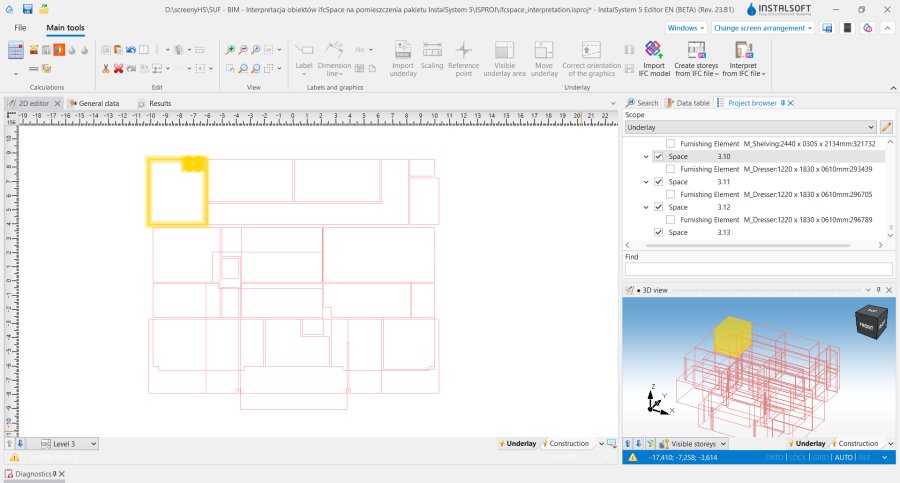
4. Hiding the objects from the IFC model to facilitate manual insertion of 房间 components.
- The 基于IFC文件创建房间 operation gives the created 房间 the native shape from the IFC model, even when the body of the component is top-cut by a sloping roof.
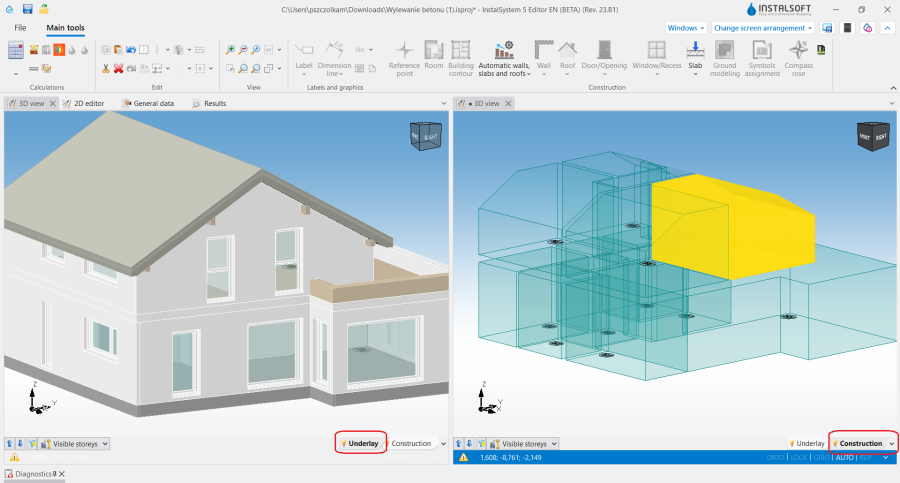
5. 房间 手动 with sloping roof interpreted from an IFC model. - If there are vertical openings in an ifcSpace object that fully intersect its body (e.g. columns, a room defined in a room), the shape of the resulting 房间 手动 component in the 2D编辑器 window on that storey contains a "hole". This is a situation that cannot be achieved by manually creating a 房间 in the 建筑 scope.


Interpretation of room elevations
- The bottom and top elevations of the 房间 component in InstalSystem 5 mostly result from and coincide with the data of the 楼层 component. If the elevations of the ifcSpace object do not coincide with the range of the previously created 楼层 components (更多信息,见:: BIM - Creating storeys based on data from IFC model), the elevations of the 房间 手动 component will be aligned with the elevations of the 楼层, and the modified values will be accordingly converted into the parameters presented in the 参数表 window of the 房间 手动 components:
- 地面厚度
- 吊顶厚度.
- The operation interprets the elevations with a certain tolerance. If the elevations of an ifcSpace object are slightly outside the range of the storey elevations , they will be changed to fit within an appropriate range.
- If the difference is greater than the tolerance adopted in the program, the bottom and top limiting elevations of the 房间 手动 components will remain unchanged. In such a situation, it is possible to modify and adjust the position of the 房间 手动 components by making appropriate settings in the 从楼层 and 至楼层 fields in the 参数表 window. Changes can be made simultaneously to a number of selected 房间 手动 components.
- If the range of rooms is being aligned on the same storey to which 房间 (or group of rooms) is assigned, it is necessary to change the value in the 从楼层 or 至楼层 field to another value available in the list and revert to the initial value in this field to reset the position of the 房间 手动.
- In order to analyse the elevations of the components being created, the 显示地面/吊顶区 function available in the 3D视图 window can be used. This function highlights within the rooms the area determined by the values for the parameters: 地面厚度 and 吊顶厚度.
Editing rooms created by interpreting
- After the 基于IFC文件创建房间 operation the 房间 手动 components are created within the 建筑 editing scope and exist in parallel (simultaneously) with the IFC model components within the 底图 scope. ifcSpace objects within the 底图 scope are shown by means of red edges in both the 2D编辑器 and the 3D视图 window.
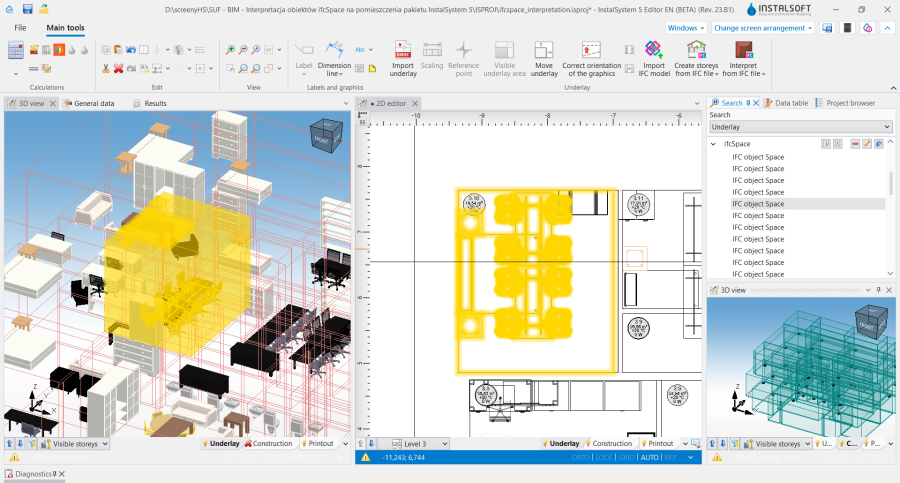
6. IfcSpace in the 2D编辑器 and 3D视图 windows. - It is possible to modify freely the 房间 手动 components created as a result of this operation. They can be moved, deleted, have their shape corrected, etc. All necessary changes must be made within the 建筑 scope.
- The ifcSpace objects within the 底图 scope cannot be modified or deleted. They can, however, be hidden using the 项目浏览器 window. 更多信息,见: BIM - Import and management of IFC models in InstalSystem 5 package.
- Attention! The 房间 手动 component formed from an ifcSpace object of irregular shape, when its shape is modified using hotpoints, takes the shape of a right prism.

Using the rooms from ifcSpace in the 自动生成墙、楼板和屋顶 operation
- In the next design stage, the interpreted 房间 手动 components can be used in the 自动生成墙、楼板和屋顶 operation. This allows a tailored approach to interpreting the structure according to the design needs and quality of the IFC model. The function should be used when the level of detail in the IFC model with respect to walls, roofs, slabs and any openings therein is such that InstalSystem 5 has difficulty in converting them into native structural components that can be properly handled by 建筑结构计算. 更多信息,见: BIM - Interpretation of IFC elements into building structure elements of InstalSystem 5 package.
- After interpreting the ifcSpace objects, the design must be supplemented with 建筑外轮廓 components and the 自动生成墙、楼板和屋顶 function must be used. In a further step, the 基于IFC文件创建窗、门和墙洞 operation can be performed on the building body thus formed. 更多信息,见: Interpretation of windows, doors and openings.
Export of ifcSpace objects
- It is possible to export the 房间 components created by interpreting ifcSpace objects into an IFC model. The exported components are supplemented with the technical and calculation parameters presented in the 参数表 window of the component. 更多信息,见: BIM - Export of installation and construction data from the project to IFC models.
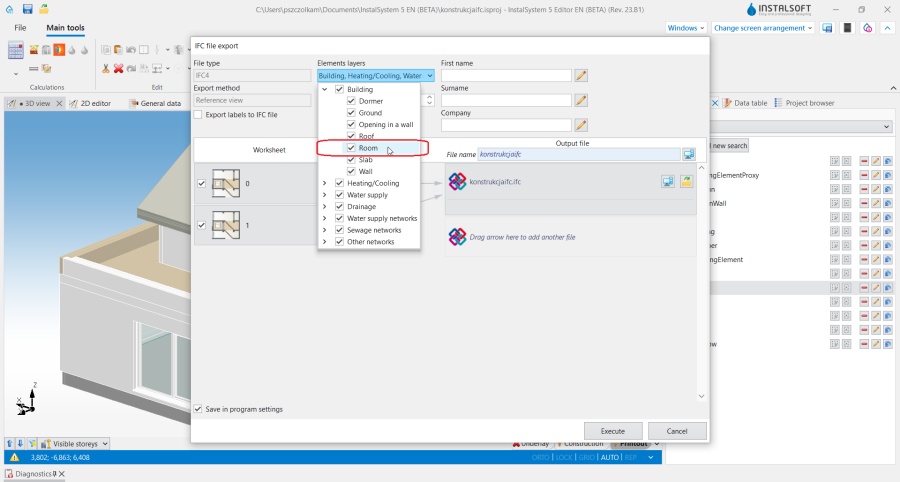
7. Export of 房间 components into IFC format.
