选择和编辑多个部件:修订间差异
跳转到导航
跳转到搜索
无编辑摘要 |
|||
| 第34行: | 第34行: | ||
# 在''<IS_TS id=ProjectBrowser/>'' 窗口,从窗口上部的下拉菜单中选择适宜的''<IS_TS id=StructureType/>'' (如:''<IS_TS id=ScopeKonstrukcjaBudynku/>'', ''<IS_TS id=strInstalacjaGrzewczaIChlodnicza/>'' ) | # 在''<IS_TS id=ProjectBrowser/>'' 窗口,从窗口上部的下拉菜单中选择适宜的''<IS_TS id=StructureType/>'' (如:''<IS_TS id=ScopeKonstrukcjaBudynku/>'', ''<IS_TS id=strInstalacjaGrzewczaIChlodnicza/>'' ) | ||
#* 仅选择属于特定窗口部分中已定义类型的部件 | #* 仅选择属于特定窗口部分中已定义类型的部件 | ||
#*:- ''<IS_TS id=btRectSelectType/>'' | #*:- 位于每一部件类型右侧的''<IS_TS id=btRectSelectType/>'' 按钮 | ||
#*:- ''<IS_TS id=btnSelectAll/>'' | #*:- 位于每一部件类型右侧的''<IS_TS id=btnSelectAll/>'' <br><br> [[File:Selecting-elements-from-project-browser-location.png|none|thumb|250px|2. Selecting elements of defined type in ''<IS_TS id=ProjectBrowser/>'' window]] | ||
# ''<IS_TS id=FindTitle/>'' | # ''<IS_TS id=FindTitle/>'' 窗口 | ||
#* Selecting only elements of defined type, which meet the additional selection criteria (possibilty to define own criteria) | #* Selecting only elements of defined type, which meet the additional selection criteria (possibilty to define own criteria) | ||
#*:- ''<IS_TS id=btRectSelectType/>'' button located at the right side of each element type | #*:- ''<IS_TS id=btRectSelectType/>'' button located at the right side of each element type | ||
2018年4月15日 (日) 07:51的版本
| 产品 | InstalSystem 5 |
| 文章类型 | 功能和工具 |
| 版本的最新内容 | IS 5.0 Beta 5.B1 |
说明
本软件可同时选择和编辑多个部件。
在程序中的位置
利用软件自带的各种工具可同时选择多个部件,这些工具是:
- 在图像编辑器 (2D编辑器 和 3D视图 )内,
- 一个一个地选择多个部件
- - 按住 Ctrl 键,鼠标左键点击每个部件;
- 从指定的区域中选择多个部件
- - 按住鼠标左键,同时拖动鼠标光标以指定选择的区域,
- - 在进行选择矩形框中的部件 操作时,可:
- - 在图形编辑器的任意位置,通过点击鼠标右键可打开上下文菜单,
- - 在主工具 工具栏内,在展开选择 标签后,即可进入编辑 工具栏。
- 选择特定图形编辑器内当前活动的所有部件
- - 使用Ctrl+A 组合键;
- - 在主工具 工具栏,进入编辑 工具栏, 在展开选择 标签后,进行选择所有 的操作。
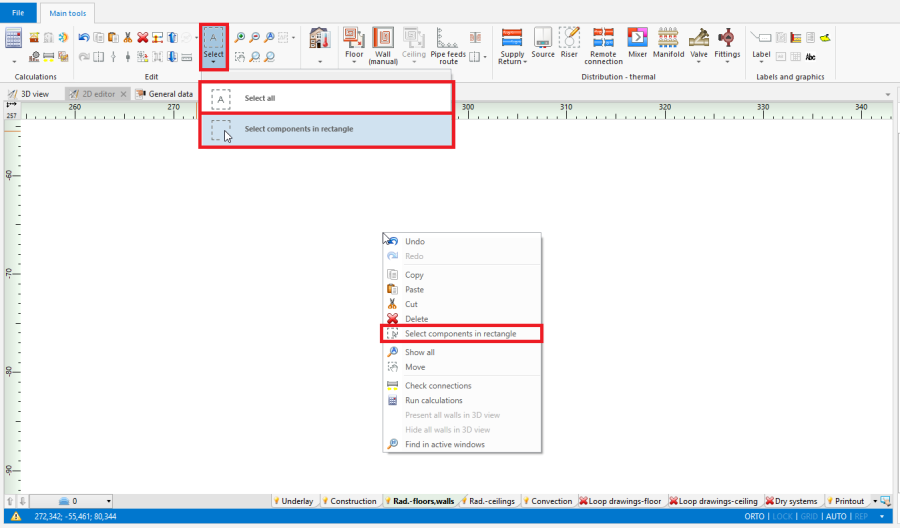
1. 选择矩形框中的部件/选择所有
- 一个一个地选择多个部件
- 在项目浏览器 窗口,从窗口上部的下拉菜单中选择适宜的范围 (如:建筑结构, 供热和供冷系统计算 )
- 仅选择属于特定窗口部分中已定义类型的部件
- - 位于每一部件类型右侧的框选当前楼层中指定类型的部件 按钮
- - 位于每一部件类型右侧的选择所有
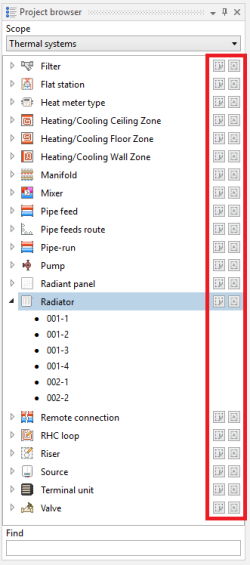
2. Selecting elements of defined type in 项目浏览器 window
- 仅选择属于特定窗口部分中已定义类型的部件
- 寻找 窗口
- Selecting only elements of defined type, which meet the additional selection criteria (possibilty to define own criteria)
- - 框选当前楼层中指定类型的部件 button located at the right side of each element type
- - 选择所有 button located at the right side of each element type
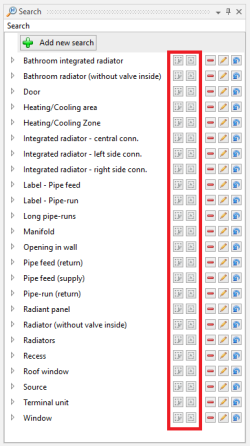
3. Selecting elements meeting additional criteria in "Search" window
- Selecting only elements of defined type, which meet the additional selection criteria (possibilty to define own criteria)
- 诊断 window
- Highlighting all elements, for which a single, grouping diagnostic message was displayed
- - click left mouse button on diagnostic message
- Selecting all elements, for which a single, grouping diagnostic message was displayed
- - double-click left mouse button on diagnostic message
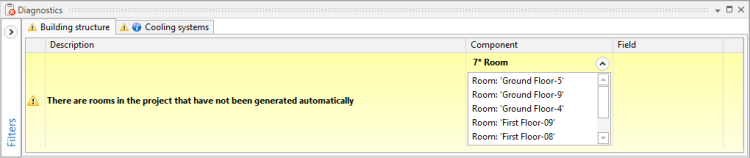
4. Diagnostic message grouping many elements
- - double-click left mouse button on diagnostic message
- Selecting all elements, for which a particular error has occured, in case of repeated diagnostic messages
- - click right mouse button on any of the repeated diagnostic messages and select a 标出所有发生错误的部件 option from a contex manu
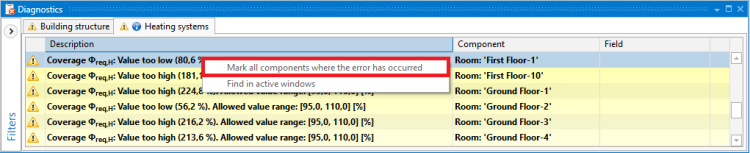
5. 标出所有发生错误的部件 function for repeated diagnostic messages
- - click right mouse button on any of the repeated diagnostic messages and select a 标出所有发生错误的部件 option from a contex manu
- Highlighting all elements, for which a single, grouping diagnostic message was displayed


Example of use
Selecting return pipe-runs from a specified area, through a 寻找 window
Specifying additional selection criteria for pipe-runs and selecting all elements, which meet these criteria
Additional information
- Correction of the selection:
- There is a possibility to deselect individual elements, by holding the Ctrl button and clicking the left mouse button on previously selected element