选择和编辑多个部件:修订间差异
跳转到导航
跳转到搜索
(创建页面,内容为“<!--Case 150708, W9674--> {{Article table |commercial_product1=InstalSystem 5 |p2 =<!--gdy jest kolejny produkt handlowy, zamienić na->"produkt_hand...”) |
无编辑摘要 |
||
| 第6行: | 第6行: | ||
|p4 =<!--gdy jest kolejny produkt handlowy, zamienić na->"produkt_handlowy3="--> | |p4 =<!--gdy jest kolejny produkt handlowy, zamienić na->"produkt_handlowy3="--> | ||
|category1 =InstalSystem 5#Funkcjonalności | |category1 =InstalSystem 5#Funkcjonalności | ||
|category_name1 = | |category_name1 =功能和工具 | ||
|c2 =<!--Jest kategoria -> zamienić na: "category2=" i uzupełnić link do sekcji kategorii na stronie głównej produktu--> | |c2 =<!--Jest kategoria -> zamienić na: "category2=" i uzupełnić link do sekcji kategorii na stronie głównej produktu--> | ||
|category_name2 =<!--podać nazwę kategorii "ZASTOSOWANIE"/"FUNCTIONALITY"/...--> | |category_name2 =<!--podać nazwę kategorii "ZASTOSOWANIE"/"FUNCTIONALITY"/...--> | ||
| 第16行: | 第16行: | ||
|v4 =<!--Jest wersja -> zamienić na: "version2=" i uzupełnić link do sekcji RN danego produktu--> | |v4 =<!--Jest wersja -> zamienić na: "version2=" i uzupełnić link do sekcji RN danego produktu--> | ||
}} | }} | ||
== | ==说明== | ||
In the InstalSystem software there is a possibility to select and edit multiple elements simultaneously. | In the InstalSystem software there is a possibility to select and edit multiple elements simultaneously. | ||
2018年4月4日 (三) 06:05的版本
| 产品 | InstalSystem 5 |
| 文章类型 | 功能和工具 |
| 版本的最新内容 | IS 5.0 Beta 5.B1 |
说明
In the InstalSystem software there is a possibility to select and edit multiple elements simultaneously.
Location in the program
Multiple elements can be selected with the use of various software tools, described below:
- Graphical editor (2D编辑器 and 3D视图)
- Selecting multiple elements one-by-one
- - while holding Ctrl button, click on individual elements with the left mouse button
- Selecting multiple elements from given area
- - while holding left mouse button, drag the mouse cursor in order to specify selection area
- - perform a 选择矩形框中的部件 operation, accessible:
- - in context menu, which is opened by clicking the righ mouse button anywhere in the graphical editor
- - on the 主工具 toolbar, section 编辑, after expanding 选择 icon
- Selecting all elements located in the given graphical editor and belonging to the active edditing scopes
- - use the Ctrl+A buttons combination
- - perform a 选择所有 operation, accessible on the 主工具 toolbar, section 编辑, after expanding 选择 icon
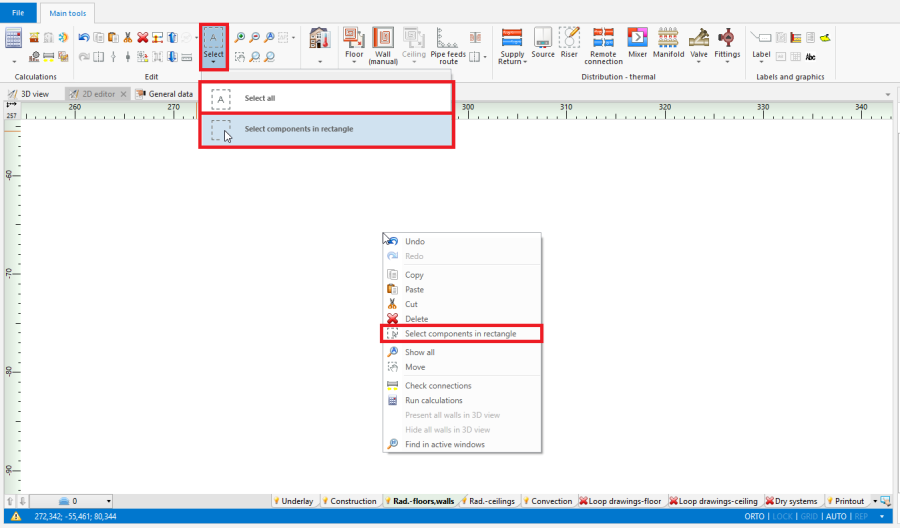
1. 选择矩形框中的部件/选择所有
- Selecting multiple elements one-by-one
- 项目浏览器 window, by selecting suitable 范围 (eg. 建筑结构, 供热和供冷系统计算), from a drop-down list located at the top of the window
- Selecting only elements of defined type, which belong to a given window section
- - 框选当前楼层中指定类型的部件 button located at the right side of each element type
- - 选择所有 button located at the right side of each element type
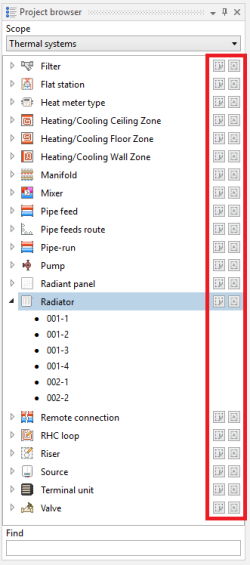
2. Selecting elements of defined type in 项目浏览器 window
- Selecting only elements of defined type, which belong to a given window section
- 寻找 window
- Selecting only elements of defined type, which meet the additional selection criteria (possibilty to define own criteria)
- - 框选当前楼层中指定类型的部件 button located at the right side of each element type
- - 选择所有 button located at the right side of each element type
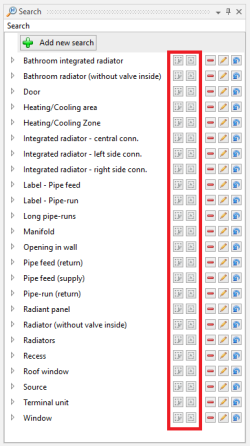
3. Selecting elements meeting additional criteria in "Search" window
- Selecting only elements of defined type, which meet the additional selection criteria (possibilty to define own criteria)
- 诊断 window
- Highlighting all elements, for which a single, grouping diagnostic message was displayed
- - click left mouse button on diagnostic message
- Selecting all elements, for which a single, grouping diagnostic message was displayed
- - double-click left mouse button on diagnostic message
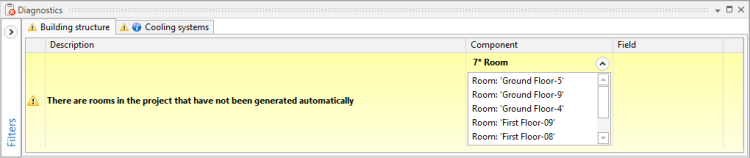
4. Diagnostic message grouping many elements
- - double-click left mouse button on diagnostic message
- Selecting all elements, for which a particular error has occured, in case of repeated diagnostic messages
- - click right mouse button on any of the repeated diagnostic messages and select a 标出所有发生错误的部件 option from a contex manu
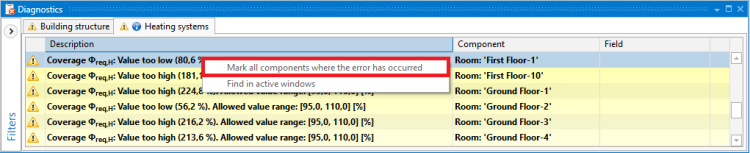
5. 标出所有发生错误的部件 function for repeated diagnostic messages
- - click right mouse button on any of the repeated diagnostic messages and select a 标出所有发生错误的部件 option from a contex manu
- Highlighting all elements, for which a single, grouping diagnostic message was displayed


Example of use
Selecting return pipe-runs from a specified area, through a 寻找 window
Specifying additional selection criteria for pipe-runs and selecting all elements, which meet these criteria
Additional information
- Correction of the selection:
- There is a possibility to deselect individual elements, by holding the Ctrl button and clicking the left mouse button on previously selected element