从BIM兼容的格式文件中导入建筑模型:修订间差异
跳转到导航
跳转到搜索
(创建页面,内容为“==Description== The article describes how to import data on building structure from the following file formats: * '''IFC''', * '''gbXML'''. The following elements...”) |
|||
| 第1行: | 第1行: | ||
{{Article table | |||
|commercial_product1=InstalSystem 5 | |||
|p2 =<!--gdy jest kolejny produkt handlowy, zamienić na->"produkt_handlowy2="--> | |||
|p3 =<!--gdy jest kolejny produkt handlowy, zamienić na->"produkt_handlowy3="--> | |||
|p4 =<!--gdy jest kolejny produkt handlowy, zamienić na->"produkt_handlowy3="--> | |||
|category1 =InstalSystem 5#Funkcjonalności | |||
|category_name1 = FUNCTION AND TOOL | |||
|c2 =<!--Jest kategoria -> zamienić na: "category2=" i uzupełnić link do sekcji kategorii na stronie głównej produktu--> | |||
|category_name2 =<!--podać nazwę kategorii--> | |||
|c3 =<!--Jest kategoria -> zamienić na: "category3=" i uzupełnić link do sekcji kategorii na stronie głównej produktu--> | |||
|category_name3 =<!--podać nazwę kategorii "ZASTOSOWANIE"/"FUNKCJONALNOŚĆ"/...--> | |||
|version1 =[[Release notes InstalSystem 5#Wersja BETA Rev. 2.0.B6|BETA REV. 2.0.B6]] | |||
|v2 =<!--Jest wersja -> zamienić na: "version2=" i uzupełnić link do sekcji RN danego produktu--> | |||
|v3 =<!--Jest wersja -> zamienić na: "version2=" i uzupełnić link do sekcji RN danego produktu--> | |||
|v4 =<!--Jest wersja -> zamienić na: "version2=" i uzupełnić link do sekcji RN danego produktu--> | |||
}} | |||
<!--Case 165839--> | |||
==Description== | ==Description== | ||
The article describes how to import data on building structure from the following file formats: | The article describes how to import data on building structure from the following file formats: | ||
| 第24行: | 第41行: | ||
* beams, | * beams, | ||
* stairs. | * stairs. | ||
==Location in the program== | ==Location in the program== | ||
===Viewing and handling diagnostic messages=== | ===Viewing and handling diagnostic messages=== | ||
2017年11月26日 (日) 06:41的版本
| 产品 | InstalSystem 5 |
| 文章类型 | FUNCTION AND TOOL |
| 版本的最新内容 | BETA REV. 2.0.B6 |
Description
The article describes how to import data on building structure from the following file formats:
- IFC,
- gbXML.
The following elements of building structure included in the IFC format are recognized and supported:
- storeys,
- vertical partitions: walls and related components - windows, doors, openings, etc.,
- horizontal partitions: roofs and related components - roof windows,
- dormers, etc.,
- floor slabs and openings,
- columns,
- beams,
- stairs.
The following elements of building structure included in the gbXML format are recognized and supported:
- storeys,
- vertical partitions: walls and related components - windows, doors, openings, etc.,
- dormers, etc.,
- columns,
- beams,
- stairs.
Location in the program
Viewing and handling diagnostic messages
- The icon of the import of building model from BIM compatible formats is accessible in the 2D Editor window in the 主工具 bar, section 建筑 when 建筑 editing scope is enabled.
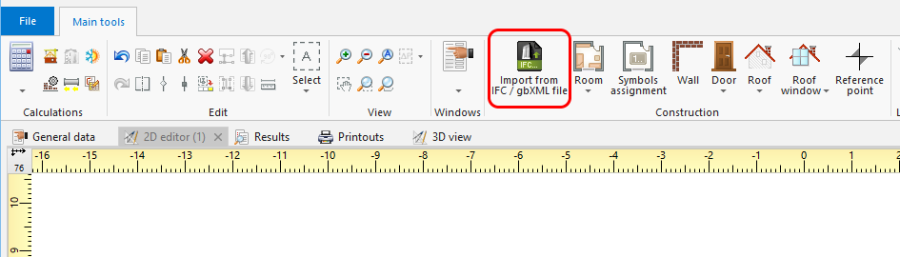
1. 导入 gbXML 文件

Example of use
Importing a building model from an IFC format file
- Select the scope of import in the import window if there is more than one building in the IFC file.
Importing a building model from a gbXML format file
- Building model is imported from a gbXML format file in a similar way to that from an IFC format file.