自动连接末端装置:修订间差异
跳转到导航
跳转到搜索
| 第1行: | 第1行: | ||
==说明== | ==说明== | ||
''<IS_TS id=btPodlaczGrzejnikiDoLinii/>'' 就是可将带有特定连接点的末端装置自动连接到''<IS_TS id=iNameDzialka/>''/''<IS_TS id=iNameOPDzialka/>'' 部件上。在选择了所有要连接的部件并完成了这一操作后,就会自动生成所需的系统的管段(''<IS_TS id=iNameDzialkaPlural/>'') | ''<IS_TS id=btPodlaczGrzejnikiDoLinii/>'' 就是可将带有特定连接点的末端装置自动连接到''<IS_TS id=iNameDzialka/>''/''<IS_TS id=iNameOPDzialka/>'' 部件上。在选择了所有要连接的部件并完成了这一操作后,就会自动生成所需的系统的管段(''<IS_TS id=iNameDzialkaPlural/>''),可操作的部件如下: | ||
*''<IS_TS id=iNameDzialka/>''/''<IS_TS id=iNameOPDzialka/>'' | *''<IS_TS id=iNameDzialka/>''/''<IS_TS id=iNameOPDzialka/>'' | ||
*末端装置 | *末端装置 | ||
| 第11行: | 第11行: | ||
*:-''<IS_TS id=iNameHyperlink/>'' | *:-''<IS_TS id=iNameHyperlink/>'' | ||
== | ==程序中的位置== | ||
''<IS_TS id=btPodlaczGrzejnikiDoLinii/>'' | ''<IS_TS id=btPodlaczGrzejnikiDoLinii/>'' 位于''<IS_TS id=GraphicalEdit/>'' 窗口中,当打开''<IS_TS id=ScopeInstalacjePodlogoweIScienneShort/>'' 、''<IS_TS id=ScopeInstalacjeSufitoweShort/>'' 或''<IS_TS id=ScopeInstalacjeKonwekcyjneShort/> '' 编辑器时,在''<IS_TS id=NarzedziaGlowne/>'' 的''<IS_TS id=rsEdit/>'' 工具栏里就可找到该工具。<br/>[[File:Automatically connect terminal units - location.png|900 px|left|thumb|1. ''<IS_TS id=btPodlaczGrzejnikiDoLinii/>'']]<br clear="all"/> | ||
== | ==应用举例== | ||
=== | ===举例1:将''<IS_TS id=iNameCOGrzejnik/>'' 部件连接到系统中=== | ||
{{#ev:youtube|1wIddtrOM80|900||||rel=0}} | {{#ev:youtube|1wIddtrOM80|900||||rel=0}} | ||
=== | ===举例2:将''<IS_TS id=PowGrzewczoChlodzaca/>'' 部件连接到同程管理系统中=== | ||
{{#ev:youtube|--1op9L0qGE|900||||rel=0}} | {{#ev:youtube|--1op9L0qGE|900||||rel=0}} | ||
== | ==其它信息== | ||
*After completing the creation of additional pipe-runs and connecting terminal units, all "dead" sections are highlighted within the system fragment engaged in the operation. "Dead" sections are those that have one end not connected to any other section or unit. This facilitates the removal of redundant parts of the system.<br/>[[File:Automatically connect terminal units - redundant pipes.png|900 px|left|thumb|2. Sections highlighted after completed operation]]<br clear="all"/> | *After completing the creation of additional pipe-runs and connecting terminal units, all "dead" sections are highlighted within the system fragment engaged in the operation. "Dead" sections are those that have one end not connected to any other section or unit. This facilitates the removal of redundant parts of the system.<br/>[[File:Automatically connect terminal units - redundant pipes.png|900 px|left|thumb|2. Sections highlighted after completed operation]]<br clear="all"/> | ||
*When connecting ''<IS_TS id=PowGrzewczoChlodzaca/>'' the ''<IS_TS id=iNameDzialka/>''/''<IS_TS id=iNameOPDzialka/>'' must be connected with ''<IS_TS id=iNameCOZrodlo/>'' or ''<IS_TS id=iNamePion/>''. | *When connecting ''<IS_TS id=PowGrzewczoChlodzaca/>'' the ''<IS_TS id=iNameDzialka/>''/''<IS_TS id=iNameOPDzialka/>'' must be connected with ''<IS_TS id=iNameCOZrodlo/>'' or ''<IS_TS id=iNamePion/>''. | ||
2017年11月25日 (六) 08:21的版本
说明
自动连接末端装置 就是可将带有特定连接点的末端装置自动连接到管路/引线管 部件上。在选择了所有要连接的部件并完成了这一操作后,就会自动生成所需的系统的管段(管路),可操作的部件如下:
- 管路/引线管
- 末端装置
- -供热/供冷面
- -顶面辐射板/毛细管网/墙面辐射板/毛细管
- -散热器
- -末端装置
- -源
- -分/集水器
- -远程连接
程序中的位置
自动连接末端装置 位于2D编辑器 窗口中,当打开地面/墙面辐射 、顶面辐射 或对流 编辑器时,在主工具 的编辑 工具栏里就可找到该工具。

应用举例
举例1:将散热器 部件连接到系统中
举例2:将供热/供冷面 部件连接到同程管理系统中
其它信息
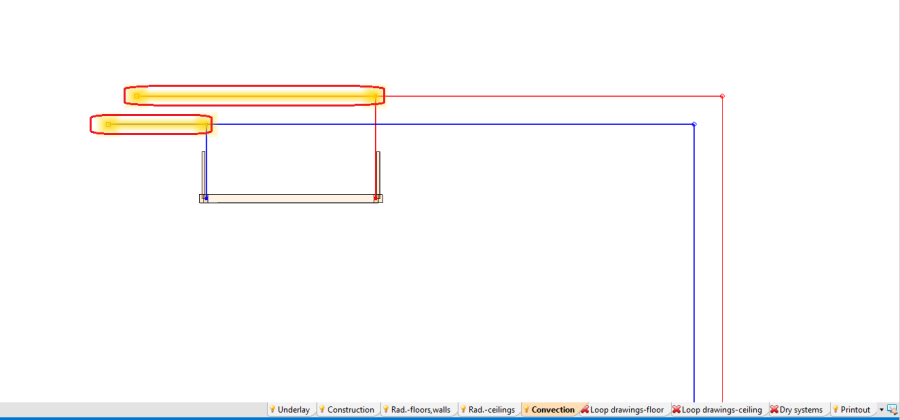
- After completing the creation of additional pipe-runs and connecting terminal units, all "dead" sections are highlighted within the system fragment engaged in the operation. "Dead" sections are those that have one end not connected to any other section or unit. This facilitates the removal of redundant parts of the system.
2. Sections highlighted after completed operation - When connecting 供热/供冷面 the 管路/引线管 must be connected with 源 or 立管.
