示意图:如何删除与不对称安装相关的的警告:修订间差异
跳转到导航
跳转到搜索
(→解决方法) |
(→解决方法) |
||
| 第22行: | 第22行: | ||
==解决方法== | ==解决方法== | ||
当生成带有''<IS_TS id=strWodaZimna/>'', ''<IS_TS id=strWodaCiepla/>'' 和''<IS_TS id=strCyrkulacja/>'' 的大型不对称安装的''<IS_TS id=SchematicView/>'' 时,会出现警告。在这种情况下,重要的是要知道,很难创建一个仅使用一个''<IS_TS id=rpCreateSchematicStartPointW/>'' 的适当''<IS_TS id=SchematicView/>'' 。 | 当生成带有''<IS_TS id=strWodaZimna/>'', ''<IS_TS id=strWodaCiepla/>'' 和''<IS_TS id=strCyrkulacja/>'' 的大型不对称安装的''<IS_TS id=SchematicView/>'' 时,会出现警告。在这种情况下,重要的是要知道,很难创建一个仅使用一个''<IS_TS id=rpCreateSchematicStartPointW/>'' 的适当''<IS_TS id=SchematicView/>'' 。<br/>[[File:Warning Asymmetrical installation.png|900 px|left|thumb|1. <IS_TS id=InstalationsNotAligned/>]]<br clear="all"/> | ||
<br/>[[File:Warning Asymmetrical installation.png|900 px|left|thumb|1. <IS_TS id=InstalationsNotAligned/>]]<br clear="all"/> | |||
为了消除警告并创建此类安装的有效''<IS_TS id=SchematicView/>'' ,我们建议将其划分为多个部分: | 为了消除警告并创建此类安装的有效''<IS_TS id=SchematicView/>'' ,我们建议将其划分为多个部分: | ||
* 在''<IS_TS id=iNameSanKoniecSekcji/>'' 上插入''<IS_TS id=rpCreateSchematicStartPointW/>'' | * 在''<IS_TS id=iNameSanKoniecSekcji/>'' 上插入''<IS_TS id=rpCreateSchematicStartPointW/>'' ,然后在其''<IS_TS id=DataEditorTable/>'' 中找到''<IS_TS id=ElementyPrezentowaneNaRozw/>'' ,在下拉菜单中仅勾选''<IS_TS id=ElementyPrezentowaneNaRozwZrodloDoPionu/>'' 和''<IS_TS id=ElementyPrezentowaneNaRozwPiony/>'' ,以创建''<IS_TS id=SchematicView/>'' 和''<IS_TS id=ElementyPrezentowaneNaRozwPiony/>'' 。<br/>'''''注:''''' 禁用''<IS_TS id=GenerateSchematicCaption/>'' 复选框,可编辑修改生成的示意图,当再次执行后续的创建时,它会保持原样,不会被删除。<br/>{{#ev:youtube|DfOJ2NeAzQM|900||||rel=0}} <br clear="all"/> | ||
* 在每个''<IS_TS id=iNamePion/>'' 连续插入''<IS_TS id=rpCreateSchematicStartPointW/>'' ,以创建单独的''<IS_TS id=strSchematicViewPlural/>'' 。{{#ev:youtube|eq5uUt9rNYo|900||||rel=0}} <br clear="all"/> | * 在每个''<IS_TS id=iNamePion/>'' 连续插入''<IS_TS id=rpCreateSchematicStartPointW/>'' ,以创建单独的''<IS_TS id=strSchematicViewPlural/>'' 。{{#ev:youtube|eq5uUt9rNYo|900||||rel=0}} <br clear="all"/> | ||
如果出现警告,还有其它方法可以改进: | 如果出现警告,还有其它方法可以改进: | ||
2024年5月5日 (日) 02:47的版本
| 产品 | InstalSystem 5 |
| 文章类型 | 提示和技巧 |
| 版本的最新内容 | 2024-01-18 |
问题说明
创建自动生成的示意图 时,可能会出现以下与不对称安装相关的消息:
- 不对称安装。 在“示意图”上出现了冷水、热水和循环装置与末端设备匹配的问题。
解决方法
当生成带有冷水, 热水 和循环 的大型不对称安装的示意图 时,会出现警告。在这种情况下,重要的是要知道,很难创建一个仅使用一个起始点 (给水系统) 的适当示意图 。

为了消除警告并创建此类安装的有效示意图 ,我们建议将其划分为多个部分:
- 在水源 上插入起始点 (给水系统) ,然后在其参数表 中找到在示意图上显示 ,在下拉菜单中仅勾选源和立管之间的装置 和立管 ,以创建示意图 和立管 。
注: 禁用创建示意图 复选框,可编辑修改生成的示意图,当再次执行后续的创建时,它会保持原样,不会被删除。
- 在每个立管 连续插入起始点 (给水系统) ,以创建单独的示意图 。
如果出现警告,还有其它方法可以改进:
- 方法 1: 插入控制点 。对于示意图中有断点 ,选择"是" 。 在这种情况下,安装部分将与插入位置后面的节点断开连接。
- 方法 2: 使用起始点 (给水系统) 的特性, 如隐藏管路的最大长度 。
- 方法3: 对于起始点 (给水系统) ,在其参数表 中使用"冷热水分开绘制" 功能,创建单独的示意图。
for 冷水 and 热水+循环 using the function "冷热水分开绘制" in Data table for element 起始点 (给水系统).
更多信息,见: Schematic view - Water supply systems.
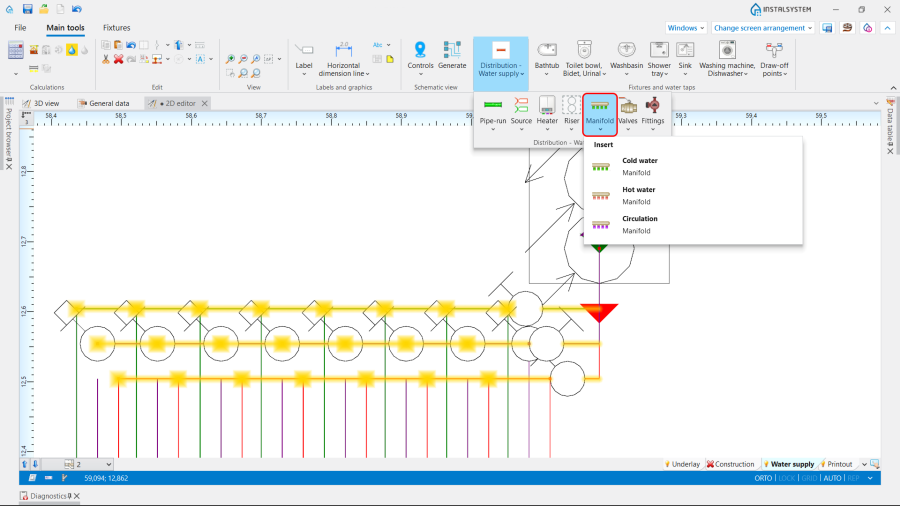
- For the installations with the manifolds created manually with the 管路 it is advisable to use manifolds from the neutral catalogues, as these contain sets of pipe sections and tees in the form of manifolds, the use of which significantly improves the quality of the schematic view.
2. 分/集水器
