如何删除有关IFC模型解析过程中的诊断信息:修订间差异
(→问题说明) |
|||
| 第46行: | 第46行: | ||
** 在''<IS_TS id=rpCreateRoomsFromIfc/>'' 的操作过程中,程序检测到要解析的''ifcSpace'' 构件的标高与''<IS_TS id=iNameKondygnacja/>'' 构件的标高不一致。{{Info}} [[BIM - 基于导入的IFC模型参数创建楼层]]. | ** 在''<IS_TS id=rpCreateRoomsFromIfc/>'' 的操作过程中,程序检测到要解析的''ifcSpace'' 构件的标高与''<IS_TS id=iNameKondygnacja/>'' 构件的标高不一致。{{Info}} [[BIM - 基于导入的IFC模型参数创建楼层]]. | ||
== | ==解决方案== | ||
单击''<IS_TS id=ErrorModuleTitle/>'' 窗口中的错误或警告消息后,解析过程中有问题的IFC模型中的对象将在''<IS_TS id=GraphicalEdit/>'' ,''<IS_TS id=View3D/>'' 和''项目浏览器'' 中高亮显示。如果此信息涉及多个部件,则这些部件将在''<IS_TS id=Element/>'' 字段列表中分别列出。 | |||
消除每个错误需要分析IFC模型中对象定义的正确性。如果无法解决已识别的问题,并且设计过程中也需要它,则可以以混合方式对构件进行解析,即通过逐层、逐构件应用自动功能来解析所选对象,然后用所需的结构构件手动补充创建的建筑结构。{{Info}} [[建筑结构的准备]] | |||
'''注意!''' 建筑结构解析时,可分数次。不建议在一次操作中对一整组IFC图元/对象进行解析,尤其是复杂的建筑。这种方法允许对''诊断'' 窗口中的信息指示的潜在问题进行更全面的控制,并有助于解决这些问题。 | |||
</br> | </br> | ||
===<IS_TS id=BrakKondygnacjiDlaSciany/>=== | ===<IS_TS id=BrakKondygnacjiDlaSciany/>=== | ||
* | * 在''<IS_TS id=rsDanogi/>'' 窗口,''<IS_TS id=StoreyManagement/>'' 选项中, 检查基于IFC模型所创建的楼层的正确性。首先,应分析''<IS_TS id=iNameKondygnacja/>'' 部件的参数,如有必要,应根据''<IS_TS id=pcstrXY/>'' 和''<IS_TS id=pcstrSizes/>'' 对其进行更正。{{Info}} [[BIM - 基于导入的IFC模型参数创建楼层]]。<br/>[[File:Storey-size-and-position.png|900 px|left|thumb|1. <IS_TS id=iNameKondygnacja/>的<IS_TS id=pcstrXY/>和<IS_TS id=pcstrSizes/>]]<br clear="all"/> | ||
===<IS_TS id=BrakScianyDlaElementu/>=== | ===<IS_TS id=BrakScianyDlaElementu/>=== | ||
* | * 当''<IS_TS id=iNameKonstrSciana/>'' 或''Curtain wall'' 的标高范围与解析的''ifcWindow'', ''ifcDoor'' 或''ifcOpeningElement''的标高不一致时,必须通过更改''<IS_TS id=DataEditorTable/>'' 窗口中构件的楼层范围以及''<IS_TS id=OdlegloscDolnejKrawedziOdDolnejKond/>'' 或''<IS_TS id=OdlegloscGornejKrawedziOdGornejKond/>'' 字段中的值来修改''<IS_TS id=iNameKonstrSciana/>'' 或''Curtain wall'' 构件。<br/>[[File:Wall-position.png|900 px|left|thumb|2. 更改<IS_TS id=iNameKonstrSciana/>的位置.]]<br clear="all"/> | ||
===<IS_TS id=NieprawidlowyTypElementu/>=== | ===<IS_TS id=NieprawidlowyTypElementu/>=== | ||
* | * 标记适用于解析操作的那一类型的IFC对象。{{Info}} [[BIM - 将IFC中的建筑构件解析为InstalSystem 5软件包中的建筑构件#选择解析的部件|选择解析的部件]]: | ||
** | ** 对象:''ifcWall'', ''ifcWallStandardCase'', ''ifcCurtainWall'' (或其他, 见下文) 用于''<IS_TS id=rpCreateWallsFromIfc/>'' 操作。{{Info}} [[BIM - 将IFC中的建筑构件解析为INSTALSYSTEM 5软件包中的建筑构件#墙的解析|墙的解析]]。 | ||
** | ** 对象:''ifcWindow'', ''ifcDoor'', ''ifcOpeningElement'' 用于''<IS_TS id=rpCreateWindowsDoorsOpeningsFromIfc/>'' 操作。{{Info}} [[BIM - 将IFC中的建筑构件解析为INSTALSYSTEM 5软件包中的建筑构件#窗户、门和墙洞的解析|窗户、门和墙洞的解析]]。 | ||
** | ** 对象:''ifcRoof'' 和''ifcSlab'' (或其他,见下文) 用于''<IS_TS id=rpCreateRoofsFromIfc/>'' 操作。{{Info}} [[BIM - 将IFC中的建筑构件解析为INSTALSYSTEM 5软件包中的建筑构件#屋顶的解析|屋顶的解析]]。 | ||
** | ** 对象:''ifcSlab'' (或其他,见下文) 用于 ''<IS_TS id=rpCreateSlabsFromIfc/>'' 操作。{{Info}} [[BIM - 将IFC中的建筑构件解析为INSTALSYSTEM 5软件包中的建筑构件#楼板的解析|楼板的解析]]。 | ||
''' | '''注意!''' 还可以使用上述功能将IFC模型中的部分其他部件(未在上面列出,表示建筑结构)解析为'''InstalSystem 5''' 中的本地部件。这适用于如''IfcBuildingElementProxy'' 、''IfcColumn''、''IfcStair''、''IfcTairFlight''、''IfcCovering'' 等部件。在大多数IFC模型中,它们表示建筑的复杂结构,而不是执行''<IS_TS id=ObliczeniaCieplneBudynku/>''所需的结构。因此,在进行此类额外解释之前,应对模型进行详细分析,并在设计情况需要时进行解析。用户可以进一步手动修改所创建的建筑结构,必要时也可删除,并通过在'''InstalSystem 5''' 中手动插入建筑构件进行补充。</br> | ||
</br> | |||
===<IS_TS id=RoofCreationFromIfcElementFailure/>=== | ===<IS_TS id=RoofCreationFromIfcElementFailure/>=== | ||
* | * 根据IFC模型的2D平面图和开启''<IS_TS id=strAUTOModeName/>'' 功能,为项目添加上手动插入的''<IS_TS id=Roof/>'' 构件,然后使用''<IS_TS id=AddRoofEdge/>''功能添加屋顶边缘。{{Info}} [[BIM - 将IFC中的建筑构件解析为INSTALSYSTEM 5软件包中的建筑构件#插入屋顶|插入屋顶]]。 | ||
===IfcPlate is a component of a ifcCurtainWall and cannot be interpreted separately=== | ===IfcPlate is a component of a ifcCurtainWall and cannot be interpreted separately=== | ||
2023年7月7日 (五) 07:08的版本
| 产品 | InstalSystem 5 |
| 文章类型 | TIP&TRICK |
| 版本的最新内容 | 2021-08-26 |
问题说明
在某些情况下,由于导入的IFC模型的质量和项目情况的复杂性,以下操作:
可能无法成功。程序在将IFC模型中的对象解析为InstalSystem 5 软件包中的部件过程中产生的有关的问题,也将诊断出来,并给出精确的错误和警告信息。
注意! 当对基于IFC模型的建筑结构进行建筑热负荷计算 时,有必要分析该模型,并考虑对哪些建筑构件应使用程序中的自动功能来进行解析。对于无需解析的部件,应以简化的方式绘制,以便获得与传热耗热量 相同(或相似)的结果。
最常见的错误和警告包括:
- 无法识别墙 - 墙所在的楼层标高范围内不包括此楼层
当有如下情况时,将显示此 错误 信息:- 在基于IFC文件创建墙体 时,程序检测到已解析的构件ifc墙(ifcWall), ifc标准墙(ifcWallStandardCase) 或ifc幕墙(ifcCurtainWall) 的高度与楼层 的高度不一致。更多信息,见: BIM - 基于导入的IFC模型参数创建楼层l。
- 无法识别窗/门/墙洞,因为没有插入此图元的墙
当有如下情况时,将显示此 错误 信息:- 在基于IFC文件创建窗、门和墙洞 时,程序检测到解析的部件ifc窗(ifcWindow), ifc门(ifcDoor) 或ifc墙洞(ifcOpeningElement) 的标高与墙 部件中所放置的窗, 门, 墙洞 部件的墙的标高不一致。
- 无效的部件类型.
当有如下情况时,将显示此 错误 信息:- 用户在调用解析操作之前标记的IFC对象属于该操作所需类型之外的其他类型。
- 无法从IFC图元生成屋顶 .
当有如下情况时,将显示此 错误 信息:- 程序无法通过解析ifc屋顶(ifcRoof)和ifc楼板(ifcSlab) 图元或标记为其他类型的构件来创建基于IFC文件创建屋顶 部件。
- ifcPlate(ifc板)是IfcCurtainWall(ifc幕墙)的一个组成部分,不能单独解释
当有如下情况时,将显示此 错误 信息:- 在从基于IFC文件创建墙体 的操作过程中,程序检测到为解析所选择的ifcPlate 是IfcCurtainWall 中的一个部件。
- 无法识别房间 - 房间所在的楼层不包括此楼层的标高范围内
当有如下情况时,将显示此 警告 信息:- 在基于IFC文件创建房间 的操作过程中,程序检测到要解析的ifcSpace 构件的标高与楼层 构件的标高不一致。更多信息,见: BIM - 基于导入的IFC模型参数创建楼层.
解决方案
单击诊断 窗口中的错误或警告消息后,解析过程中有问题的IFC模型中的对象将在2D编辑器 ,3D视图 和项目浏览器 中高亮显示。如果此信息涉及多个部件,则这些部件将在部件 字段列表中分别列出。 消除每个错误需要分析IFC模型中对象定义的正确性。如果无法解决已识别的问题,并且设计过程中也需要它,则可以以混合方式对构件进行解析,即通过逐层、逐构件应用自动功能来解析所选对象,然后用所需的结构构件手动补充创建的建筑结构。更多信息,见: 建筑结构的准备
注意! 建筑结构解析时,可分数次。不建议在一次操作中对一整组IFC图元/对象进行解析,尤其是复杂的建筑。这种方法允许对诊断 窗口中的信息指示的潜在问题进行更全面的控制,并有助于解决这些问题。
无法识别墙 - 墙所在的楼层标高范围内不包括此楼层
- 在一般参数 窗口,楼层管理 选项中, 检查基于IFC模型所创建的楼层的正确性。首先,应分析楼层 部件的参数,如有必要,应根据位置 和尺寸 对其进行更正。更多信息,见: BIM - 基于导入的IFC模型参数创建楼层。
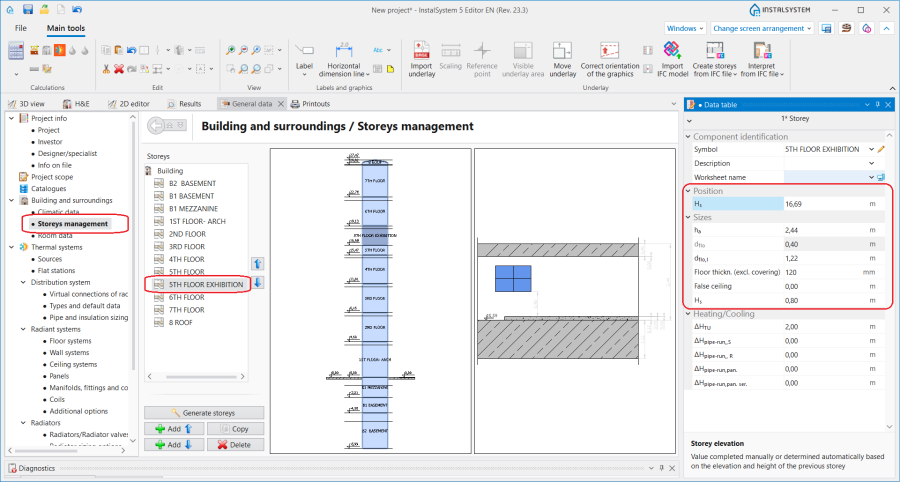
1. 楼层的位置和尺寸

无法识别窗/门/墙洞,因为没有插入此图元的墙
- 当墙 或Curtain wall 的标高范围与解析的ifcWindow, ifcDoor 或ifcOpeningElement的标高不一致时,必须通过更改参数表 窗口中构件的楼层范围以及下沿偏移 或上沿偏移 字段中的值来修改墙 或Curtain wall 构件。
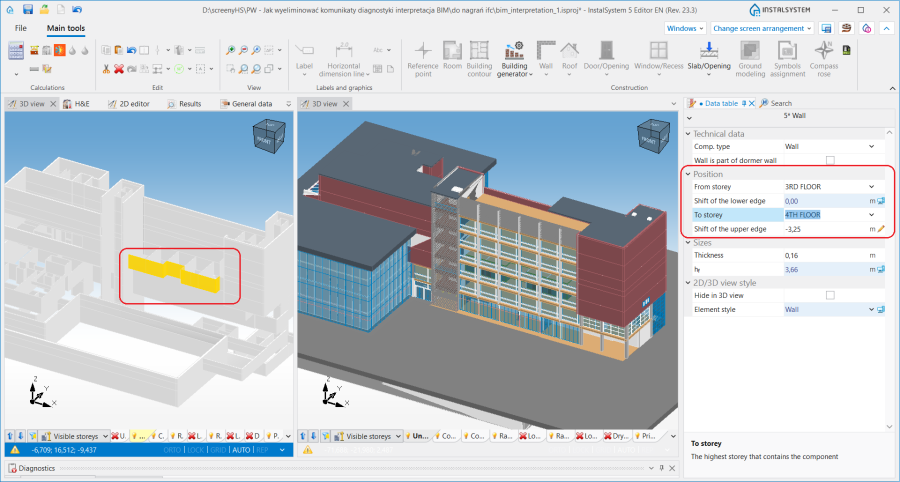
2. 更改墙的位置.

无效的部件类型
- 标记适用于解析操作的那一类型的IFC对象。更多信息,见: 选择解析的部件:
- 对象:ifcWall, ifcWallStandardCase, ifcCurtainWall (或其他, 见下文) 用于基于IFC文件创建墙体 操作。更多信息,见: 墙的解析。
- 对象:ifcWindow, ifcDoor, ifcOpeningElement 用于基于IFC文件创建窗、门和墙洞 操作。更多信息,见: 窗户、门和墙洞的解析。
- 对象:ifcRoof 和ifcSlab (或其他,见下文) 用于基于IFC文件创建屋顶 操作。更多信息,见: 屋顶的解析。
- 对象:ifcSlab (或其他,见下文) 用于 基于IFC文件创建楼板 操作。更多信息,见: 楼板的解析。
注意! 还可以使用上述功能将IFC模型中的部分其他部件(未在上面列出,表示建筑结构)解析为InstalSystem 5 中的本地部件。这适用于如IfcBuildingElementProxy 、IfcColumn、IfcStair、IfcTairFlight、IfcCovering 等部件。在大多数IFC模型中,它们表示建筑的复杂结构,而不是执行建筑热负荷计算所需的结构。因此,在进行此类额外解释之前,应对模型进行详细分析,并在设计情况需要时进行解析。用户可以进一步手动修改所创建的建筑结构,必要时也可删除,并通过在InstalSystem 5 中手动插入建筑构件进行补充。
无法从IFC图元生成屋顶
- 根据IFC模型的2D平面图和开启捕捉 功能,为项目添加上手动插入的屋顶 构件,然后使用添加屋顶边缘功能添加屋顶边缘。更多信息,见: 插入屋顶。
IfcPlate is a component of a ifcCurtainWall and cannot be interpreted separately
- The parent component of the ifcCurtainWall type, which includes the indicated ifcPlate component, should be interpreted.
无法识别房间 - 房间所在的楼层不包括此楼层的标高范围内
- Verify the correctness of the storeys arrangement created from the IFC model in the 一般参数 window, 楼层管理 tab. First, the data of the 楼层 component should be analysed and, if necessary, corrected with regard to the values of 位置 and 尺寸. 更多信息,见: BIM - Creating storeys based on data from IFC model.