建筑结构的准备 - 无房间:修订间差异
跳转到导航
跳转到搜索
| 第32行: | 第32行: | ||
* ''<IS_TS id=StoreyManagement/>'' 位于''<IS_TS id=rsDanogi/>'' 窗口,''<IS_TS id=btDaneBudynku/>'' 选项卡中。<br/>[[File:Storeys_management.png|900 px|left|thumb|1. <IS_TS id=StoreyManagement/>]]<br clear="all"/> | * ''<IS_TS id=StoreyManagement/>'' 位于''<IS_TS id=rsDanogi/>'' 窗口,''<IS_TS id=btDaneBudynku/>'' 选项卡中。<br/>[[File:Storeys_management.png|900 px|left|thumb|1. <IS_TS id=StoreyManagement/>]]<br clear="all"/> | ||
== | ==应用举例== | ||
=== | ===创建一楼层=== | ||
在''<IS_TS id=StoreyManagement/>'' 选项卡中,可定义最重要的''<IS_TS id=iNameKondygnacja/>'' 参数: | |||
*''<IS_TS id=strLblRzednaKondCaption/>'' ''<IS_TS id=strLblRzednaKondSymbol/>'' - | *''<IS_TS id=strLblRzednaKondCaption/>'' ''<IS_TS id=strLblRzednaKondSymbol/>'' - 在一系列楼层中,应以最底层的标高为基准,通过使用楼层高度和楼板厚度的信息自动确定上面所有楼层的标高。 | ||
*''<IS_TS id=KondGruboscPodlogiBezOkladzinyCaption/>'' - ''<IS_TS id=KondGruboscPodlogiBezOkladzinyHint/>'' | *''<IS_TS id=KondGruboscPodlogiBezOkladzinyCaption/>'' - ''<IS_TS id=KondGruboscPodlogiBezOkladzinyHint/>'' | ||
{{Info}} [[ | {{Info}} [[建筑结构的准备|建筑结构的准备 - 楼层管理]] | ||
=== | ===导入底图=== | ||
可以将''<IS_TS id=lystrGraphicBackground/>'' 导入到每个楼层上。''<IS_TS id=lystrGraphicBackground/>'' 是从外部光栅或矢量文件中提取的二维(平面)图形对象。''<IS_TS id=lystrGraphicBackground/>'' 本身不提供建筑结构的任何部件,但它可显示各个楼层的平面,这有助于在项目中插入系统部件。 | |||
有关详细信息,请参见:导入参考底图文件。<br/>{{Info}} [[导入底图文件|导入底图文件]] | |||
[[Category:InstalSystem 5]] | [[Category:InstalSystem 5]] | ||
[[Category: | [[Category:功能和工具]] | ||
<!-- Do not write text below this tag --> | <!-- Do not write text below this tag --> | ||
<br class="iwlinks"/>[[pl:Przygotowanie struktury budynku - Bez pomieszczeń|Przygotowanie struktury budynku - Bez pomieszczeń]] | <br class="iwlinks"/>[[pl:Przygotowanie struktury budynku - Bez pomieszczeń|Przygotowanie struktury budynku - Bez pomieszczeń]] | ||
2022年7月22日 (五) 03:41的版本
| 产品 | InstalSystem 5 |
| 文章类型 | 功能和工具 |
| 版本的最新内容 | 2022-02-16 |
说明
本文描述了如何设置没有房间的建筑物的基本结构。一旦定义了建筑参数(首先是层数),就可以基于实际的项目的范围开展设计。当进行以下内容的设计时,就可以使用这种方式创建的建筑结构:
- 具有用户指定输出功率和所需功率的散热器系统、各种具有用户定义了压降的末端装置,如风机盘管、冷梁的供热供冷系统。更多信息,见: 末端装置
- 给水系统计算 ,
- 排水系统计算 。
网络研讨会
欢迎观看我们网络研讨会上的视频,该视频介绍了本文所述功能的使用方法
在程序中的位置
楼层管理
- 楼层管理 位于一般参数 窗口,建筑和环境 选项卡中。
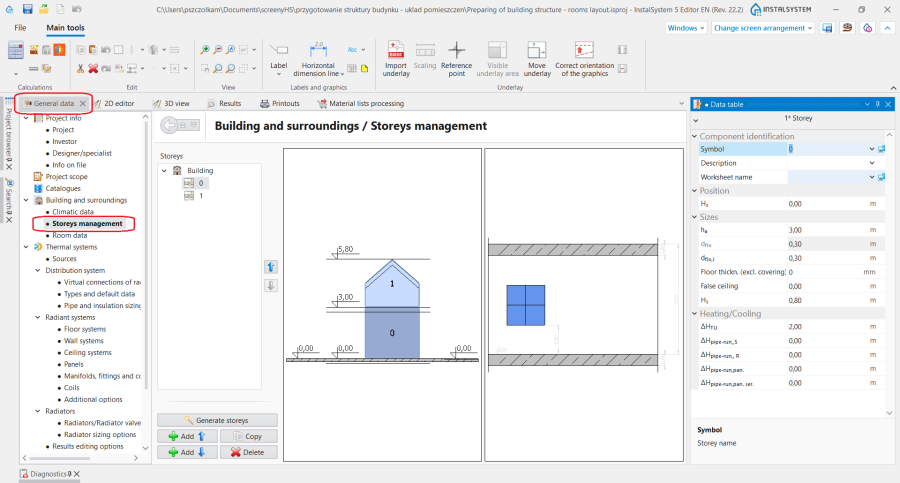
1. 楼层管理

应用举例
创建一楼层
在楼层管理 选项卡中,可定义最重要的楼层 参数:
- 楼层标高 H标高 - 在一系列楼层中,应以最底层的标高为基准,通过使用楼层高度和楼板厚度的信息自动确定上面所有楼层的标高。
- 地面厚度(不含装饰面层,如瓷砖、木地板等) - 所设计的地面厚度,对于地面辐射冷暖,不包括装饰面层(如瓷砖、木地板等)的厚度。在给定楼层上所设计的所有部件,无论房间中相应参数的值是多少,其高度值均以此地面的上表面为基准计量。开启显示地面/吊顶区功能,可在模型中展示地面/吊顶所占据的空间。
更多信息,见: 建筑结构的准备 - 楼层管理
导入底图
可以将底图 导入到每个楼层上。底图 是从外部光栅或矢量文件中提取的二维(平面)图形对象。底图 本身不提供建筑结构的任何部件,但它可显示各个楼层的平面,这有助于在项目中插入系统部件。
有关详细信息,请参见:导入参考底图文件。
更多信息,见: 导入底图文件