输出 / 打印结果和图纸:修订间差异
跳转到导航
跳转到搜索
无编辑摘要 |
|||
| 第1行: | 第1行: | ||
{{Article table | |||
|commercial_product1=InstalSystem 5 | |||
|p2 =<!--gdy jest kolejny produkt handlowy, zamienić na->"produkt_handlowy2="--> | |||
|p3 =<!--gdy jest kolejny produkt handlowy, zamienić na->"produkt_handlowy3="--> | |||
|p4 =<!--gdy jest kolejny produkt handlowy, zamienić na->"produkt_handlowy3="--> | |||
|category1 =InstalSystem 5#Functionalities | |||
|category_name1 =功能 | |||
|c2 =<!--Jest kategoria -> zamienić na: "category2=" i uzupełnić link do sekcji kategorii na stronie głównej produktu--> | |||
|category_name2 =<!--podać nazwę kategorii, np.: ZASTOSOWANIE/FUNKCJONALNOŚĆ/...--> | |||
|c3 =<!--Jest kategoria -> zamienić na: "category3=" i uzupełnić link do sekcji kategorii na stronie głównej produktu--> | |||
|category_name3 =<!--podać nazwę kategorii, np.: ZASTOSOWANIE/FUNKCJONALNOŚĆ/...--> | |||
|version1 =[[Release notes InstalSystem 5#Version BETA 22 Rev. 15.10.2|IS 5.0 Beta 22]] | |||
|v2 =<!--Jest wersja -> zamienić na: "version2=" i uzupełnić link: | |||
IS4 -> "[http://instalsoft.com/pl/produkty/informacje-o-zmianach-w-instalsystem.html IS 4.13]" / | |||
NS4 -> "[http://instalsoft.com/pl/produkty/informacje-o-zmianach-w-netsystem.html NS 4.7]" / | |||
IS5 -> "[[Release notes InstalSystem 5#Version BETA 21 Rev. 15.9.2|IS 5.0 Beta 21]]"--> | |||
|v3 = | |||
|v4 = | |||
}} | |||
==说明== | ==说明== | ||
该程序可将项目设计图纸和计算结果以多种文件格式(PDF、DWG、XLS等)输出和打印。输出成DWG/DXF格式的文件是由一个专门的功能完成的,而输出成其它格式的文件是通过输出到打印输出,然后选择文件格式,再进行保存来完成的。 | 该程序可将项目设计图纸和计算结果以多种文件格式(PDF、DWG、XLS等)输出和打印。输出成DWG/DXF格式的文件是由一个专门的功能完成的,而输出成其它格式的文件是通过输出到打印输出,然后选择文件格式,再进行保存来完成的。 | ||
| 第16行: | 第35行: | ||
===将所选择楼层的图形打印/输出到一 PDF 文件=== | ===将所选择楼层的图形打印/输出到一 PDF 文件=== | ||
{{#ev:youku|id_XMjUxMTQyNzc3Mg|900||||rel=0}} | {{#ev:youku|id_XMjUxMTQyNzc3Mg|900||||rel=0}} | ||
==Additional information== | |||
* When underlay drawing was imported with the ''<IS_TS id=Underlay_SaveTypeCaption/> -> <IS_TS id=StoreInExternalFile/>'' option and original location of the file is not available, the underlay layers cannot be exported. In such case, in order to have the underlay drawing included in the export or printout, it must be loaded again. | |||
* User-defined and saved printout compositions, in addition to pre-defined compositions, will also be available in other projects.<br/>{{Info}} [[Software configuration#Printout compositions|Printout compositions]]. | |||
[[Category:InstalSystem 5]] | |||
[[Category:功能]] | |||
[[it:Esportazione / stampa dei risultati e dei disegni]] | |||
[[pl:Eksport / wydruk wyników i rysunków]] | |||
[[lt:Eksportas / rezultatų ir brėžinių spausdinimas]] | |||
[[en:Export / print results and drawings]] | |||
2017年3月4日 (六) 13:02的版本
| 产品 | InstalSystem 5 |
| 文章类型 | 功能 |
| 版本的最新内容 | IS 5.0 Beta 22 |
说明
该程序可将项目设计图纸和计算结果以多种文件格式(PDF、DWG、XLS等)输出和打印。输出成DWG/DXF格式的文件是由一个专门的功能完成的,而输出成其它格式的文件是通过输出到打印输出,然后选择文件格式,再进行保存来完成的。
在程序中的位置
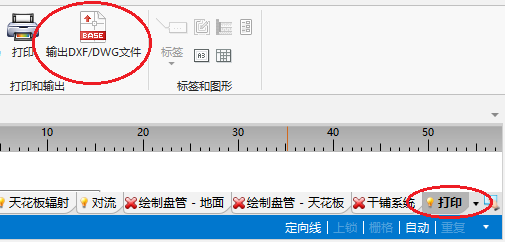
- 当打开打印 编辑范围时,在主工具 工具栏上,就可见输出 DXF/DWG 文件 功能。 该功能可将项目的图形文件输出成一个DXF/DWG文件。
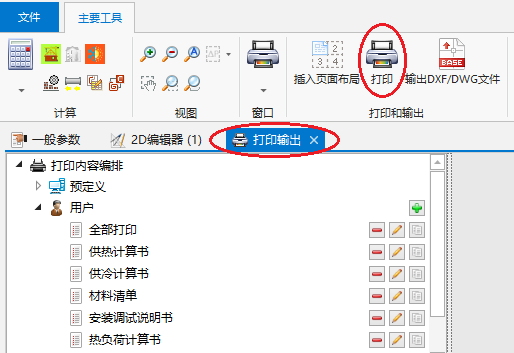
1. 输出 DXF/DWG 文件 - 当打开打印输出 窗口,才可输出到打印机和保存成其它格式的文件。当打开打印 编辑范围时,在主工具 内的打印和输出 工具栏上,点击打印,就可将程序切换到打印输出 窗口。另外,也可在主工具 里的窗口 菜单内直接打开这个打印输出 窗口。
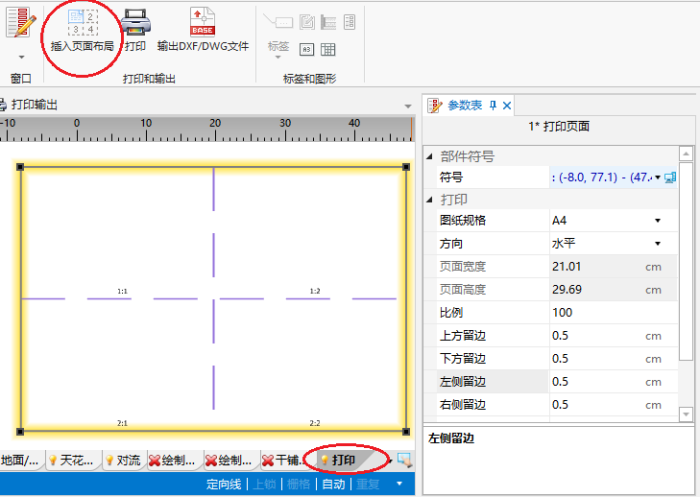
2. 打印 - 当打开打印 编辑范围时,在主工具 内的打印和输出 工具栏上,可见插入页面布局 图标,它允许在图中放置一个打印页面 部件。项目中每个这样的部件就是对图形的打印/输出范围的一个新的定义。
3. 插入页面布局


应用举例
将图形输出到一 DWG 格式文件
将结果打印/输出到一 XLS 文件
将所选择楼层的图形打印/输出到一 PDF 文件
Additional information
- When underlay drawing was imported with the 保存底图 -> 在外部文件中 option and original location of the file is not available, the underlay layers cannot be exported. In such case, in order to have the underlay drawing included in the export or printout, it must be loaded again.
- User-defined and saved printout compositions, in addition to pre-defined compositions, will also be available in other projects.
更多信息,见: Printout compositions.