环路给水系统的设计:修订间差异
跳转到导航
跳转到搜索
(创建页面,内容为“<IS_HELP id="HS37"/> {{Article table |commercial_product1=InstalSystem 5 |p2 =<!--gdy jest kolejny produkt handlowy, zamienić na->"produkt_handlowy2...”) |
|||
| 第17行: | 第17行: | ||
}} | }} | ||
== | ==课程内容== | ||
本课程以一个独栋带地下室的二层别墅为例,介绍了如何开展环路给水系统的设计。 | |||
==Modules and program configuration== | ==Modules and program configuration== | ||
2019年12月17日 (二) 10:23的版本
| 产品 | InstalSystem 5 |
| 文章类型 | ZASTOSOWANIE PROJEKTOWE |
| 版本的最新内容 | GOLD Rev. 15.3 |
课程内容
本课程以一个独栋带地下室的二层别墅为例,介绍了如何开展环路给水系统的设计。
Modules and program configuration
- InstalSystem 5 software package with the following modules:
- 给水系统
- Tap water extensions
- Recommended: sanitary system pipe catalogues containing direct U-shaped tap water connection, which guarantees lack of no-flow zones within the system
| 项目文件
|
Single-family building water installation initial state, isproj Water ring installation in a single-family building , isproj |
| 设计时使用 | InstalSystem 5 Rev. 17.0 |
| 所需模块 | InstalSystem basis Tap water systems Tap water extensions |
| 项目范围 | Instalacje wodociągowe |
| 所用的产品目录 |
Steel pipes, medium, DIN 2440 |
| 建筑类型 | residential building with basement three-storey |
| 建筑结构 | Underlay - all plans, dwg |
| 图纸范围 | Plan views |
| 设计者 | 100px www.instalsoft.com |
| 法律免责声明 | Copying of entire project and of its fragments allowed |
| 计算结果 | Tap water installation ring full printout, pdf Tap water installation ring bill components, pdf |
| 设计图纸 | All storeys, dwg Basement, pdf Groundfloor, pdf Attic, pdf |
Initial state
The initial state file is located in the Project table, and it contains the building graphic structure and radiant sanitary system, which needs to be completed with a loop installation on the storey.
更多信息,见: Design of water supply system installation
Steps to perform
Turning on the program and project general data configuration
- Turn the program on.
- Load the project file - Single-family building water installation initial state, isproj.
Installation edition
- Select storey No. 1.
- Draw hot and cold water pipe feeds, so that a loop installation is created in room 1.5.
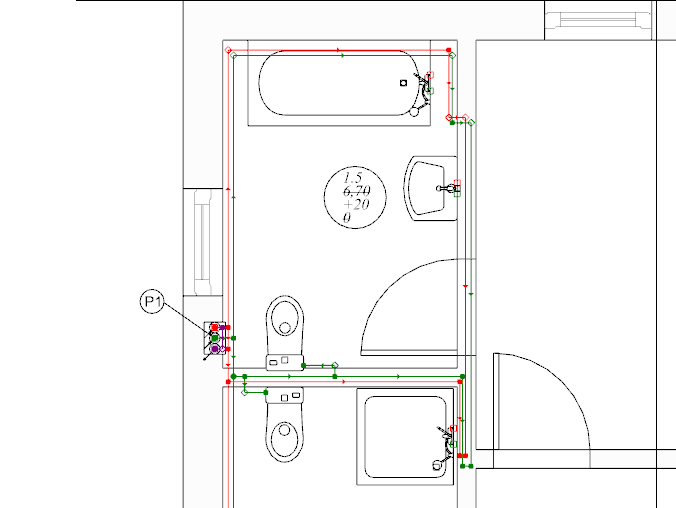
1.Creating a loop installation. - With your mouse, select the area with terminal units and choose 自动用活水三通连接件连接末端用水点.
- If needed, modify pipe feed ordinates to evade doors. To do so, insert additional division points for the pipe feed passing through the door opening.
it is necessary to impose a correct ordinate. The correction of imposed values should be verified in the 3D视图 window.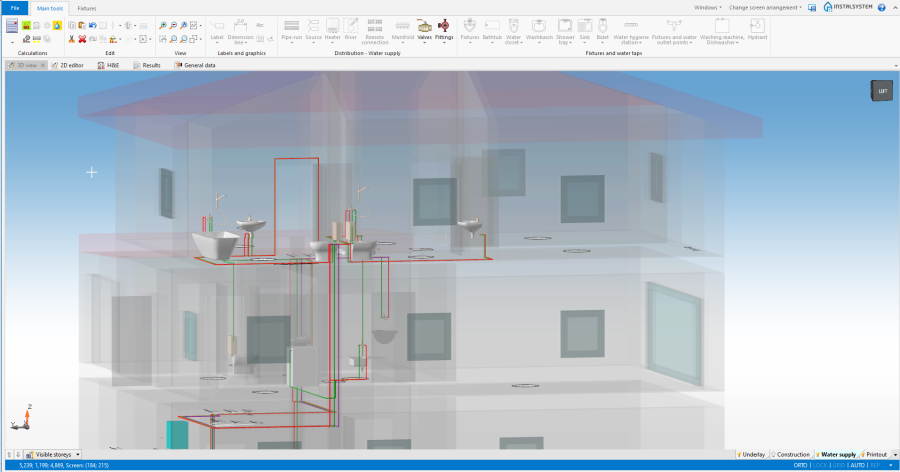
2. Omitting the door opening
- Verify if the circulation circuit has been closed properly on the storey.
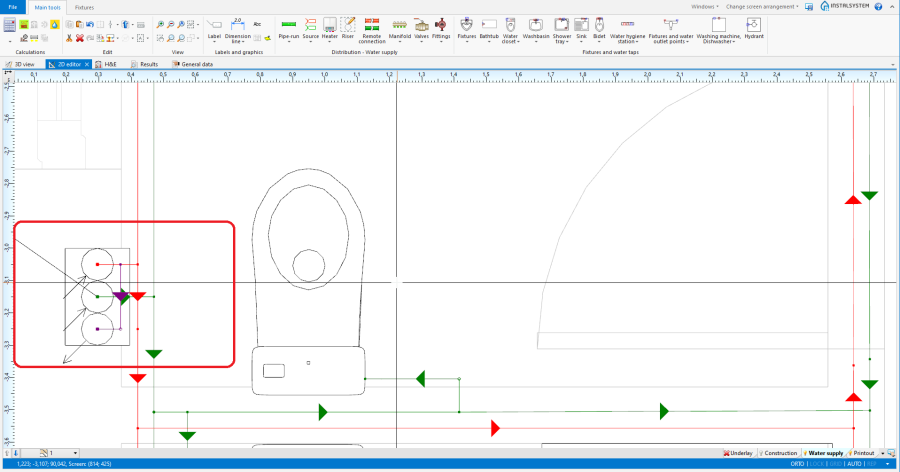
3. Closing the circulation circuit on the first storey


Verification of the correctness of installation structure
- Verify correctness of the installation structure using the 检查连接 function (shortcut: Shift + F2).
- Verify correctness of the installation structure and find collisions using 3D视图.
更多信息,见: Verification of the correctness of installation structure
Calculations and diagnostics
- Perform 给水系统计算 by clicking on
 located in the 计算 section of the Main tools toolbar.
 - Verify calculation results.


更多信息,见: Calculations and diagnostics