输出 / 打印结果和图纸:修订间差异
跳转到导航
跳转到搜索
(→说明) |
|||
| 第2行: | 第2行: | ||
该程序可将项目设计图纸和计算结果以多种文件格式(PDF、DWG、XLS等)输出和打印。输出成DWG/DXF格式的文件是由一个专门的功能完成的,而输出成其它格式的文件是通过输出到打印输出,然后选择文件格式,再进行保存来完成的。 | 该程序可将项目设计图纸和计算结果以多种文件格式(PDF、DWG、XLS等)输出和打印。输出成DWG/DXF格式的文件是由一个专门的功能完成的,而输出成其它格式的文件是通过输出到打印输出,然后选择文件格式,再进行保存来完成的。 | ||
== | ==在程序中的位置== | ||
* | * 当打开''<IS_TS id=lystrPrintPreview/>'' 编辑范围时,在''<IS_TS id=NarzedziaGlowne/>'' 工具栏上,就可见''<IS_TS id=ExportDXFDWGFile/>'' 功能。 该功能可将项目的图形文件输出成一个DXF/DWG文件。<br/>[[File:Suf-export-other-extensions5.png|left|thumb|700px|1. <IS_TS id=ExportDXFDWGFile/>]]<br clear="all"/> | ||
* | * 当打开''<IS_TS id=Printouts/>'' 窗口,才可输出到打印机和保存成其它格式的文件。当打开''<IS_TS id=lystrPrintPreview/>'' 编辑范围时,在''<IS_TS id=NarzedziaGlowne/>'' 工具栏上,就可见''<IS_TS id=sBtnPrint/>'' 。另外,也可在''<IS_TS id=NarzedziaGlowne/>'' 工具栏上,从''<IS_TS id=Windows/>'' 菜单内调用这个打印窗口。<br/>[[File:Suf-export-other-extensions4.png|left|thumb|600px|2. <IS_TS id=sBtnPrint/>]]<br clear="all"/> | ||
* The ''<IS_TS id=InsertPageLayout/>'' icon, available on the ''<IS_TS id=NarzedziaGlowne/>'' bar when the ''<IS_TS id=lystrPrintPreview/>'' editing scope is enabled, allows placing a ''<IS_TS id=PrintoutPages_ElementName/>'' component in a drawing. Every such component in the project is a new definition of the scope of printout / export of graphics.<br/>[[File:Suf-export-printout-pages.png|left|thumb|700px|3. <IS_TS id=InsertPageLayout/>]]<br clear="all"/> | * The ''<IS_TS id=InsertPageLayout/>'' icon, available on the ''<IS_TS id=NarzedziaGlowne/>'' bar when the ''<IS_TS id=lystrPrintPreview/>'' editing scope is enabled, allows placing a ''<IS_TS id=PrintoutPages_ElementName/>'' component in a drawing. Every such component in the project is a new definition of the scope of printout / export of graphics.<br/>[[File:Suf-export-printout-pages.png|left|thumb|700px|3. <IS_TS id=InsertPageLayout/>]]<br clear="all"/> | ||
==Location in the program== | ==Location in the program== | ||
* The ''<IS_TS id=ExportDXFDWGFile/>'' function is available on the ''<IS_TS id=NarzedziaGlowne/>'' bar when the ''<IS_TS id=lystrPrintPreview/>'' editing scope is enabled. The function enables exporting graphics from the project file to a DXF/DWG file.<br/>[[File:Suf-export-other-extensions5.png|left|thumb|700px|1. <IS_TS id=ExportDXFDWGFile/>]]<br clear="all"/> | * The ''<IS_TS id=ExportDXFDWGFile/>'' function is available on the ''<IS_TS id=NarzedziaGlowne/>'' bar when the ''<IS_TS id=lystrPrintPreview/>'' editing scope is enabled. The function enables exporting graphics from the project file to a DXF/DWG file.<br/>[[File:Suf-export-other-extensions5.png|left|thumb|700px|1. <IS_TS id=ExportDXFDWGFile/>]]<br clear="all"/> | ||
* Outputting to a printer and to other file formats is effected in the ''<IS_TS id=Printouts/>'' window. The ''<IS_TS id=sBtnPrint/>'' function, available on the ''<IS_TS id=NarzedziaGlowne/>'' bar when the ''<IS_TS id=lystrPrintPreview/>'' editing scope is enabled, switches the program to that window. Alternatively this can be done by calling this window from the ''<IS_TS id=Windows/>'' menu on the ''<IS_TS id=NarzedziaGlowne/>'' bar.<br/>[[File:Suf-export-other-extensions4.png|left|thumb|600px|2. <IS_TS id=sBtnPrint/>]]<br clear="all"/> | * Outputting to a printer and to other file formats is effected in the ''<IS_TS id=Printouts/>'' window. The ''<IS_TS id=sBtnPrint/>'' function, available on the ''<IS_TS id=NarzedziaGlowne/>'' bar when the ''<IS_TS id=lystrPrintPreview/>'' editing scope is enabled, switches the program to that window. Alternatively this can be done by calling this window from the ''<IS_TS id=Windows/>'' menu on the ''<IS_TS id=NarzedziaGlowne/>'' bar.<br/>[[File:Suf-export-other-extensions4.png|left|thumb|600px|2. <IS_TS id=sBtnPrint/>]]<br clear="all"/> | ||
* The ''<IS_TS id=InsertPageLayout/>'' icon, available on the ''<IS_TS id=NarzedziaGlowne/>'' bar when the ''<IS_TS id=lystrPrintPreview/>'' editing scope is enabled, allows placing a ''<IS_TS id=PrintoutPages_ElementName/>'' component in a drawing. Every such component in the project is a new definition of the scope of printout / export of graphics.<br/>[[File:Suf-export-printout-pages.png|left|thumb|700px|3. <IS_TS id=InsertPageLayout/>]]<br clear="all"/> | * The ''<IS_TS id=InsertPageLayout/>'' icon, available on the ''<IS_TS id=NarzedziaGlowne/>'' bar when the ''<IS_TS id=lystrPrintPreview/>'' editing scope is enabled, allows placing a ''<IS_TS id=PrintoutPages_ElementName/>'' component in a drawing. Every such component in the project is a new definition of the scope of printout / export of graphics.<br/>[[File:Suf-export-printout-pages.png|left|thumb|700px|3. <IS_TS id=InsertPageLayout/>]]<br clear="all"/> | ||
2017年1月20日 (五) 12:25的版本
说明
该程序可将项目设计图纸和计算结果以多种文件格式(PDF、DWG、XLS等)输出和打印。输出成DWG/DXF格式的文件是由一个专门的功能完成的,而输出成其它格式的文件是通过输出到打印输出,然后选择文件格式,再进行保存来完成的。
在程序中的位置
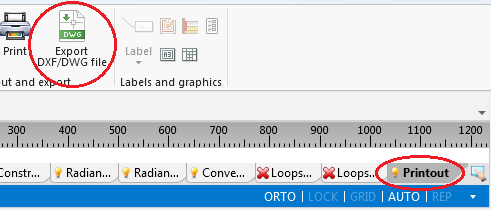
- 当打开打印 编辑范围时,在主工具 工具栏上,就可见输出 DXF/DWG 文件 功能。 该功能可将项目的图形文件输出成一个DXF/DWG文件。
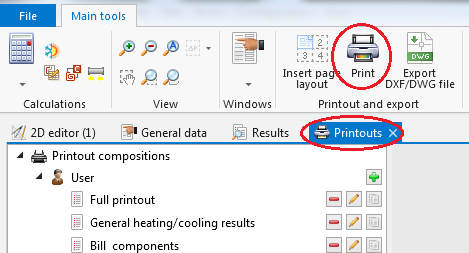
1. 输出 DXF/DWG 文件 - 当打开打印输出 窗口,才可输出到打印机和保存成其它格式的文件。当打开打印 编辑范围时,在主工具 工具栏上,就可见打印 。另外,也可在主工具 工具栏上,从窗口 菜单内调用这个打印窗口。
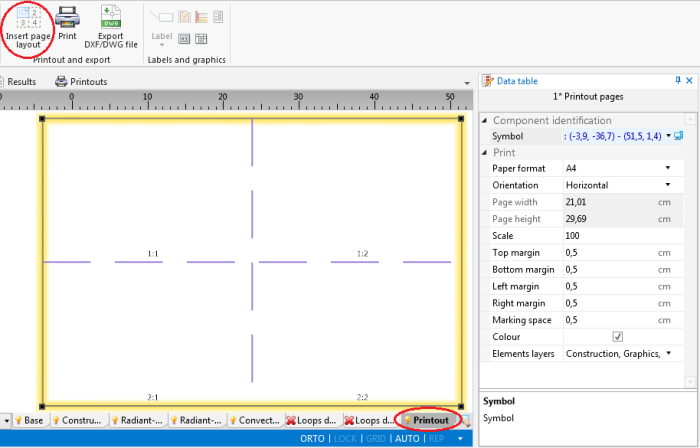
2. 打印 - The 插入页面布局 icon, available on the 主工具 bar when the 打印 editing scope is enabled, allows placing a 打印页面 component in a drawing. Every such component in the project is a new definition of the scope of printout / export of graphics.
3. 插入页面布局


Location in the program
- The 输出 DXF/DWG 文件 function is available on the 主工具 bar when the 打印 editing scope is enabled. The function enables exporting graphics from the project file to a DXF/DWG file.
1. 输出 DXF/DWG 文件 - Outputting to a printer and to other file formats is effected in the 打印输出 window. The 打印 function, available on the 主工具 bar when the 打印 editing scope is enabled, switches the program to that window. Alternatively this can be done by calling this window from the 窗口 menu on the 主工具 bar.
2. 打印 - The 插入页面布局 icon, available on the 主工具 bar when the 打印 editing scope is enabled, allows placing a 打印页面 component in a drawing. Every such component in the project is a new definition of the scope of printout / export of graphics.
3. 插入页面布局