在干式地面辐射系统中插入干式系统板:修订间差异
跳转到导航
跳转到搜索
| 第30行: | 第30行: | ||
[[File:Dry-Systems-2D-3D-view.PNG|980px|left|thumb|1. 干式系统版 - 视图]]<br clear="all"/> | [[File:Dry-Systems-2D-3D-view.PNG|980px|left|thumb|1. 干式系统版 - 视图]]<br clear="all"/> | ||
== | ==程序中的位置== | ||
<!--''Sekcja opisująca sposób użycia funkcji|modułu:--> | <!--''Sekcja opisująca sposób użycia funkcji|modułu:--> | ||
<!--* ''w którym miejscu w programie jest dostępna,''--> | <!--* ''w którym miejscu w programie jest dostępna,''--> | ||
* | * ''<IS_TS id=KlocekDrySysName/>'' 的命令图标 - 当打开''<IS_TS id=DrySysCaption/>'' 编辑范围时,在''<IS_TS id=NarzedziaGlowne/>'' 条的''<IS_TS id=NazwaZakladkiOP/>'' 组中就可看到该命令图标。 | ||
[[File:Dry-Systems-Plate-location.png|1100px|left|thumb|2. | [[File:Dry-Systems-Plate-location.png|1100px|left|thumb|2. 在程序中的位置]]<br clear="all"/> | ||
* | * 其它指定类型的干式系统板的命令图标,则取决于软件包的配置。<br/> | ||
<!--* ''jak wywołać funkcję (pasek narzędzi, klawisz funkcyjny, itd.).''--> | <!--* ''jak wywołać funkcję (pasek narzędzi, klawisz funkcyjny, itd.).''--> | ||
2018年1月6日 (六) 13:00的版本
| 产品 | InstalSystem 5 |
| 文章类型 | 功能和工具 |
| 版本的最新内容 | IS 5.0 Beta Rev. 5.B1 |
说明
这个功能能够插入干式系统板 部件并作为在带有导向板的干式地面辐射系统中管材铺设的基础。
干式系统板 部件可以任意布置,且可剪裁以适应房间的几何形状,而剪裁后的剩余部分也能够被使用。
在完成可计算后,就生成可一个辐射供热部件清单 ,指出了项目中所用的干式系统板材的数量。

程序中的位置
- 干式系统板 的命令图标 - 当打开干式系统 编辑范围时,在主工具 条的辐射 组中就可看到该命令图标。

- 其它指定类型的干式系统板的命令图标,则取决于软件包的配置。
Example of use
Manual inserting plates in dry floor heating system
- 干式系统板 is inserted within the 地面供热/供冷区 area.
更多信息,见: Heating/cooling zone
Therefore this step has to be preceded by necessary design operations. 更多信息,见: Design of radiant heating floor and wall installation and selection in 一般参数 in the 地面系统 section of "Dry system" in the 默认的系统/固定方式 field. - When inserting 干式系统板 appropriate catalog type should be selected in the 参数表 window, to take into account the pipe spacing distance determined or specified for the zone.
When the program configuration includes a dedicated toolbar it is possible to select an icon of a plate of defined type. - Inserting 干式系统板 components is supported by the 捕捉 mode, both with regard to room outline, as well as to the plates themselves. 更多信息,见: Additional information
- Using cut off pieces of 干式系统板 components.
The portion of 干式系统板 component being inserted that extends beyond 房间 or overlaps the 干式系统板 inserted before is automatically cut off. The cut off piece can be used in the project and the corresponding number of 干式系统板 components used is included in the bill of materials. The cut off pieces can be pasted outside of the drawing and reinserted elsewhere within the 地面供热/供冷区 cut to fit the edge provided that 剪切 and 粘贴 functions are used.
Adjusting the line dividing the 地面供热/供冷区 into 供热/供冷地面 components
- The lines dividing the 地面供热/供冷区 into 供热/供冷地面 components determined automatically may not match the edges of 干式系统板 components inserted manually. In order to match these the dividing line has to be adjusted.
更多信息,见: Manual indication of the dividing line
更多信息,见: Modifying the dividing line after automatic division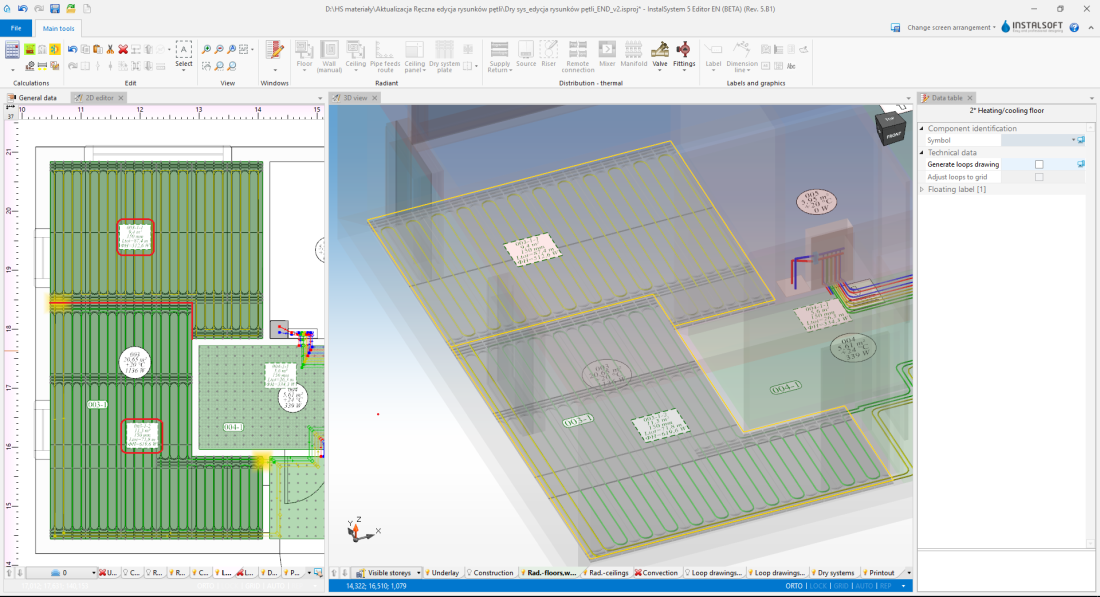
3. Adjustment of the dividing line

Inserting loop drawings
After proper arrangement of the dry system plates it is necessary to manually lay out the loops in accordance with 更多信息,见: Manual editing of loop drawings in dry systems with guide plates
Additional information
When inserting and copying/pasting a 干式系统板 component it is possible to switch between active edges/snap points:
TAB - cursor moves clockwise
Shift+TAB - cursor moves anticlockwise
- If an edge is active on a 干式系统板 component being inserted (cursor in the centre of the edge) - then 3 points are activated: 1 in the centre and 2 in corners.
- If individual points are active on a 干式系统板 component being inserted, the program switches between edge points of the component grid and snaps onto the grid points of other 干式系统板 components.
- Copying of several 干式系统板 components: the program switches between subsequent snap points of 干式系统板 components that make up the block being copied.
- Moving a 干式系统板 component: the active edge or point is selected based on the "grab" location of the component, and changing with the "Tab" key is disabled.