基于InstalSystem 4 项目文件的设计:修订间差异
跳转到导航
跳转到搜索
| 第42行: | 第42行: | ||
有些参数有一[[File:4File-pencil.png|18 px|]] 状态标签,表明此值被设置。 | 有些参数有一[[File:4File-pencil.png|18 px|]] 状态标签,表明此值被设置。 | ||
* 在'''''<IS_TS id=rsDanogi/>''''' 窗口中检查并确认,特别是: | * 在'''''<IS_TS id=rsDanogi/>''''' 窗口中检查并确认,特别是: | ||
** '''''<IS_TS id=btProjectOptions2/>''''' | ** '''''<IS_TS id=btProjectOptions2/>''''', | ||
** 所选择的'''''<IS_TS id=stringZakresObliczen/>''''' | ** 所选择的'''''<IS_TS id=stringZakresObliczen/>''''', | ||
** 项目中所使用的'''''<IS_TS id=sKatalogi/>''''' | ** 项目中所使用的'''''<IS_TS id=sKatalogi/>''''' , | ||
** 从'''''<IS_TS id=InstalacjaRozprowadzajaca/>''''' | ** 从'''''<IS_TS id=InstalacjaRozprowadzajaca/>''''' 中所选择的部件: | ||
*** '''''<IS_TS id=DaneInstalacjiRozprowadzajacejCzynnikGrzewczyChlodniczy/>''''' | *** '''''<IS_TS id=DaneInstalacjiRozprowadzajacejCzynnikGrzewczyChlodniczy/>''''', | ||
*** '''''<IS_TS id=strOpcjeDoboruSrednic/>''''' | *** '''''<IS_TS id=strOpcjeDoboruSrednic/>'''''。 | ||
** '''''<IS_TS id=SystemyPlaszczyznowe/>''''' | ** '''''<IS_TS id=SystemyPlaszczyznowe/>''''': | ||
*** '''''<IS_TS id=DaneInstalacjiPodlogowych/>''''' | *** '''''<IS_TS id=DaneInstalacjiPodlogowych/>'''''。 | ||
* | * 建筑结构的检查和确认 | ||
** | ** 现有的建筑结构部件:楼层、房间、墙、水平隔断、窗户、门 | ||
** 与原文件有关的墙体参数(厚度)和窗/ | ** 与原文件有关的墙体参数(厚度)和窗/门的参数(尺寸) | ||
** 使用'''''<IS_TS id=View3D/>''''' 并在'''''<IS_TS id=rsDanogi/>''''' / '''''<IS_TS id=StoreyManagement/>''''' | ** 使用'''''<IS_TS id=View3D/>''''' 并在'''''<IS_TS id=rsDanogi/>''''' / '''''<IS_TS id=StoreyManagement/>''''' 中检查并确认: | ||
*** | *** 楼层的朝向, | ||
*** | *** 在原文件中所带的部件(窗、门)和位置是否正确显示, | ||
*** | *** 房间所占有的面积是否与原文件中的面积一致, | ||
*** | *** 房间是否匹配, | ||
*** | *** 多层建筑与预期的是否一致。 | ||
* | * 服务系统的检查和确认 | ||
** | ** 供热表面 - 自动转换为''<IS_TS id=strSPGCh/>'', | ||
** 分集水器 - ''<IS_TS id=pinNameZestRozdz/>'' 被设置成 ''<IS_TS id=strInny/>'' | ** 分集水器 - ''<IS_TS id=pinNameZestRozdz/>'' 被设置成 ''<IS_TS id=strInny/>'', | ||
** | ** 管路和引线管, | ||
** 混水装置 - | ** 混水装置 - 撤掉了''混水上的2个阀门,泵'' ,造成了系统的不连续, | ||
** | ** 设定的水流阻力单位, | ||
** ''<IS_TS id=iNameHyperlink/>'' - | ** ''<IS_TS id=iNameHyperlink/>'' - 缺少对''轴测图'' 的支持,造成了系统的不连续, | ||
** | ** 立管, | ||
** | ** 源, | ||
* | * 部件外观的确认 | ||
** | ** 图的风格, | ||
** | ** 标签的外观和内容。 | ||
===Verification of data after opening file with data for calculating thermal load of building=== | ===Verification of data after opening file with data for calculating thermal load of building=== | ||
2017年11月25日 (六) 15:45的版本
说明
本文介绍了如何利用InstalSystem 5 软件
- 打开InstalSystem 4 项目文件(ISB 格式),以及
- 解决打开文件过程中所遇到问题。
在程序中位置
在InstalSystem 5程序中打开InstalSystem 4 项目文件会受到InstalSystem 5 Manager 以及InstalSystem 5 编辑器 中的打开文件 功能的影响。
应用举例
打开一个ISB格式文件项目
程序总是以InstalSystem 5 最新安装的版本打开一个ISB项目文件。
导入参数和部件的范围
- 可导入到InstalSystem 5的参数和部件的范围:
- 一般参数 - 每个参数会被传送到InstalSystem 5 相应的参数域中。
- 建筑部件:楼层、墙、地板和有关部件(窗、门、墙洞)、房间、等。
- 系统部件:供热面、分集水器、管线、引线管、远程连接、源、管件、立管、混水装置、阀门、散热器、自定义末端装置、膨胀缝等。
- 部件参数转换到InstalSystem 5 相应的部件参数中。
- 建筑热负荷计算所需的部件参数,包括:
- 标准和计算选项,
- 维护结构的定义,
- 建筑和建筑单元的一般参数,
- 房间参数(通风参数、采暖/非采暖、设计温度)。
- 描述性的部件和打印输出部件:标签、表格等。
- 不能导入到InstalSystem 5 中的参数和部件:
- “轴测图”或“示意图”类型的工作表,
- 在InstalSystem 5 中无法显示的部件的参数域,
- 由扫描合并 生成的底图(基础图),
- 部件:3通阀;4通阀;2个阀一个泵组成的混水装置,
- 逻辑维护结构(表格和图形),
- 应用和计算范围不支持的系统部件,
- 在“轴测图”类型的工作表中所创建的部件。
打开文件后检查诊断信息
- 检查确认计算范围不支持的的诊断信息。
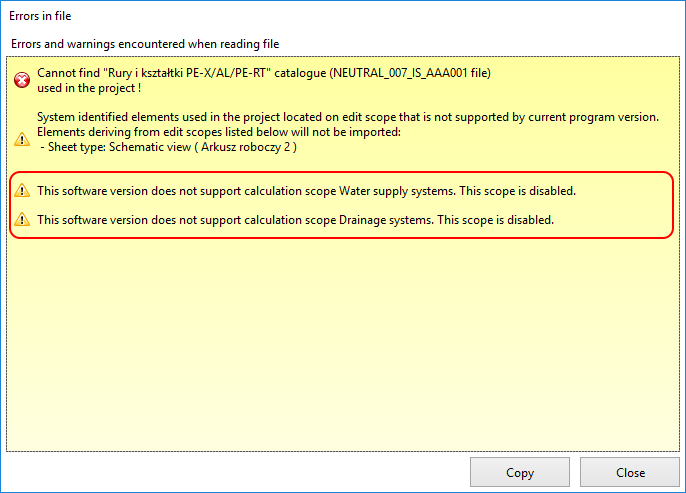
1. 不支持的计算范围 - 检查确认丢失的目录诊断信息。
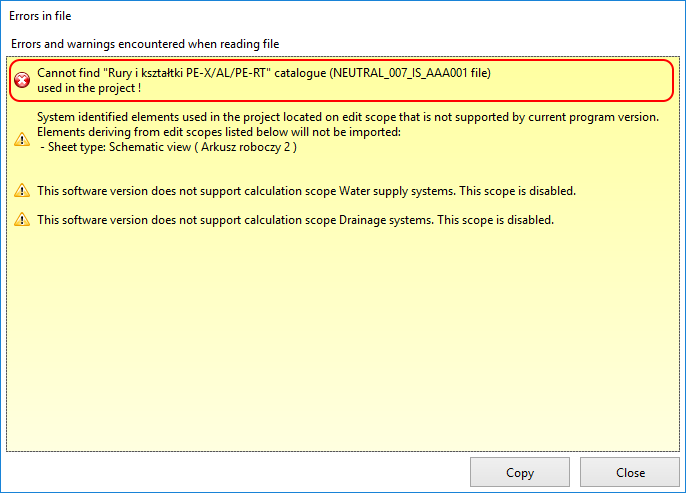
2. 丢失的目录 - 检查确认没有导入的参数和部件的诊断信息。
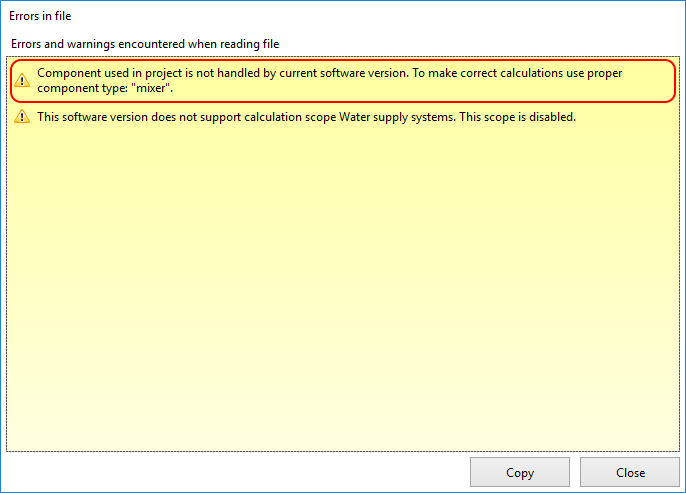
3. 未导入的参数和部件 - 检查确认导入的不支持的参数和部件的诊断信息。
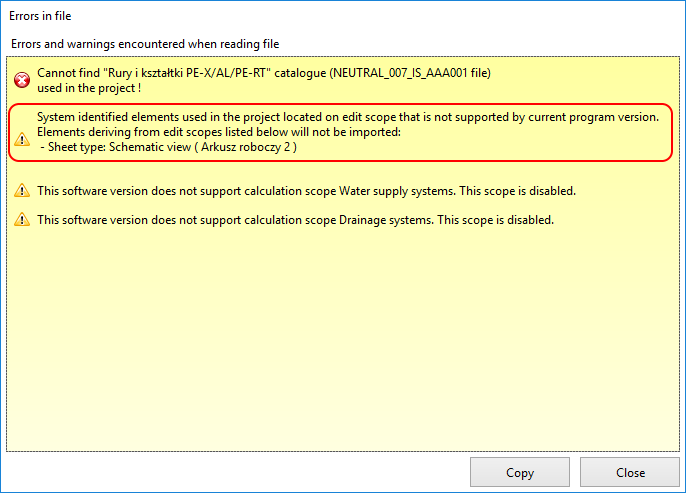
4. 不支持的参数和部件


检查和确认打开文件后的参数和部件
有些参数有一 状态标签,表明此值被设置。
- 在一般参数 窗口中检查并确认,特别是:
- 项目信息,
- 所选择的计算范围,
- 项目中所使用的目录 ,
- 从水力分配系统 中所选择的部件:
- 默认类型和参数,
- 管材和绝热材料设计选项。
- 辐射系统:
- 地面系统。
- 建筑结构的检查和确认
- 现有的建筑结构部件:楼层、房间、墙、水平隔断、窗户、门
- 与原文件有关的墙体参数(厚度)和窗/门的参数(尺寸)
- 使用3D视图 并在一般参数 / 楼层管理 中检查并确认:
- 楼层的朝向,
- 在原文件中所带的部件(窗、门)和位置是否正确显示,
- 房间所占有的面积是否与原文件中的面积一致,
- 房间是否匹配,
- 多层建筑与预期的是否一致。
- 服务系统的检查和确认
- 供热表面 - 自动转换为供热/供冷区,
- 分集水器 - 分集水器配件 被设置成 其它,
- 管路和引线管,
- 混水装置 - 撤掉了混水上的2个阀门,泵 ,造成了系统的不连续,
- 设定的水流阻力单位,
- 远程连接 - 缺少对轴测图 的支持,造成了系统的不连续,
- 立管,
- 源,
- 部件外观的确认
- 图的风格,
- 标签的外观和内容。
Verification of data after opening file with data for calculating thermal load of building
- Verification of building structure.
- Verification of room data.
- verify in 热负荷计算 accordance of room data with source file:
- Type,
- Symbol,
- Method of calculating Phi,
- Theta_i,H,
- Status: heated/not heated,
- assignment to 建筑单元,
- data in frame 通风耗热量
- verify in 热负荷计算 accordance of room data with source file:
- Verification of logical partitions.
- rooms have logical partitions - verify in 热负荷计算 and in 项目浏览器 within the 热负荷计算 scope.
- Verification of partition data.
- verify in 项目浏览器 within the 热负荷计算 scope the existence of partition definitions - cooling partitions InstalSystem 4 with properties specified directly in the room table (with no definition applied) automatically generate in InstalSystem 5 appropriate definitions.
Appending data and components after open file
After verifying diagnostic messages, data and components, to continue working with InstalSystem 5 it may be necessary to:
- append and adjust remote connections due to lack of imported worksheets of the Developed view type,
- append service systems with unimported components that are necessary to continue working with the project,
- replace components that are not imported with equivalent components available in InstalSystem 5,
- append the building structure with missing components,
- launch 建筑结构计算 to generate logical partitions required for 建筑热负荷计算,
- reinstate lost assignments of partition definitions to logical partitions.