建筑结构的准备 - 创建不同建筑的屋顶:修订间差异
跳转到导航
跳转到搜索
(→建筑结构计算) |
|||
| 第16行: | 第16行: | ||
* 在''<IS_TS id=NarzedziaGlowne/>'' 的''<IS_TS id=sObliczenie/>'' 工具栏中可见''<IS_TS id=BuildingStructureCalculation/>''。<br/>[[File:计算建筑结构.png|900 px|left|thumb|4. ''<IS_TS id=BuildingStructureCalculation/>'']]<br clear="all"/> | * 在''<IS_TS id=NarzedziaGlowne/>'' 的''<IS_TS id=sObliczenie/>'' 工具栏中可见''<IS_TS id=BuildingStructureCalculation/>''。<br/>[[File:计算建筑结构.png|900 px|left|thumb|4. ''<IS_TS id=BuildingStructureCalculation/>'']]<br clear="all"/> | ||
== | ==应用举例== | ||
1. | 1. 利用''<IS_TS id=Roof/>'' 部件绘制屋顶覆盖的轮廓线。然后再利用''<IS_TS id=AddRoofEdge/>'' 并指定屋顶特征点的标高来绘制屋檐。<br/>屋顶的分割线可以使用[[File:Delete-ikon.png|18 px|]]删除。<br/>红色分割线表示分割无效以及点的标高或分割线需要调整。 | ||
* | * 单面斜屋顶,<br/>{{#ev:youtube|3ZAYeNR2ZvQ|900||||rel=0}} <br clear="all"/> | ||
* | * 三角形屋顶,<br/>{{#ev:youtube|c1Xe-0rJTHA|900||||rel=0}} <br clear="all"/> | ||
* | * 四坡顶,<br/>{{#ev:youtube|Wk4xVHWcAVM|900||||rel=0}} <br clear="all"/> | ||
* | * 半四坡顶,<br/>{{#ev:youtube|CAnthUkX3PU|900||||rel=0}} <br clear="all"/> | ||
* | * 复斜屋顶,<br/>{{#ev:youtube|RyT-DP9-954|900||||rel=0}} <br clear="all"/> | ||
* | * 多面屋顶。<br/>{{#ev:youtube|us6xceXY_XA|900||||rel=0}}<br/> | ||
2. | 2. 使用''<IS_TS id=Lukarna/>'' 创建带天窗的屋顶: | ||
* | * 带单坡老虎窗的屋顶,<br/>{{#ev:youtube|T3xHd_ESvmo|900||||rel=0}} <br clear="all"/> | ||
* | * 带有三角形天窗的屋顶。<br/>{{#ev:youtube|h53hAnTdTvw|900||||rel=0}} <br clear="all"/> | ||
[[pl:Przygotowanie struktury budynku - Utworzenie dachów różnej konstrukcji]] | [[pl:Przygotowanie struktury budynku - Utworzenie dachów różnej konstrukcji]] | ||
[[Category:InstalSystem 5]] | [[Category:InstalSystem 5]] | ||
[[Category: | [[Category:功能]] | ||
2017年9月10日 (日) 11:04的版本
描述
本文介绍了如何创建各种屋顶结构。屋顶结构包括:
- 屋顶,
- 添加屋顶边缘,
- 天窗,
- 天窗。
在编辑时为了检查所做的修改的效果,需要调用建筑结构计算 。
更多信息,见: 建筑结构的准备
在程序中的位置
建筑结构
- 在2D编辑器 窗口中,当打开建筑 编辑范围时,在主工具 的建筑 工具栏中,可见与建筑结构相关的部件和功能图标。
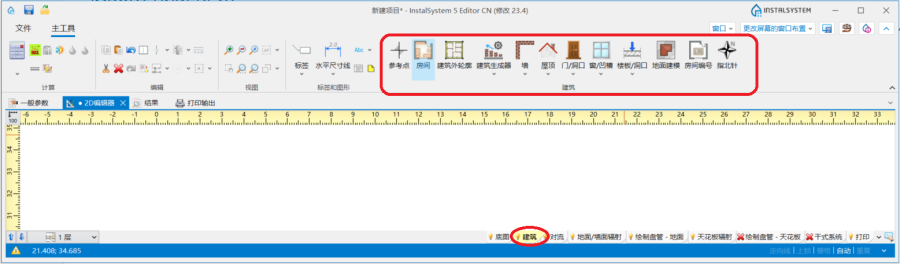
3. 建筑结构部件

计算建筑结构
- 在主工具 的计算 工具栏中可见建筑结构计算。
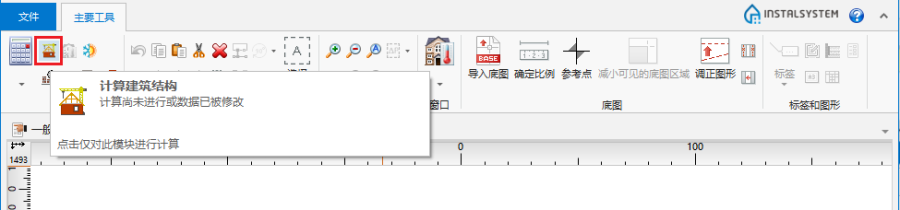
4. 建筑结构计算

应用举例
1. 利用屋顶 部件绘制屋顶覆盖的轮廓线。然后再利用添加屋顶边缘 并指定屋顶特征点的标高来绘制屋檐。
屋顶的分割线可以使用 删除。
删除。
红色分割线表示分割无效以及点的标高或分割线需要调整。
- 单面斜屋顶,
- 三角形屋顶,
- 四坡顶,
- 半四坡顶,
- 复斜屋顶,
- 多面屋顶。
2. 使用天窗 创建带天窗的屋顶:
- 带单坡老虎窗的屋顶,
- 带有三角形天窗的屋顶。