在项目中查找部件:修订间差异
跳转到导航
跳转到搜索
(创建页面,内容为“==Description== The ''<IS_TS id=ProjectBrowserTitle/>'' tool enables searching for a component or a group of components within a project. As a result the found compo...”) |
|||
| 第1行: | 第1行: | ||
== | ==说明== | ||
该''项目浏览器'' 工具可寻找项目中使用的部件或组件。所找到的部件将在所有活动窗口,如:''2D编辑器'' 、''<IS_TS id=View3D/>'' 、''<IS_TS id=DataEditorTable/>'' 、''<IS_TS id=ResultModuleTitle/>'' 等中被标识出来。 | |||
==Location in the program== | ==Location in the program== | ||
* The ''<IS_TS id=ProjectBrowserTitle/>'' function forms a separate window and is available in the ''<IS_TS id=NarzedziaGlowne/>'' toolbar in the ''<IS_TS id=Windows/>'' section.<br/>[[File:Suf-prezwiw-window.png|thumb|left|800px|1. <IS_TS id=ProjectBrowserTitle/> function]]<br clear="all"/> | * The ''<IS_TS id=ProjectBrowserTitle/>'' function forms a separate window and is available in the ''<IS_TS id=NarzedziaGlowne/>'' toolbar in the ''<IS_TS id=Windows/>'' section.<br/>[[File:Suf-prezwiw-window.png|thumb|left|800px|1. <IS_TS id=ProjectBrowserTitle/> function]]<br clear="all"/> | ||
2017年2月6日 (一) 09:44的版本
说明
该项目浏览器 工具可寻找项目中使用的部件或组件。所找到的部件将在所有活动窗口,如:2D编辑器 、3D视图 、参数表 、结果 等中被标识出来。
Location in the program
- The function forms a separate window and is available in the 主工具 toolbar in the 窗口 section.
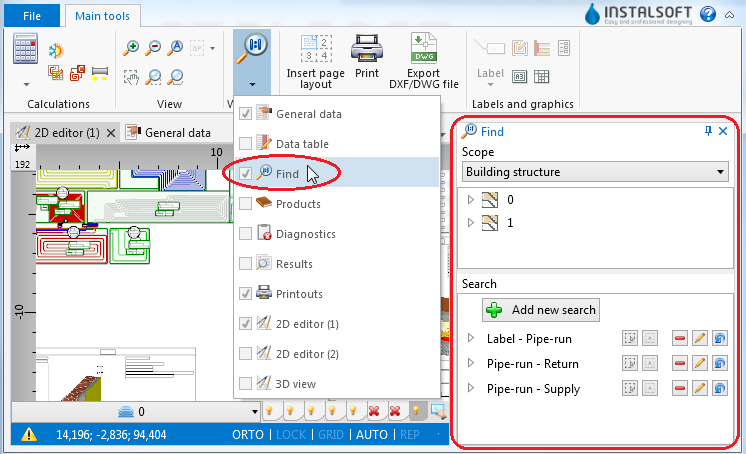
1. function

Example of use
Searching for components of selected type
- Select 范围 of search (e.g. 建筑结构, 供热和供冷系统计算).
- Select the component in the tree of components.
- Additional buttons on the right side of window enable:
- searching for components of selected type within a drawing indicated by the user,
- searching for all components of selected type.
Searching for components that meet defined criteria
- Select one of the previously defined searches
or - Select 添加新的寻找.
- Fill in the 寻找名称 field.
- Select the scope of search in the 寻找 field.
- Select from the list the data type to be used in the search.
- Narrow down the range of your search by specifying the values of selected data.