输出 / 打印结果和图纸:修订间差异
跳转到导航
跳转到搜索
(→说明) |
|||
| 第1行: | 第1行: | ||
==说明== | ==说明== | ||
该程序可将项目设计图纸和计算结果以多种文件格式(PDF、DWG、XLS等)输出和打印。输出成DWG/DXF格式的文件是由一个专门的功能完成的,而输出成其它格式的文件是通过输出到打印机,然后选择文件格式,再进行打印来完成的。 | |||
==Location in the program== | ==Location in the program== | ||
2017年1月20日 (五) 11:37的版本
说明
该程序可将项目设计图纸和计算结果以多种文件格式(PDF、DWG、XLS等)输出和打印。输出成DWG/DXF格式的文件是由一个专门的功能完成的,而输出成其它格式的文件是通过输出到打印机,然后选择文件格式,再进行打印来完成的。
Location in the program
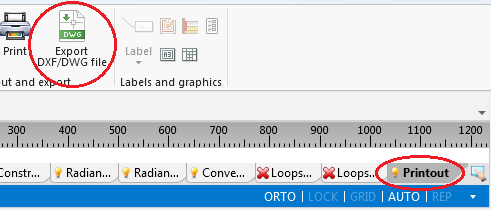
- The 输出 DXF/DWG 文件 function is available on the 主工具 bar when the 打印 editing scope is enabled. The function enables exporting graphics from the project file to a DXF/DWG file.
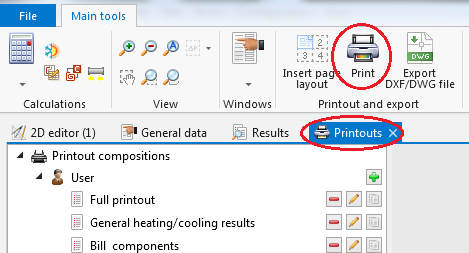
1. 输出 DXF/DWG 文件 - Outputting to a printer and to other file formats is effected in the 打印输出 window. The 打印 function, available on the 主工具 bar when the 打印 editing scope is enabled, switches the program to that window. Alternatively this can be done by calling this window from the 窗口 menu on the 主工具 bar.
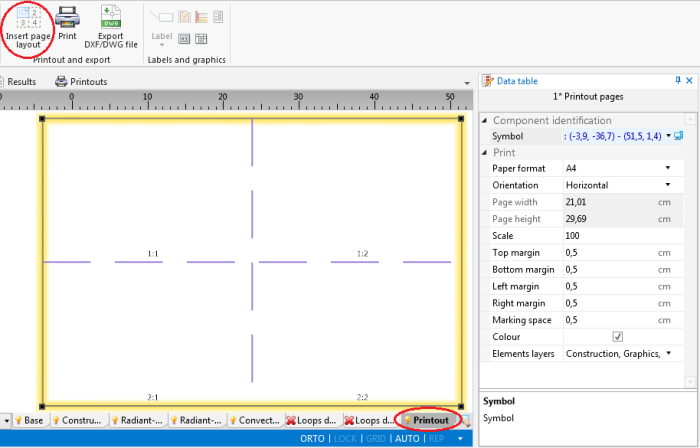
2. 打印 - The 插入页面布局 icon, available on the 主工具 bar when the 打印 editing scope is enabled, allows placing a 打印页面 component in a drawing. Every such component in the project is a new definition of the scope of printout / export of graphics.
3. 插入页面布局


Location in the program
- The 输出 DXF/DWG 文件 function is available on the 主工具 bar when the 打印 editing scope is enabled. The function enables exporting graphics from the project file to a DXF/DWG file.
1. 输出 DXF/DWG 文件 - Outputting to a printer and to other file formats is effected in the 打印输出 window. The 打印 function, available on the 主工具 bar when the 打印 editing scope is enabled, switches the program to that window. Alternatively this can be done by calling this window from the 窗口 menu on the 主工具 bar.
2. 打印 - The 插入页面布局 icon, available on the 主工具 bar when the 打印 editing scope is enabled, allows placing a 打印页面 component in a drawing. Every such component in the project is a new definition of the scope of printout / export of graphics.
3. 插入页面布局