管路:修订间差异
无编辑摘要 |
|||
| (未显示2个用户的83个中间版本) | |||
| 第21行: | 第21行: | ||
==说明== | ==说明== | ||
''<IS_TS id=iNameDzialka/>'' | ''<IS_TS id=iNameDzialka/>'' 是一个在所有设计范围内都需使用的部件,它在两个连接点之间形成了管道系统的一部分,并在连接点处可以改变水流。在以下设计范围内:''<IS_TS id=InstalacjeGrzewcze/>'' ,''<IS_TS id=InstalacjeChlodnicze/>'' 和''<IS_TS id=InstalacjeWodociagowe/>'' 中,一根''<IS_TS id=iNameDzialka/>'' 可以由多个管段(垂直和水平)组成,每段由管路分割点分隔。可以绘制单根管路,也可以绘制''<IS_TS id=iName2Dzialki/>'' /''三根管路'' 。在''<IS_TS id=InstalacjeKanalizacjiSanitarnej/>'' 范围内,''<IS_TS id=strKanalizacjaGrawitacyjna/>'' 或''<IS_TS id=strKanalizacjaWentylacjaSkrot/>'' 的''<IS_TS id=iNameDzialka/>'' 始终由单根管段组成。</br> 可以指定 ''<IS_TS id=OdlegloscOdPodlogiCaption/>'' 默认值。此外,用户可以使用''<IS_TS id=GraphicalEdit/>'' 和''<IS_TS id=View3D/>'' 中的专用编辑器完全控制管路的布置。 | ||
==在程序中的位置== | ==在程序中的位置== | ||
===插入管路=== | ===插入管路=== | ||
* 当勾选了''<IS_TS id='ZakresProjektu/>'' :''<IS_TS id=InstalacjeGrzewcze/>'' 或''<IS_TS id=InstalacjeChlodnicze/>'' ,在''<IS_TS id=GraphicalEdit/>'' 窗口,进入:''<IS_TS id=ScopeInstalacjeKonwekcyjneShort/>'' 、''<IS_TS id=ScopeInstalacjePodlogoweIScienneShort/>'' 或''<IS_TS id=ScopeInstalacjeSufitoweShort/>'' 编辑器,就可在''<IS_TS id=NarzedziaGlowne/>'' 选项卡的''<IS_TS id=RozprowadzenieCieplne/>'' 工具栏内找到与''<IS_TS id=iNameDzialka/>'' 相关联的图标。</br>[[File: | * 当勾选了''<IS_TS id='ZakresProjektu/>'' :''<IS_TS id=InstalacjeGrzewcze/>'' 或''<IS_TS id=InstalacjeChlodnicze/>'' ,在''<IS_TS id=GraphicalEdit/>'' 窗口,进入:''<IS_TS id=ScopeInstalacjeKonwekcyjneShort/>'' 、''<IS_TS id=ScopeInstalacjePodlogoweIScienneShort/>'' 或''<IS_TS id=ScopeInstalacjeSufitoweShort/>'' 编辑器,就可在''<IS_TS id=NarzedziaGlowne/>'' 选项卡的''<IS_TS id=RozprowadzenieCieplne/>'' 工具栏内找到与''<IS_TS id=iNameDzialka/>'' 相关联的图标。</br>[[File:管路工具的位置.png|900 px|left|thumb|1. <IS_TS id=iNameDzialka/> - <IS_TS id=InstalacjeGrzewcze/> 或<IS_TS id=InstalacjeChlodnicze/>.]]<br clear="all"/> | ||
* 当勾选了''<IS_TS id=InstalacjeWodociagowe/>'' ,在''<IS_TS id=GraphicalEdit/>'' 窗口,进入''<IS_TS id=strInstalacjaWodociag/>'' 编辑器,就可在''<IS_TS id=NarzedziaGlowne/>'' 选项卡, ''<IS_TS id=RozprowadzenieInstalacjaWodociag/>'' 工具栏内,看到与''<IS_TS id=iNameDzialka/>'' 相关的图标。</br>[[File: | * 当勾选了''<IS_TS id=InstalacjeWodociagowe/>'' ,在''<IS_TS id=GraphicalEdit/>'' 窗口,进入''<IS_TS id=strInstalacjaWodociag/>'' 编辑器,就可在''<IS_TS id=NarzedziaGlowne/>'' 选项卡, ''<IS_TS id=RozprowadzenieInstalacjaWodociag/>'' 工具栏内,看到与''<IS_TS id=iNameDzialka/>'' 相关的图标。</br>[[File:给水管道工具的位置.png|900 px|left|thumb|2. <IS_TS id=iNameDzialka/> - <IS_TS id=InstalacjeWodociagowe/>.]]<br clear="all"/> | ||
* 当勾选了''<IS_TS id=InstalacjeKanalizacjiSanitarnej/>'' , 在''<IS_TS id=GraphicalEdit/>'' 窗口,进入''<IS_TS id=strInstalacjaKanalizacjaSanit/>'' 编辑器,就可在''<IS_TS id=NarzedziaGlowne/>'' 选项卡, ''<IS_TS id=strKanalizacjaWewnSanit/>'' 工具栏内就可看到与''<IS_TS id=iNameDzialka/>'' 相关的图标。</br>[[File: | * 当勾选了''<IS_TS id=InstalacjeKanalizacjiSanitarnej/>'' , 在''<IS_TS id=GraphicalEdit/>'' 窗口,进入''<IS_TS id=strInstalacjaKanalizacjaSanit/>'' 编辑器,就可在''<IS_TS id=NarzedziaGlowne/>'' 选项卡, ''<IS_TS id=strKanalizacjaWewnSanit/>'' 工具栏内就可看到与''<IS_TS id=iNameDzialka/>'' 相关的图标。</br>[[File:排水管道工具的位置.png|900 px|left|thumb|3. <IS_TS id=iNameDzialka/> - <IS_TS id=InstalacjeKanalizacjiSanitarnej/>.]]<br clear="all"/> | ||
==应用举例== | ==应用举例== | ||
=== | ===管路分割点和中间点=== | ||
* 一根''<IS_TS id=iNameDzialka/>'' | * 一根''<IS_TS id=iNameDzialka/>'' 可以由多个通过中间点连接的管路组成。 | ||
* 两根''<IS_TS id=iNameDzialka/>'' | * 两根''<IS_TS id=iNameDzialka/>'' 由管路分割点 - 也就是通过一个断点/节点分开(此处会生成一个连接件,连接件两侧的管路编号也将不同)。 | ||
* 可以使用关联菜单和其中可用的功能在''<IS_TS id=iNameDzialka/>'' 上放置任意数量的附加点:''<IS_TS id=InsertPoint/>'' 和 ''<IS_TS id=InsertEndPoint/>''。 | * 可以使用关联菜单和其中可用的功能在''<IS_TS id=iNameDzialka/>'' 上放置任意数量的附加点:''<IS_TS id=InsertPoint/>'' 和''<IS_TS id=InsertEndPoint/>''。 | ||
* | * 中间点可以更改为分割点,分割点也可以更改为中间点,程序将以最后一次所插入的点的类型为准:<br/>[[File:中间点和分割点.png|900 px|left|thumb|'''[[视频:管路的中间点和分割点]]'''|link=https://www.bilibili.com/video/BV1cs4y1j78F/]]<br clear="all"/> | ||
=== | ===管路与地面以及管路与天花板之间的默认距离=== | ||
在''<IS_TS id=DataEditorTable/>'' 窗口,在如下的区域中,可为每一''<IS_TS id=iNameKondygnacja/>'' 的每种''<IS_TS id=iNameDzialka/>'' | 在''<IS_TS id=DataEditorTable/>'' 窗口,在如下的区域中,可为每一''<IS_TS id=iNameKondygnacja/>'' 的每种''<IS_TS id=iNameDzialka/>'' 设定它们与地面的默认距离,并可为顶面辐射板的输配管路设定每种''<IS_TS id=iNameDzialka/>'' 与天花板的默认距离: | ||
* 对于''<IS_TS id=InstalacjeGrzewcze/>'' 和''<IS_TS id= | * 对于''<IS_TS id=InstalacjeGrzewcze/>'' 和''<IS_TS id=InstalacjeChlodnicze/>'' : | ||
** ''<IS_TS id=DeltaRzednaDzialkiSymbolZasilanie/>'' 和''<IS_TS id=DeltaRzednaDzialkiSymbolPowrot/>'' - ''<IS_TS id=DeltaRzednaDzialkiCaption/>'' | ** ''<IS_TS id=DeltaRzednaDzialkiSymbolZasilanie/>'' 和''<IS_TS id=DeltaRzednaDzialkiSymbolPowrot/>'' - ''<IS_TS id=DeltaRzednaDzialkiCaption/>'' | ||
** ''<IS_TS id=DeltaRzednaDzialkiPanelSymbol/>'' - ''<IS_TS id=DeltaRzednaDzialkiPanelCaption/>'' | ** ''<IS_TS id=DeltaRzednaDzialkiPanelSymbol/>'' - ''<IS_TS id=DeltaRzednaDzialkiPanelCaption/>'' | ||
| 第45行: | 第44行: | ||
** ''<IS_TS id=DeltaRzednaDzialkiSymbolCiepla/>'' - ''<IS_TS id=strLblDeltaRzednaDzialekCaption/>'' 对于''<IS_TS id=iNameDzialka/>'' :''<IS_TS id=strWodaCiepla/>'' | ** ''<IS_TS id=DeltaRzednaDzialkiSymbolCiepla/>'' - ''<IS_TS id=strLblDeltaRzednaDzialekCaption/>'' 对于''<IS_TS id=iNameDzialka/>'' :''<IS_TS id=strWodaCiepla/>'' | ||
** ''<IS_TS id=DeltaRzednaDzialkiSymbolZimna/>'' - ''<IS_TS id=strLblDeltaRzednaDzialekCaption/>'' 对于''<IS_TS id=iNameDzialka/>'' :''<IS_TS id=strWodaZimna/>'' | ** ''<IS_TS id=DeltaRzednaDzialkiSymbolZimna/>'' - ''<IS_TS id=strLblDeltaRzednaDzialekCaption/>'' 对于''<IS_TS id=iNameDzialka/>'' :''<IS_TS id=strWodaZimna/>'' | ||
** ''<IS_TS id=DeltaRzednaDzialkiSymbolCyrk/>'' - ''<IS_TS id=strLblDeltaRzednaDzialekCaption/>'' 对于''<IS_TS id=iNameDzialka/>'' :''<IS_TS id=strCyrkulacja/>''</br>[[File: | ** ''<IS_TS id=DeltaRzednaDzialkiSymbolCyrk/>'' - ''<IS_TS id=strLblDeltaRzednaDzialekCaption/>'' 对于''<IS_TS id=iNameDzialka/>'' :''<IS_TS id=strCyrkulacja/>''</br>[[File:楼层参数中各种管路与地面距离的设置.png|900 px|left|thumb|4. 默认的管路距离]]<br clear="all"/> | ||
=== | ===管道敷设间距=== | ||
* 在''<IS_TS id=DataEditorTable/>'' 窗口中,可以为''<IS_TS id=iName2Dzialki/>'' /''三根管路'' 指定它们之间的''<IS_TS id=strpnMultiPiperunDistance/>'' 。在管路部件插入后,程序将记住最后指定的距离,以便下次使用时再次使用该值。</br>[[File: | * 在''<IS_TS id=DataEditorTable/>'' 窗口中,可以为''<IS_TS id=iName2Dzialki/>'' /''三根管路'' 指定它们之间的''<IS_TS id=strpnMultiPiperunDistance/>'' 。在管路部件插入后,程序将记住最后指定的距离,以便下次使用时再次使用该值。</br>[[File:管路铺设间距.png|900 px|left|thumb|5. <IS_TS id=iName2Dzialki/>的<IS_TS id=strpnMultiPiperunDistance/>]]<br clear="all"/> | ||
===确定<IS_TS id=InstalacjeGrzewcze/>、<IS_TS id=InstalacjeChlodnicze/>和<IS_TS id=InstalacjeWodociagowe/>中管路的竖向对齐=== | ===确定<IS_TS id=InstalacjeGrzewcze/>、<IS_TS id=InstalacjeChlodnicze/>和<IS_TS id=InstalacjeWodociagowe/>中管路的竖向对齐=== | ||
| 第54行: | 第53行: | ||
* [[File:Rzedna_konca_dzialki-new.png|40px|]] - 显示管路端点的标高 | * [[File:Rzedna_konca_dzialki-new.png|40px|]] - 显示管路端点的标高 | ||
* [[File:Rzedna-odcinka-new.png|40 px|]] - 显示某一段管路的标高 | * [[File:Rzedna-odcinka-new.png|40 px|]] - 显示某一段管路的标高 | ||
* [[File:Odleglosc-od-podlogi-new.png|40 px|]] - 显示管路某一点/一段与地面的距离 </br>[[File: | * [[File:Odleglosc-od-podlogi-new.png|40 px|]] - 显示管路某一点/一段与地面的距离 </br>[[File:管路标高编辑器.png|900 px|left|thumb|6. 在<IS_TS id=GraphicalEdit/> 和<IS_TS id=View3D/> 窗口中,显示<IS_TS id=iNameDzialka/>的标高]]<br clear="all"/> | ||
''InstalSystem 5'' | ''InstalSystem 5'' 提供了三种管理输配管路系统对齐的方法,它允许选择最方便的方法来适应各个设计环境。该方法应在''<IS_TS id=iNameDzialka/>'' 的''<IS_TS id=DataEditorTable/>'' 窗口,''<IS_TS id=PiperunElevationOptions/>'' 编辑器中进行选择: | ||
* ''<IS_TS id=sRbtAuto/>'' | * ''<IS_TS id=sRbtAuto/>'' 模式: | ||
** | ** 编辑器显示管路末端的标高和距地面的距离并呈灰色,该值无法修改。 | ||
** | ** 可以在''<IS_TS id=iNameDzialka/>'' 的''<IS_TS id=DataEditorTable/>'' 窗口中修改''<IS_TS id=strRzednaLong/>'' 值,这一更改也将自动完成对于选定部件在所有其它编辑器中的值。<br/>[[File:管路标高的调节视频.png|900 px|left|thumb|'''[[视频:管路标高的调节视频]]'''|link=https://www.bilibili.com/video/BV18s4y1V79A/]]<br clear="all"/> | ||
</br> | * ''<IS_TS id=PiperunElevationOptionsManualBySegments/>'' 模式: | ||
** 在''<IS_TS id=GraphicalEdit/>'' 和''<IS_TS id=View3D/>'' 窗口的编辑器中,都可以指定某段管路的标高和与地面的距离。 | |||
** 基于指定的管路间的标高差,将会自动创建竖向管路。 | |||
** 一端连接到末端装置的管路的编辑器显示为灰色,无法编辑 | |||
** 在''<IS_TS id=GraphicalEdit/>'' 和''<IS_TS id=View3D/>'' 窗口,不显示具有垂直管段标高的编辑器</br>[[File:管路局部标高.png|900 px|left|thumb|7. <IS_TS id=PiperunElevationOptions/> - <IS_TS id=PiperunElevationOptionsManualBySegments/>.]]<br clear="all"/> | |||
* ''<IS_TS id=PiperunElevationOptionsManualByNodes/>'' : | |||
** 在''<IS_TS id=GraphicalEdit/>'' 和''<IS_TS id=View3D/>'' 窗口的编辑器中,可以指定''<IS_TS id=iNameDzialka/>'' 段的端点标高和与地面的距离值。 | |||
** 垂直管段不能自动创建 - 整个管路的布置需要用户来控制。 | |||
** 一端连接到末端装置的管路的编辑器显示为灰色,无法编辑。</br>[[File:手动调节节点标高.png|900 px|left|thumb|8. <IS_TS id=PiperunElevationOptions/> - <IS_TS id=PiperunElevationOptionsManualByNodes/>.]]<br clear="all"/> | |||
'''注意!''' 每次更改标高和修改''<IS_TS id=iNameDzialka/>'' 布局,都需要运行''<IS_TS id=NarzedziaGlowne/>'' 选项卡''<IS_TS id=sObliczenie/>'' 工具栏内的''<IS_TS id=btCheckFlow/>'' 功能。</br> | |||
=== | ===确定<IS_TS id=InstalacjeKanalizacjiSanitarnej/>中管路的竖向对齐=== | ||
可以使用在''<IS_TS id=GraphicalEdit/>'' 和''<IS_TS id=View3D/>'' 窗口中选择部件后显示的专用编辑器来管理管路的标高和坡度: | |||
* [[File:Editor_drainage.png|40px|]] - | * [[File:Editor_drainage.png|40px|]] - 显示管路段的标高,在编辑器中显示的值对应于部件''<IS_TS id=DataEditorTable/>'' 窗口中的字段:''<IS_TS id=ZValuePiperunEndPoint1/>'' 和''<IS_TS id=ZValuePiperunEndPoint2/>''。 | ||
* [[File:Editor_2drainage.png|40 px|]] - | * [[File:Editor_2drainage.png|40 px|]] - 显示管道的坡度,并与部件在''<IS_TS id=DataEditorTable/>'' 窗口中的 ''<IS_TS id=strSpadekLong/>'' 字段中的值相对应。</br>[[File:Pipe-run-drainage-position.png|900 px|left|thumb|5. 在<IS_TS id=GraphicalEdit/>和<IS_TS id=View3D/>窗口中,<IS_TS id=iNameDzialka/>标高和坡度的显示]]<br clear="all"/> | ||
铺设管路时,考虑到在''<IS_TS id=rsDanogi/>'' 窗口''<IS_TS id=InstalacjeKanalizacjiSanitarnej/>''/ ''<IS_TS id=rsDanog_Normy/>'' 上的所做的设置,管路将根据流向排污口的水流方向采用如下的坡度: | |||
*将为选定的部件位置采用指定的默认的最小坡度。此外,管路铺设的算法考虑了用户在上述编辑器中指定的标高和坡度值。 | |||
* | *考虑''<IS_TS id=ConnectionPoint/>'' : | ||
** 对于''<IS_TS id=KanInFloor/>'' 的设置 - 管道将根据''<IS_TS id=strDistanceFromFloorForVerticalPiperunConnections/>'' 中指定的值,以最小坡度走向末端装置,并在必要时,在末端装置处添加一段垂直的管道。 | |||
** 对于''<IS_TS id=KanInWall/>'' 的设置 - 管路将按照''<IS_TS id=rsDanogi/>'' 窗口中指定的坡度从末端装置处开始布置管路,然后通过垂直管道连接到横支管上(如果绘图是系统连续性所必需的)。</br>[[File:Conducting-of-branches.png|900 px|left|thumb|9. 管路的对齐 - <IS_TS id=InstalacjeKanalizacjiSanitarnej/>.]]<br clear="all"/> | |||
=== | ===在一个垂直平面中敷设管路=== | ||
* | * 在''<IS_TS id=DataEditorTable/>'' 窗口中,对于某一''<IS_TS id=iNameKondygnacja/>'' 的''<IS_TS id=OgrzewanieChlodzenie/>'' 或''<IS_TS id=strInstalacjaWodociag/>'' 中的各种类型管路设定适当的标高值,并在''<IS_TS id=iName2Dzialki/>''/ ''三根管路'' 的''<IS_TS id=DataEditorTable/>'' 窗口中,将''<IS_TS id=strpnMultiPiperunDistance/>'' 设定到最小值1mm,就可在一个垂直平面上,将所布置的管路上下对齐。例如,在墙上铺设上下对齐的两根管路。<br/>[[File:管路在墙面内外的上下布置.png|900 px|left|thumb|'''[[视频:管路在墙面内外的上下布置]]'''|link=https://www.bilibili.com/video/BV1mo4y1r7dS/]]<br clear="all"/> | ||
=== | ===倾斜的管道=== | ||
* ''<IS_TS id=PiperunElevationOptions/>'' 功能可对管路的走向进行完全的控制,配合在部件上使用中间点或分割点的功能,使得绘制倾斜管路和设计位于阁楼上倾斜部件的连接成为可能。<br/>[[File:管路的倾斜铺设.png|900 px|left|thumb|'''[[视频:管路的倾斜铺设]]'''|link=https://www.bilibili.com/video/BV1yY41167P1/]]<br clear="all"/> | |||
===管路与其他系统部件连接的基本规则=== | |||
在''<IS_TS id=NarzedziaGlowne/>'' 选项卡''<IS_TS id=ctgstringEdycja/>'' 工具栏中的连接工具提供了三种将末端装置自动连接到预先画好的管路上的方法:</br>[[File:自动连接末端装置工具.png|900 px|left|thumb|10. 连接末端装置的各种工具]]<br clear="all"/> | |||
* | * ''<IS_TS id=btPodlaczGrzejnikiDoLinii/>'' - 在如下的范围内: ''<IS_TS id=InstalacjeGrzewcze/>'', ''<IS_TS id=InstalacjeChlodnicze/>'' 和''<IS_TS id=InstalacjeWodociagowe/>'' ,连接所选择的''<IS_TS id=iNameDzialka/>'' 部件和末端装置。 | ||
* | * ''<IS_TS id=btPodlaczGrzejnikiDoLiniiLooping/>'' - 使用三通连接件连接所选择的''<IS_TS id=iNameDzialka/>'' 部件和给水系统中的末端装置。 | ||
* | * ''<IS_TS id=PolaczPaneleSzeregowo/>'' - 使用''<IS_TS id=rpDzialkaSzeregowa/>'' 类型的管路,连接所选择的''<IS_TS id=iNameCOPanelSufitowy/>'' 或''<IS_TS id=PanelScienny/>'' 。{{Info}} [[(墙面和顶面)辐射板供暖供冷系统的设计]] <br/>[[File:管路与末端装置的自动连接.png|900 px|left|thumb|'''[[视频:管路与末端装置的自动连接]]'''|link=https://www.bilibili.com/video/BV16s4y1V7jJ/]]<br clear="all"/> | ||
* | 对于连接到系统的所有部件(例如''<IS_TS id=iNameCOElementONarzOporze/>'', ''<IS_TS id=rpMieszacz/>'', ''<IS_TS id=iNameRozdzielaczPure/>''),将绘制一个5cm长的水平管路,然后再绘制一个弯管,以达到''<IS_TS id=iNameDzialka/>'' 所定义的标高上。 | ||
此规则的例外情况: | |||
* ''<IS_TS id=iNameCOGrzejnik/>'' 与集成角阀的连接 - 绘制一段''<IS_TS id=strOdlOdSciany/>'' + 5cm长的水平管路,然后再弯曲以达到''<IS_TS id=iNameDzialka/>'' 所定义的标高。 | |||
* ''<IS_TS id=iNameBateriaCzerpalna/>'' 的连接 - 绘制一段 1cm长的水平管路,然后再弯曲以达到''<IS_TS id=iNameDzialka/>'' 所定义的标高。</br>[[File:末端连接的水平管.png|900 px|left|thumb|11.<IS_TS id=iNameBateriaCzerpalna/>的连接]]<br clear="all"/> | |||
* ''<IS_TS id=iNamePion/>'' 的连接 - 如果管路的连接是直接进行的,没有中间点,则所采用的管路标高将是''<IS_TS id=iNameDzialka/>'' 的''<IS_TS id=DataEditorTable/>'' 窗口中给出的参数值。 | |||
* ''<IS_TS id=rpMieszacz/>''/''<IS_TS id=rpWezel/>'' 的连接 - ''<IS_TS id=btPodlaczGrzejnikiDoLinii/>'' 的操作将仅连接到''<IS_TS id=rpMieszacz/>'' 一次侧的连接点上。 | |||
=== | ===自动模式的管路=== | ||
当在项目中绘制管路时,若在同一个楼层内有垂直管路,它不能通过插入''<IS_TS id=iNamePion/>'' 来创建,而需要通过四根管路或管路对的连接来创建。与这些竖向管路连接的管路应遵守如下定义的绘图规则: | |||
* | *在启用''自动'' 模式的情况下绘制部件时,连接到竖向管路的''<IS_TS id=iNameDzialka/>'' ,其标高将保持不变。 | ||
* | *将管路连接到坐标重叠的管路时,绘制的''<IS_TS id=iNameDzialka/>'' 将连接到最低标高的部件上。</br>[[File:Pipe-run-tway-auto.png|900 px|left|thumb|12. 竖向管路的连接]]<br clear="all"/> | ||
<!--==Dodatkowe informacje== | <!--==Dodatkowe informacje== | ||
''Sekcja opcjonalna, zawierająca dodatkowe informacje opisujące funkcję/element programu.'' | ''Sekcja opcjonalna, zawierająca dodatkowe informacje opisujące funkcję/element programu.'' | ||
| 第111行: | 第109行: | ||
[[Category:InstalSystem 5]] | [[Category:InstalSystem 5]] | ||
[[Category: | [[Category:功能和工具]] | ||
<!-- Do not write text below this tag --> | <!-- Do not write text below this tag --> | ||
<br class="iwlinks"/>[[pl:Działka instalacji|Działka instalacji]] | <br class="iwlinks"/>[[pl:Działka instalacji|Działka instalacji]][[en:Pipe-run|Pipe-run]] | ||
2024年6月7日 (五) 06:58的最新版本
| 产品 | InstalSystem 5 |
| 文章类型 | 功能和工具 |
| 版本的最新内容 | 2023-01-10 |
说明
管路 是一个在所有设计范围内都需使用的部件,它在两个连接点之间形成了管道系统的一部分,并在连接点处可以改变水流。在以下设计范围内:供热系统计算 ,供冷系统计算 和给水系统计算 中,一根管路 可以由多个管段(垂直和水平)组成,每段由管路分割点分隔。可以绘制单根管路,也可以绘制管线对 /三根管路 。在生活排水系统计算 范围内,重力排水 或通气管 的管路 始终由单根管段组成。
可以指定 与地面的距离(在楼层管理中设置) 默认值。此外,用户可以使用2D编辑器 和3D视图 中的专用编辑器完全控制管路的布置。
在程序中的位置
插入管路
- 当勾选了项目范围 :供热系统计算 或供冷系统计算 ,在2D编辑器 窗口,进入:对流 、地面/墙面辐射 或顶面辐射 编辑器,就可在主工具 选项卡的水力分配 - 供热供冷系统 工具栏内找到与管路 相关联的图标。
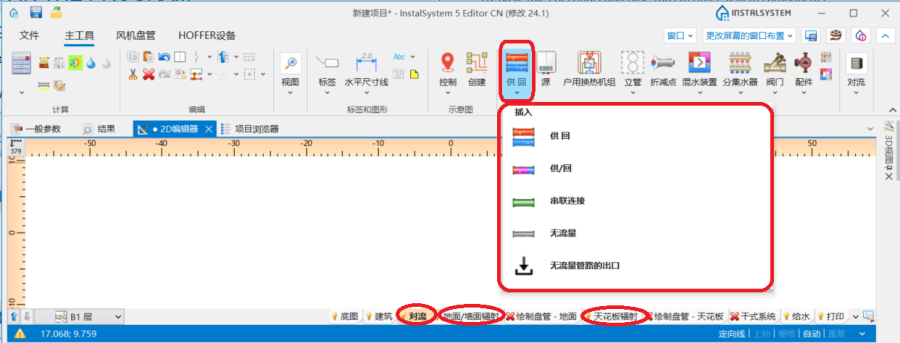
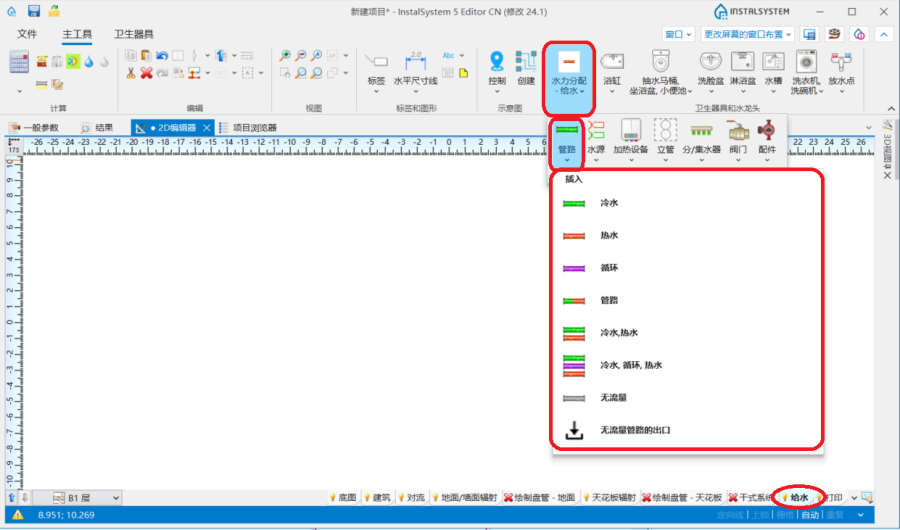
1. 管路 - 供热系统计算 或供冷系统计算. - 当勾选了给水系统计算 ,在2D编辑器 窗口,进入给水系统 编辑器,就可在主工具 选项卡, 水力分配 - 给水系统 工具栏内,看到与管路 相关的图标。
2. 管路 - 给水系统计算. - 当勾选了生活排水系统计算 , 在2D编辑器 窗口,进入室内排水 编辑器,就可在主工具 选项卡, 排水 工具栏内就可看到与管路 相关的图标。
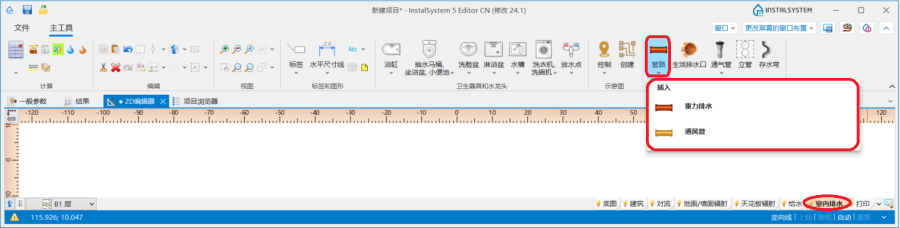
3. 管路 - 生活排水系统计算.


应用举例
管路分割点和中间点
- 一根管路 可以由多个通过中间点连接的管路组成。
- 两根管路 由管路分割点 - 也就是通过一个断点/节点分开(此处会生成一个连接件,连接件两侧的管路编号也将不同)。
- 可以使用关联菜单和其中可用的功能在管路 上放置任意数量的附加点:插入中间点 和插入分割点。
- 中间点可以更改为分割点,分割点也可以更改为中间点,程序将以最后一次所插入的点的类型为准:
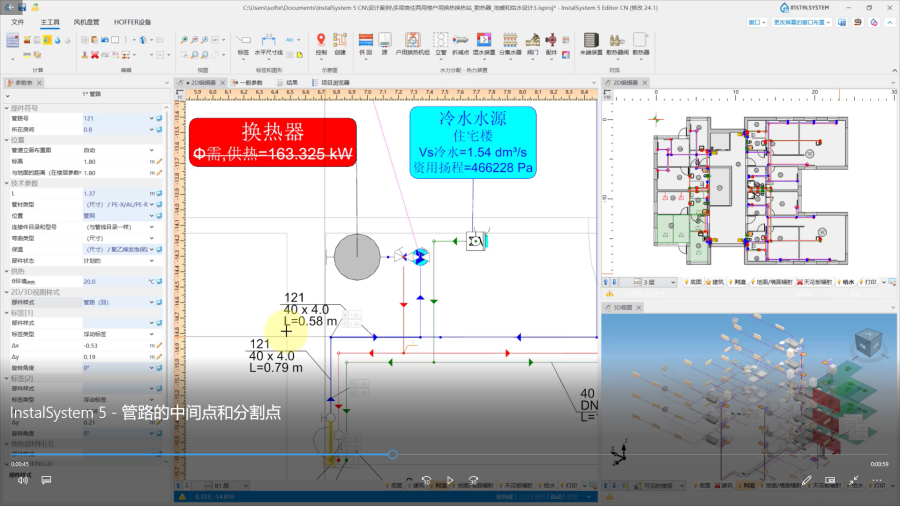
视频:管路的中间点和分割点
管路与地面以及管路与天花板之间的默认距离
在参数表 窗口,在如下的区域中,可为每一楼层 的每种管路 设定它们与地面的默认距离,并可为顶面辐射板的输配管路设定每种管路 与天花板的默认距离:
- 对于供热系统计算 和供冷系统计算 :
- ΔH管路,供 和ΔH管路, 回 - 在楼层参数中指定的管路至地面之间的距离(不适用于顶面辐射板的输配管路)。符号中的供指供水,回指回水
- ΔH管路.辐射板 - 顶面辐射板输配管路至天花板的距离
- 对于给水系统计算 :
- ΔH管路,热水 - 管路至地面的默认距离(在一般参数的楼层管理中设置) 对于管路 :热水
- ΔH管路,冷水 - 管路至地面的默认距离(在一般参数的楼层管理中设置) 对于管路 :冷水
- ΔH管路,循环 - 管路至地面的默认距离(在一般参数的楼层管理中设置) 对于管路 :循环
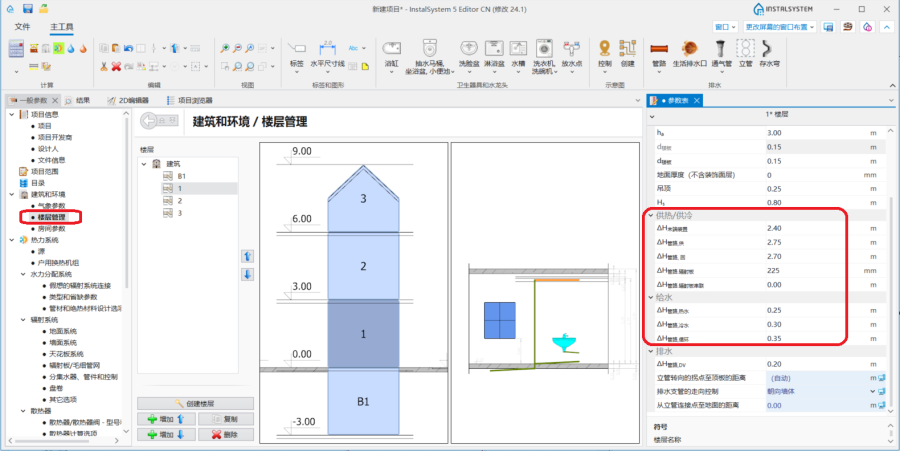
4. 默认的管路距离

管道敷设间距
- 在参数表 窗口中,可以为管线对 /三根管路 指定它们之间的距离 。在管路部件插入后,程序将记住最后指定的距离,以便下次使用时再次使用该值。
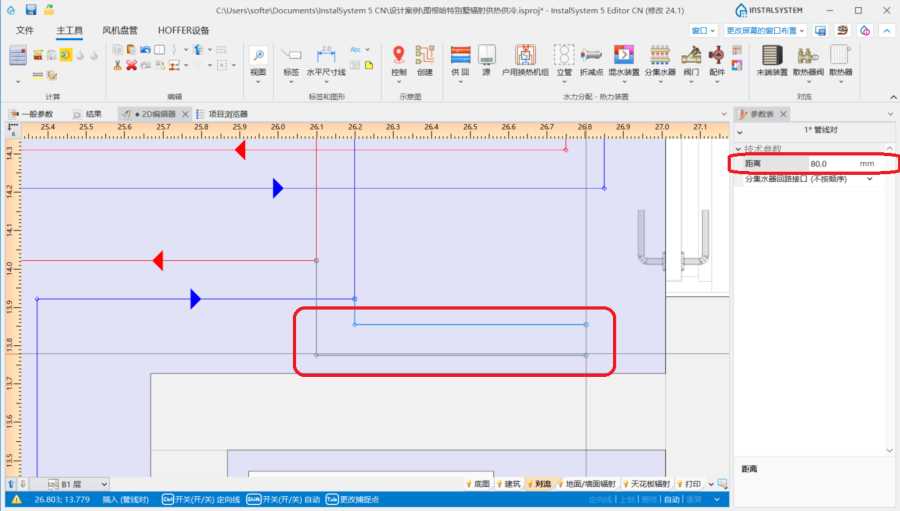
5. 管线对的距离

确定供热系统计算、供冷系统计算和给水系统计算中管路的竖向对齐
可以在2D编辑器 和3D视图 窗口中,选择部件后显示的专用编辑器来管理管路的对齐和标高:
 - 显示管路端点的标高
 - 显示某一段管路的标高
 - 显示管路某一点/一段与地面的距离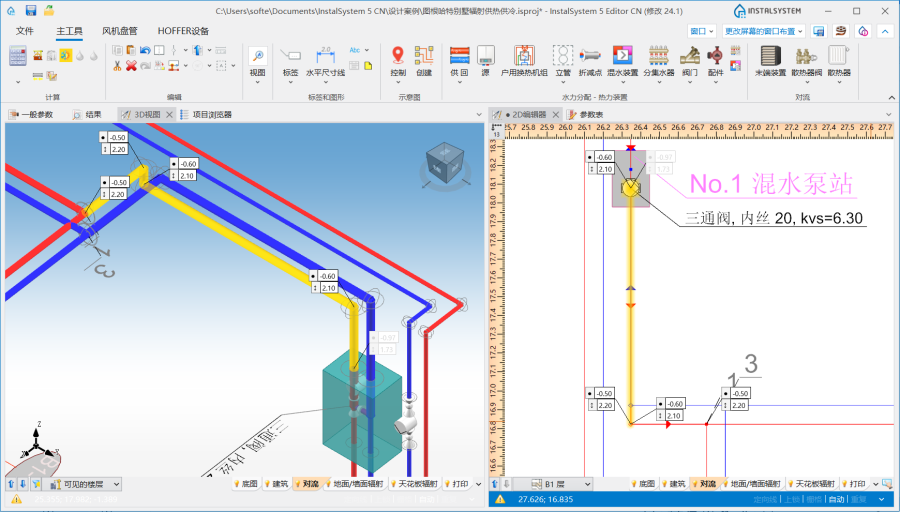
6. 在2D编辑器 和3D视图 窗口中,显示管路的标高


InstalSystem 5 提供了三种管理输配管路系统对齐的方法,它允许选择最方便的方法来适应各个设计环境。该方法应在管路 的参数表 窗口,管道标高设置 编辑器中进行选择:
- 自动 模式:
- 编辑器显示管路末端的标高和距地面的距离并呈灰色,该值无法修改。
- 可以在管路 的参数表 窗口中修改标高 值,这一更改也将自动完成对于选定部件在所有其它编辑器中的值。
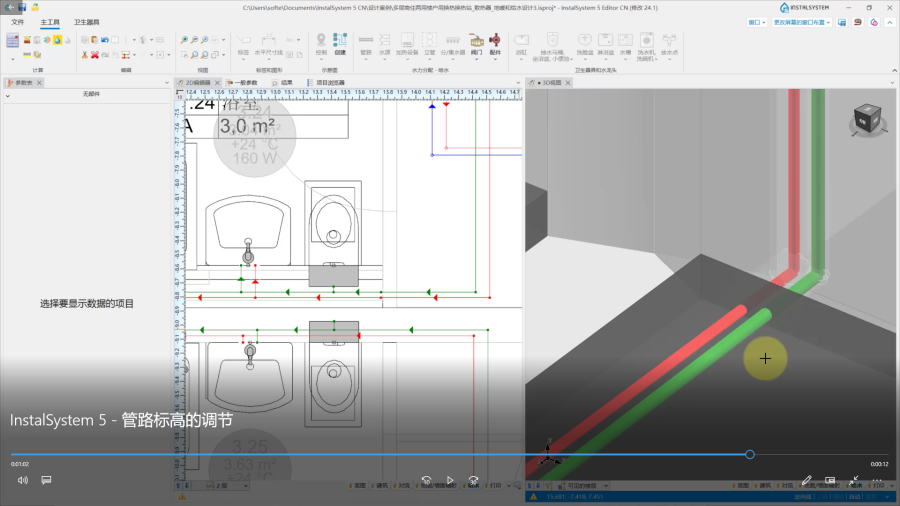
视频:管路标高的调节视频
- 手动调整局部的标高 模式:
- 在2D编辑器 和3D视图 窗口的编辑器中,都可以指定某段管路的标高和与地面的距离。
- 基于指定的管路间的标高差,将会自动创建竖向管路。
- 一端连接到末端装置的管路的编辑器显示为灰色,无法编辑
- 在2D编辑器 和3D视图 窗口,不显示具有垂直管段标高的编辑器
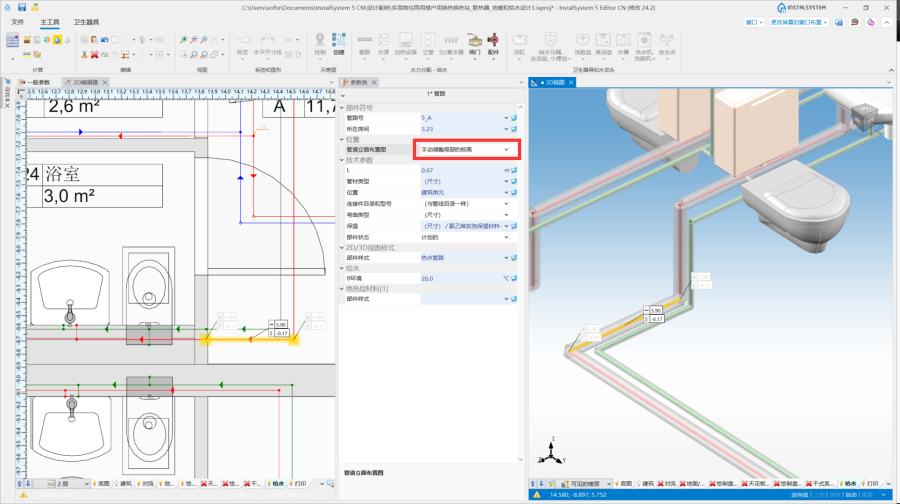
7. 管道标高设置 - 手动调整局部的标高.
- 手动调整节点的标高 :
- 在2D编辑器 和3D视图 窗口的编辑器中,可以指定管路 段的端点标高和与地面的距离值。
- 垂直管段不能自动创建 - 整个管路的布置需要用户来控制。
- 一端连接到末端装置的管路的编辑器显示为灰色,无法编辑。
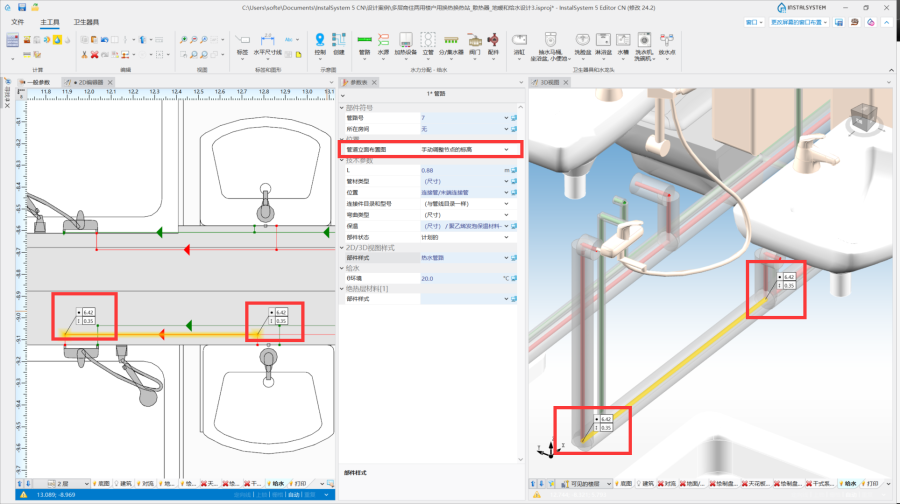
8. 管道标高设置 - 手动调整节点的标高.


注意! 每次更改标高和修改管路 布局,都需要运行主工具 选项卡计算 工具栏内的检查连接 功能。
确定生活排水系统计算中管路的竖向对齐
可以使用在2D编辑器 和3D视图 窗口中选择部件后显示的专用编辑器来管理管路的标高和坡度:
 - 显示管路段的标高,在编辑器中显示的值对应于部件参数表 窗口中的字段:第一个节点标高 和第二个节点标高。
 - 显示管道的坡度,并与部件在参数表 窗口中的 实际坡度 字段中的值相对应。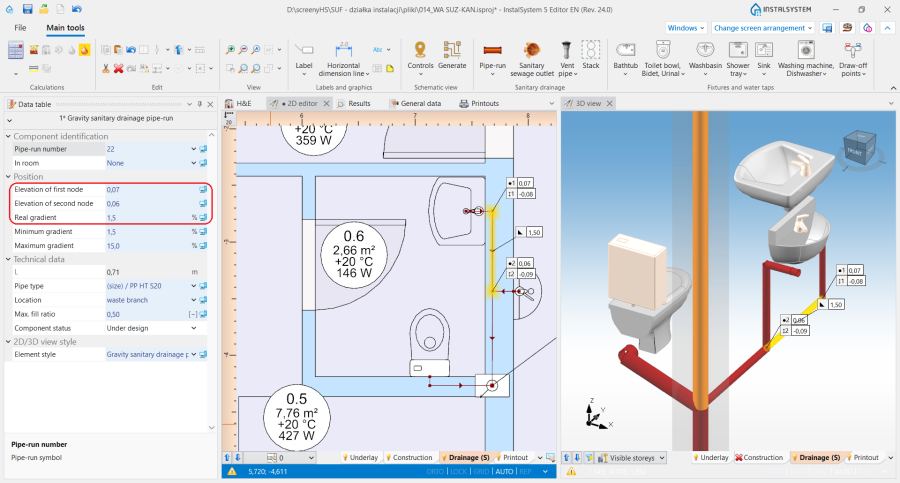
5. 在2D编辑器和3D视图窗口中,管路标高和坡度的显示


铺设管路时,考虑到在一般参数 窗口生活排水系统计算/ 计算标准和选项 上的所做的设置,管路将根据流向排污口的水流方向采用如下的坡度:
- 将为选定的部件位置采用指定的默认的最小坡度。此外,管路铺设的算法考虑了用户在上述编辑器中指定的标高和坡度值。
- 考虑器具排水管的连接方向控制 :
- 对于朝向地板 的设置 - 管道将根据排水横支管在立管上的连接点与地面完成面的距离 中指定的值,以最小坡度走向末端装置,并在必要时,在末端装置处添加一段垂直的管道。
- 对于朝向墙体 的设置 - 管路将按照一般参数 窗口中指定的坡度从末端装置处开始布置管路,然后通过垂直管道连接到横支管上(如果绘图是系统连续性所必需的)。
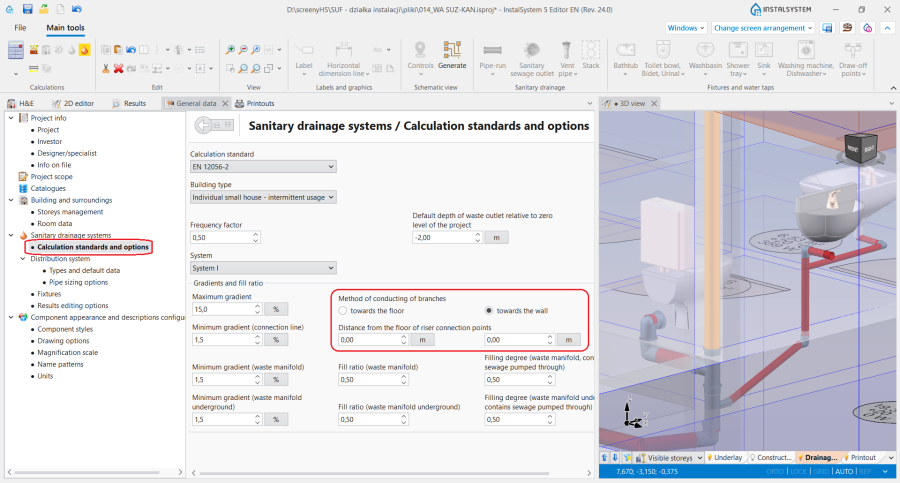
9. 管路的对齐 - 生活排水系统计算.

在一个垂直平面中敷设管路
- 在参数表 窗口中,对于某一楼层 的供热/供冷系统 或给水系统 中的各种类型管路设定适当的标高值,并在管线对/ 三根管路 的参数表 窗口中,将距离 设定到最小值1mm,就可在一个垂直平面上,将所布置的管路上下对齐。例如,在墙上铺设上下对齐的两根管路。
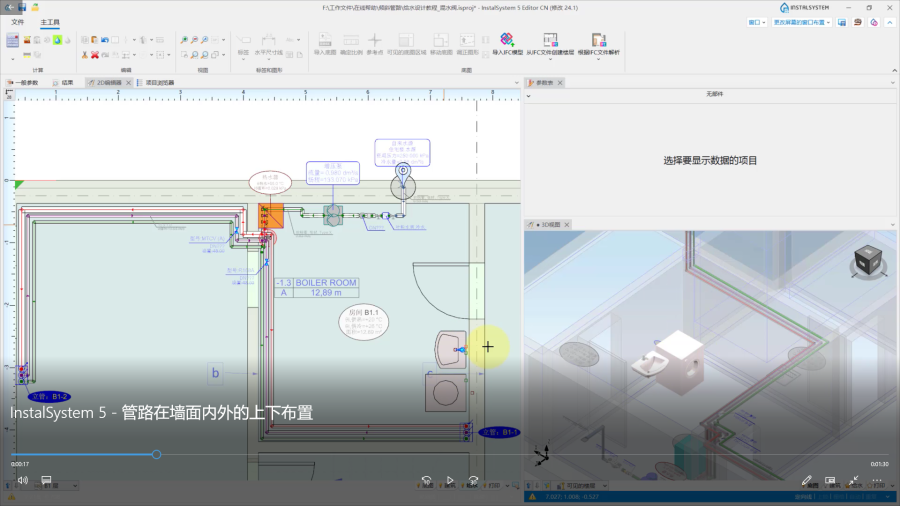
视频:管路在墙面内外的上下布置
倾斜的管道
- 管道标高设置 功能可对管路的走向进行完全的控制,配合在部件上使用中间点或分割点的功能,使得绘制倾斜管路和设计位于阁楼上倾斜部件的连接成为可能。
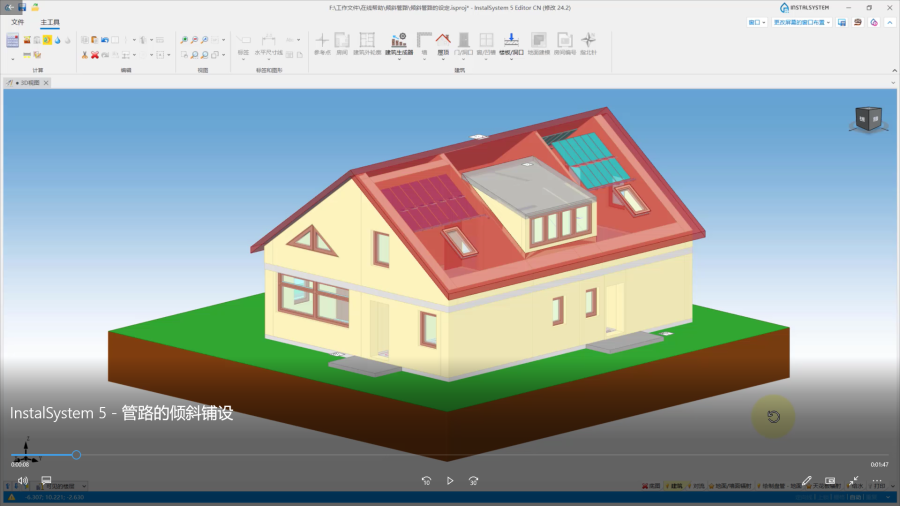
视频:管路的倾斜铺设
管路与其他系统部件连接的基本规则
在主工具 选项卡编辑 工具栏中的连接工具提供了三种将末端装置自动连接到预先画好的管路上的方法:

- 自动连接末端装置 - 在如下的范围内: 供热系统计算, 供冷系统计算 和给水系统计算 ,连接所选择的管路 部件和末端装置。
- 自动用活水三通连接件连接末端用水点 - 使用三通连接件连接所选择的管路 部件和给水系统中的末端装置。
- 串联连接 - 使用串联连接 类型的管路,连接所选择的顶面辐射板/毛细管网 或墙面辐射板/毛细管 。更多信息,见: (墙面和顶面)辐射板供暖供冷系统的设计
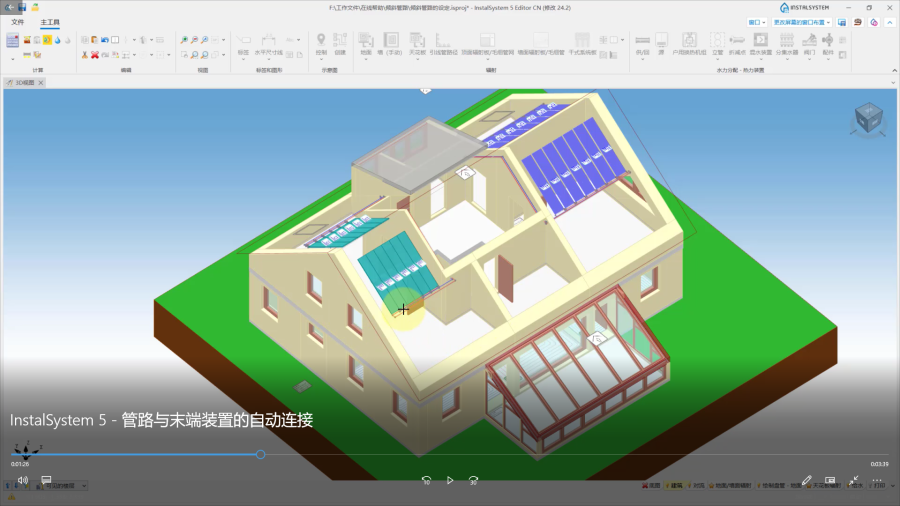
视频:管路与末端装置的自动连接
对于连接到系统的所有部件(例如末端装置, 混水装置, 分/集水器),将绘制一个5cm长的水平管路,然后再绘制一个弯管,以达到管路 所定义的标高上。 此规则的例外情况:
- 散热器 与集成角阀的连接 - 绘制一段与墙壁的距离 + 5cm长的水平管路,然后再弯曲以达到管路 所定义的标高。
- 供水水龙头 的连接 - 绘制一段 1cm长的水平管路,然后再弯曲以达到管路 所定义的标高。
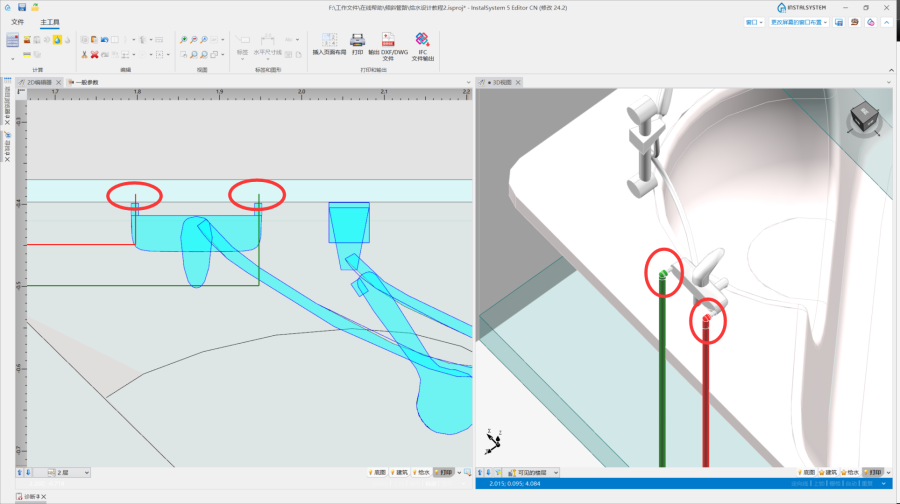
11.供水水龙头的连接 - 立管 的连接 - 如果管路的连接是直接进行的,没有中间点,则所采用的管路标高将是管路 的参数表 窗口中给出的参数值。
- 混水装置/控制回路 的连接 - 自动连接末端装置 的操作将仅连接到混水装置 一次侧的连接点上。

自动模式的管路
当在项目中绘制管路时,若在同一个楼层内有垂直管路,它不能通过插入立管 来创建,而需要通过四根管路或管路对的连接来创建。与这些竖向管路连接的管路应遵守如下定义的绘图规则:
- 在启用自动 模式的情况下绘制部件时,连接到竖向管路的管路 ,其标高将保持不变。
- 将管路连接到坐标重叠的管路时,绘制的管路 将连接到最低标高的部件上。
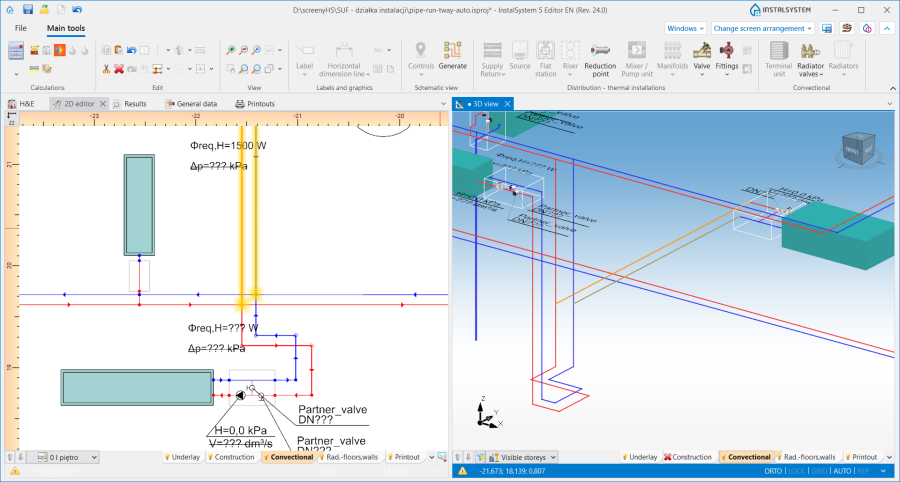
12. 竖向管路的连接
