在供热和给水系统设计时创建和使用自定义的配件组模块
跳转到导航
跳转到搜索
| 产品 | InstalSystem 5 |
| 文章类型 | 功能和工具 |
| 版本的最新内容 | 2024-07-25 |
说明
为了加快使用重复配件 如泵组、水表组件等开展系统设计的进程,程序提供了创建和保存包含所需配件 的模块,这样的模块可以在特定的项目或其他项目中多次使用,方法是将其插入到2D编辑器 或3D视图 中选定的管路上。
在程序中的位置
- 创建带有配件的模块 位于主工具 选项卡, 编辑 工具栏中。
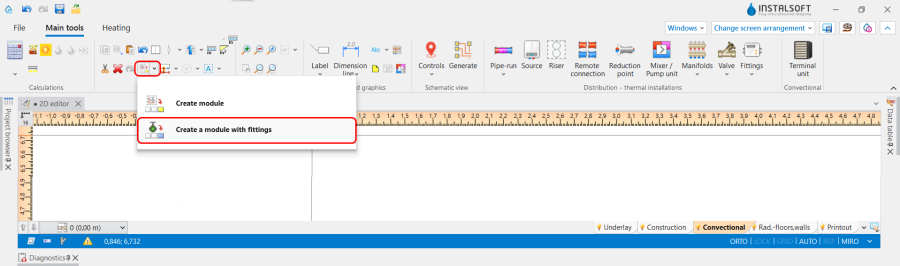
1. 在程序中的位置

应用举例
模块的创建
- 绘制一段未连接的管路,并在其上放置所需的配件 ,同时注意所需的距离。在使用该功能时,将记住并使用靠近管路 一端或另一端的配件的位置。
也可使用现有装置的管路 创建一个新的模块. 然而,重要的是要记住项目中使用的阀门类型之间的关系。因为当在根据自动 模式定义的创建模块中使用阀门时,程序将根据位置自动选择默认类型。 - 选择您添加的配件,并使用创建带有配件的模块 功能,指定模块的名称、描述和图标。
- Add a ribbon with the created module using the 工具栏设置 function: 文件 / 设置 / 工具栏设置:
- Create 新的选项卡 or use previously created one;
- Create 新的工具栏 or use previously created one;
- Use the function 将所选择的模块添加到选择的图库中
 .
.

Module insertion
Insert single module
- Select an editor (2D编辑器 or 3D视图) and the appropriate editing scope;
- Select the required module on the appropriate tab and in the gallery;
- If necessary, select the 镜像 checkbox;
- Insert the module on the required 管路;
- In case of unsatisfactory positioning of the module, correct the positioning of all components of the module or its separate parts;
- Check connections and types of fittings and their orientation in relation to the flow direction.
Insert module multiple times
- Select an editor (2D编辑器 or 3D视图) and the appropriate editing scope.
- Choose the 管路 where the modules are to be positioned;
- Use the 插入到所有已选部件上 function. The position of the inserted module relative to the end/beginning of the 管路, on which it was created, will correspond to the position in the module definition;
- Correct the positioning of the module or its separate parts. Note: The location of the module can be easily changed using the pop-up menu of the 管路 (right mouse click);
- Check connections and types of fittings and their orientation in relation to the flow direction.
Additional information
Such types of fittings as 泵, 过滤器, 止回阀 are always automatically orientated in relation to the flow direction and this orientation should not be changed.