如何缩短计算时间
| 产品 | InstalSystem 5 |
| 文章类型 | 提示和技巧 |
| 版本的最新内容 | 2021-12-08 |
问题说明
如果项目非常复杂,有可能完成所有模块计算所花费的时间长达几十秒甚至几分钟。然而,我们可以控制项目的计算范围以及在该范围内的计算内容。
解决方案
仅进行所选择的计算
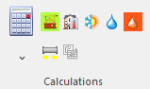
点击 按钮,省缺情况下将计算所有项目范围。通过执行以下操作之一,可以缩短计算时间:
- 展开
 按钮后,取消选中相关模块图标附近的复选框,禁用指定的计算范围。
 建筑热负荷计算
 建筑结构计算
 供热/供冷系统计算
 给水系统计算
 排水系统计算
- 通过单击相关图标仅进行选定项目范围的计算
- 在一般参数 窗口,在项目范围中不勾选特定模块


更多信息,见: 计算和诊断
更改程序设置
完成计算后,请勿启用自动切换到结果 窗口。这将减少切换到结果 和刷新打印输出所需的计算时间。

Disabling the 3D window
When working on a less powerful graphics card, the calculation time, which also includes the time necessary for refreshing of the drawing of the building model and the installation after calculation, may be reduced noticeably after disabling the 3D视图 window.

Disabling the 自动绘制盘管图 function
This applies to the 盘管辐射系统 module. If loop drawings are not required or if they have already been generated and satisfactory results have been obtained, their generation can be disabled as described in:
更多信息,见: Manual editing of loop drawings.

Disabling automatic division of 供热/供冷区 and drawing of pipe feeds
This applies to the 盘管辐射系统 module. Due to the need to take into account many parameters, the algorithm for dividing the 供热/供冷区 and drawing the pipe feeds can considerably increase the project calculation time of the 供热/供冷系统计算. When satisfactory results (flow, thermal and graphical) are obtained, these algorithms can be disabled.
更多信息,见: Dividing a Heating/Cooling Zone into Heating-cooling surface components
Other
If various pipe and fitting systems are used in a project, the sizing of connections between the systems may take longer during the first calculation of the project.