建筑结构的准备 - 无房间
跳转到导航
跳转到搜索
| 产品 | InstalSystem 5 |
| 文章类型 | 功能和工具 |
| 版本的最新内容 | 2022-02-16 |
说明
本文描述了如何设置没有房间的建筑物的基本结构。一旦定义了建筑参数(首先是层数),就可以基于实际的项目的范围开展设计。当进行以下内容的设计时,就可以使用这种方式创建的建筑结构:
- 具有用户指定输出功率和所需功率的散热器系统、各种具有用户定义了压降的末端装置,如风机盘管、冷梁的供热供冷系统。更多信息,见: 末端装置
- 给水系统计算 ,
- 排水系统计算 。
网络研讨会
欢迎观看我们网络研讨会上的视频,该视频介绍了本文所述功能的使用方法
Location in the program
楼层管理
- 楼层管理 is accessible in the 一般参数 window, section 建筑和环境.
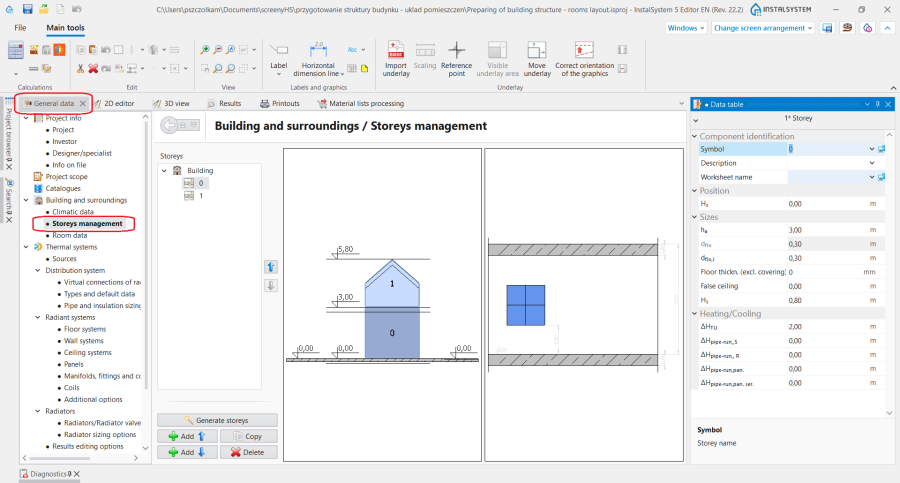
1. 楼层管理.

Examples of use
Creating a storey
In the 楼层管理 section the most important data of the 楼层 can be specified:
- 楼层标高 H标高 - the elevation of the lowermost storey in a series of storeys, automatically determines the elevations of all storeys above (using the information on storey height and slab thickness).
- 地面厚度(不含装饰面层,如瓷砖、木地板等) - 所设计的地面厚度,对于地面辐射冷暖,不包括装饰面层(如瓷砖、木地板等)的厚度。在给定楼层上所设计的所有部件,无论房间中相应参数的值是多少,其高度值均以此地面的上表面为基准计量。开启显示地面/吊顶区功能,可在模型中展示地面/吊顶所占据的空间。
更多信息,见: Preparation of building structure - storeys.
Loading an underlay
Optionally an 底图 can be transferred onto each of the storeys. 底图 is a two-dimensional (flat) graphical object extracted from an external raster or vector file. 底图 in itself does not provide any components of the building structure, but it displays the plans of the individual storeys, which may facilitate inserting system components in the project.
更多信息,见: Import underlay files.