BIM - 基于导入的IFC模型参数创建楼层
| 产品 | InstalSystem 5 |
| 文章类型 | 功能和工具 |
| 版本的最新内容 | 2022-04-06 |
说明
为了正确地将导入到软件中的IFC模型与InstalSystem 5 的设计环境整合在一起,需要基于IFC文件中的楼层去创建项目的楼层(工作表)。由于其它建筑软件中所创建的IFC项目/模型的属性及其复杂性,楼层或楼板可能与我们的设计目标不一致,因此本软件提供了基于导入的IFC模型创建楼层的各种方法:
- 使用基于IFC文件创建楼层 功能
- 使用基于从IFC文件选定的楼板/屋顶创建楼层 功能
- 在楼层管理 窗口中手动创建楼层
在下面的例子中,将全面展示这几个工具创建楼层的方法。
网络研讨会
欢迎观看我们网络研讨会上的视频,该视频介绍了本文所述功能的使用方法
在程序中的位置
- 基于IFC文件创建楼层 和基于从IFC文件选定的楼板/屋顶创建楼层 功能图标,可以在2D编辑器 窗口,并进入底图 编辑器,在主工具 的工具栏上可见。
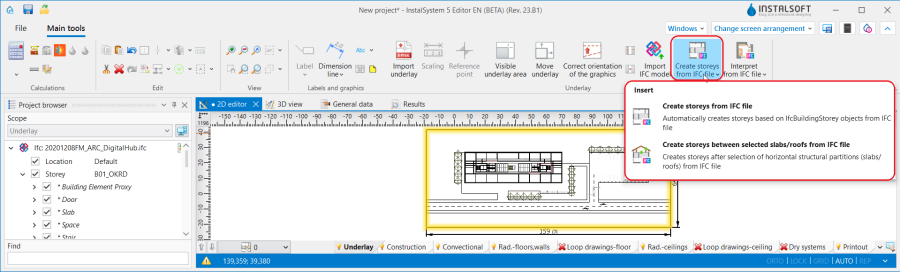
1. 基于IFC模型创建项目的楼层 - 楼层管理 位于一般参数 窗口的建筑和环境 选项卡内
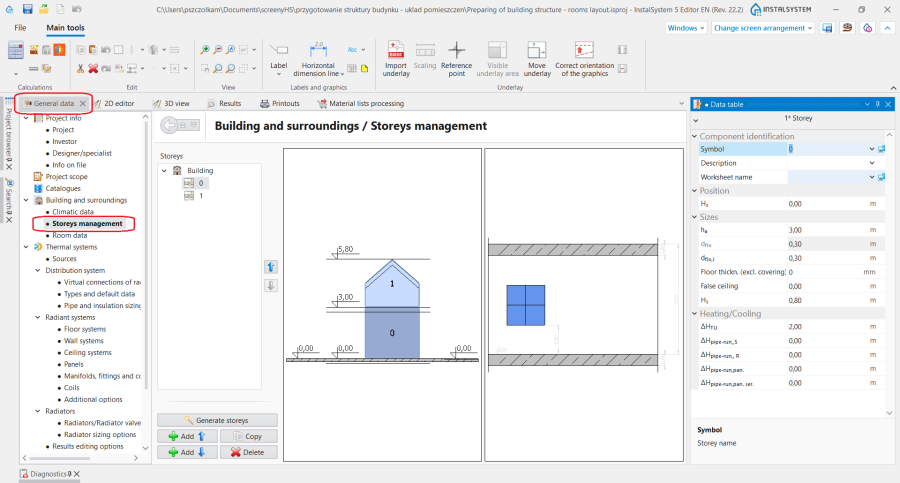
2. 楼层管理


应用举例
分析IFC文件模型结构
在选择基于导入到程序中的IFC模型对楼层进行解析的方法之前,应先分析其结构。为此,有必要使用项目浏览器 窗口来显示启用的底图 范围,并根据指定给后续的iFCbuildingStores的楼层数和构件结构来查看模型。此时,也值得考虑IFC模型中可见的所有楼层是否与热负荷计算或所设计的系统有关。更多信息,见: 使用项目浏览器查看IFC的结构.

Storeys from an IFC file
For IFC models, in which the storey structure and the assignment of construction components follow the logic of InstalSystem 5 packages, it is recommended to use the 基于IFC文件创建楼层 function, which 基于IFC文件中的 IfcBuildingStorey(ifc建筑楼层)对象自动创建楼层 . As a result of the operation, for each ifcBuildingStorey one 楼层 component is created in the project. All storeys created using the function are displayed in the 楼层管理 window and their data (i.e. 楼层标高 or 楼层高度) comes from the IFC file.
基于IFC文件创建楼层 will work properly when:
- One IFC model was loaded into the project.
- The storeys from the IFC format have the same logic as the 楼层 components in InstalSystem 5, i.e. they are created one above the other and the building components are assigned to the storey accordingly.
- In the IFC file the roof is created on a separate dedicated ifcBuildingStorey.
- In the model derived from the IFC there are construction components assigned to a particular ifcBuildingStorey, but they extend beyond its scope, e.g. walls spanning multiple storeys.
Storeys between indicated slabs/roofs from IFC file
If storeys structure in IFC model is not coherent with the logic of a building in InstalSystem 5, it is necessary to create storeys by means of the 基于从IFC文件选定的楼板/屋顶创建楼层.
In the first step in the 项目浏览器 window for the enabled scope of 底图 it is necessary to select horizontal structural partitions (slabs and roofs) from IFC model imported into the program and then to invoke the operation. For the worksheets corresponding to successive storeys to be created correctly, all ifcSlab/ifcRoof construction components that form upper and lower boundaries for the individual storeys must be indicated.
基于从IFC文件选定的楼板/屋顶创建楼层 will work properly when:
- Multiple IFC models with defined storeys have been imported into the project.
In the IFC model, storeys are defined to which only minor architectural components or other storeys not needed for the thermal model or system design have been assigned.
- In the IFC model there are storey offsets (half-storeys).
After the operation, the data of the 楼层 components created in the project are inherited from the IFC model:
- 楼层标高 H标高 - elevation of the upper edge of the ifcSlab component constituting the lower boundary of the storey
- 楼层高度 h层高 - distance between top and bottom edge of ifc components delimiting a given storey
- 天花板厚度 d楼板 - thickness of the ifcSlab/ifcRoof component constituting the upper boundary of the storey
- 地板厚度 d楼板 - thickness of the ifcSlab component constituting the lower boundary of the storey
- 屋顶标高 - for the last storey in the sequence, the elevation of the upper edge of the ifcSlab/ifcRoof component.
Manual creation of storeys in the Storeys management window based on an IFC model
If the above-mentioned operations do not produce 楼层 components correctly, the solution is to create storeys manually in the 楼层管理 window.
更多信息,见: Creating storeys.
Hint: When creating storeys, alternative software can be used to retrieve the storey constituents, e.g. with the free tool BIMVision.
Additional information
Loading multiple IFC models into a project
If multiple IFC models need to be loaded into the project, the main/basic IFC model containing the building structure should be loaded first and the necessary 楼层 components should be interpreted based on this, before loading further IFC models (e.g. containing services or minor architectural features).
Limiting the IFC model view
After interpreting the storey from the IFC model before continuing with the project, it is helpful to use the function: 在2D视图中,仅楼层范围内的图元, which is available in the 参数表 window for the IFC model selected in the 项目浏览器 window. When the function is enabled, only the IFC components within the elevation range of the storeys are presented in the worksheet.

Modifying storeys created based on an IFC model
The data of the 楼层 components interpreted from the IFC model can be edited. After creating a storey, go to the 楼层管理 window, verify and, if necessary, change the data for each 楼层.
Due to the nature and complexity of IFC projects/models created in architectural programs, storeys or slabs may not be the same as our intended design goals. For instance, when in an IFC model the ifcSlab components delimiting the storey range consist of several component layers, select one ifcSlab layer (e.g. the top one), and after launching the operation: 基于从IFC文件选定的楼板/屋顶创建楼层, go to the 楼层管理 window and change the value in 天花板厚度/地板厚度 to the sum of the thicknesses of all layers of the ifcSlab components.
Repeated use of the storey-creating functions
While working with a project it is possible to run again the functions that create storeys based on the imported IFC model:
- 基于IFC文件创建楼层 - each re-call of the operation will overwrite the storeys displayed in the 楼层管理 window with storeys created from the IFC model loaded into the project.
- 基于从IFC文件选定的楼板/屋顶创建楼层 - each time the operation is executed again, a dialog box opens with the question: :
- Selecting 是 causes the storeys displayed in the 楼层管理 window to be overwritten with storeys interpreted on the basis of the IFC model loaded into the project.
- Selecting 否 creates another component without affecting the arrangement of existing series in the project.