BIM - 将IFC中的建筑构件解析为InstalSystem 5软件包中的建筑构件
| 产品 | InstalSystem 5 |
| 文章类型 | 功能和工具 |
| 版本的最新内容 | 2022-04-22 |
说明
InstalSystem 5 软件包提供了许多功能和工具,可以将在IFC模型中选定的结构部件(如: ifcBeam, ifcBuildingElementProxy, ifcColumn, ifcCurtainWall, ifcDoor, ifcFooting, ifcOpeningElement, ifcRoof, ifcSlab, ifcWall, ifcWindow, ifcPlate 等) 解析为InstalSystem 5 原生的结构部件, 如: 墙 (包括墙洞), 幕墙, 窗 (包括天窗), 门, 屋顶, 楼板 (包括楼板开洞 )。这些解析后的结构部件之后就可用于建筑热负荷计算 ,也可用于任意系统的设计。
解析部件的功能根据结构的类型按如下排序:
- 基于IFC文件创建墙体 - 基于在IFC文件中选择代表墙的对象后创建建筑的墙体
- 基于IFC文件创建窗、门和墙洞 - 基于在IFC文件中选择适当的对象后,在墙中创建窗、门和墙洞(需要早期对墙的说明)
- 基于IFC文件创建屋顶 - 基于在IFC文件中选择适当的对象后创建带边缘的屋顶
- 基于IFC文件创建楼板 - 基于在IFC文件中选择适当的对象后创建带有洞口的楼板 .
此外,在对IFC模型进行解析时,为方便和加快解析的进程,用户可以使用InstalSystem 5 软件包中的如下标准工具:
- 寻找 窗口
- 项目浏览器 窗口
- 参数表 窗口
- 2D编辑器 和3D视图 窗口
有关如何使用这些工具以及如何导航IFC模型的详细信息,请参见:BIM - 在InstalSystem 5软件包中导入和管理IFC模型。
在将建筑结构解析为InstalSystem 5 的建筑部件之前,必须基于IFC模型创建楼层。更多信息,见: BIM - 基于导入的IFC模型参数创建楼层。
网络研讨会
欢迎观看我们网络研讨会上的视频,该视频介绍了本文所述功能的使用方法:
在程序中的位置
- 允许将IFC图元解析为InstalSystem 5 建筑部件的操作命令图标,位于2D编辑器 窗口和3D视图 窗口中, 当进入底图 编辑器时可在主工具 工具栏中看到。每个功能在工具栏上都有自己的图标。

Examples of use
Interpreting structural components of an IFC model - general
Selecting components to be interpreted
- Before running the interpreting function the components to be interpreted must be selected. This can be done using:
- The 寻找 window within the 底图 scope using predefined groups of IFC component types or by defining individual search criteria. 更多信息,见: Searching for components in a project.
- The 2D编辑器 or 3D视图 window within the enabled 底图 editing scope - directly by clicking the selected components.
- The 项目浏览器 window. 更多信息,见: BIM - Importing and managing IFC models in InstalSystem 5.
- Components can be interpreted individually or in groups. For example: selecting a group of ifcWall and selecting 基于IFC文件创建墙体 will create native 墙 components from all ifcWall components assigned to the selected group.
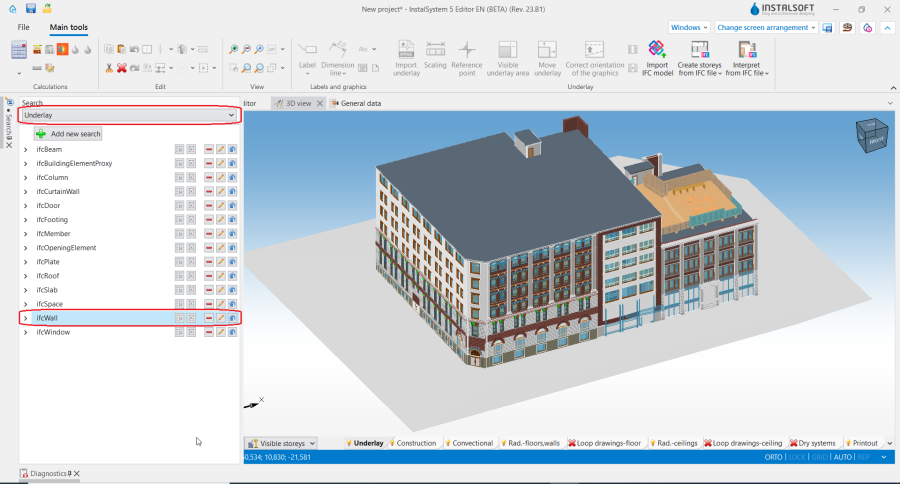
2. Selecting a group of components in the 寻找 window. - Components that are unchecked in the 项目浏览器 window are not displayed in the 2D编辑器 and 3D视图 windows and will not be interpreted. This mechanism can be used to hide entire infrastructure (low walls, fences, roads), which includes components that are not required to be interpreted in view of further work on the project or when some components are to be interpreted in subsequent steps, e.g. when structural components are interpreted storey after a storey.

Editing the structure created after interpreting a model
- After interpreting, native structural components of InstalSystem 5 are created within the 建筑 scope and exist in parallel (simultaneously) with IFC model components within the 底图 scope. After appropriately setting the visibility mode, e.g. 当没激活时不可见 or 当未激活时仅边部可见, the IFC model view can be displayed beside the view of the native structural components depending on the current design needs.
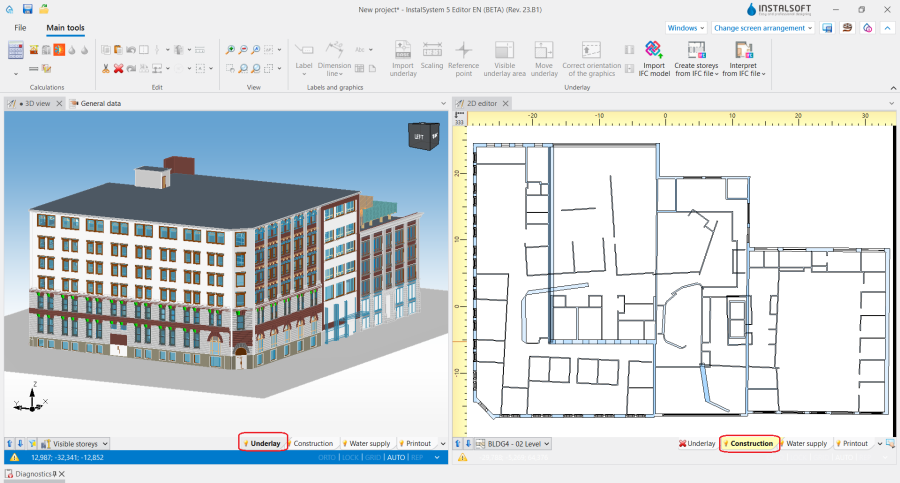
3. Setting the visibility modes. - Within the 建筑 scope the components created by interpreting an IFC model can be modified at will: moved, removed, have their data changed in the 参数表 window.
Note: IFC model components (within the 底图 scope) cannot be modified/removed. They can be hidden (in the 项目浏览器 window), and models can be removed entirely and/or replaced with their new versions. 更多信息,见: BIM - Importing and managing IFC models in InstalSystem 5. - The structure created from an IFC model can be supplemented with manually inserted components using the tools available for the 建筑 editing scope. These components have an 捕捉 function for the currently loaded IFC model design. This enables creation of the building structure to be approached in the most efficient way, adapted to the quality of the imported IFC model:
- The structure can be fully developed using functions that automate the creation process.
- The structure can be prepared in a hybrid manner - some components are automatically interpreted using the program's functions, while others are inserted manually.
- The structure is developed without the use of automation functions and the IFC model loaded into the project is used in the same way as a conventional 底图 DWG/DXF.

Interpretation of walls
- After executing the 基于IFC文件创建墙体 operation, switch to the 建筑 editing scope and carefully examine the created layout of components.
- If necessary, correct the components manually or using the 墙体几何尺寸修正 operation. 更多信息,见: Correction of wall geometry.
Problems, which may appear in the created layout of 墙 components, result from the fact, that walls are interpreted with preservation of geometry, position and shape according to the IFC model record, which is not always fully compatible with the methodology of creating a building structure InstalSystem 5. The most common situations where the 墙体几何尺寸修正 operation should be used with 修改墙的连接 enabled include:- Intersecting walls - if walls in an IFC model have been defined in such a way that they intersect, performing the operation will batch convert all such connections into connections of components that are correctly handled by 建筑结构计算.
- Tangential walls, connected in parallel by their longer edge with each other - if there are such defined components in the IFC model, the best solution is to exclude tangential walls from the interpretation and manually add them or change the wall thickness. If the tangential walls have not been unchecked before interpretation, executing the operation will turn the tangential walls into a single 墙 component with the appropriate thickness.
- Walls, the elevation Z of which begins or ends less than 5 cm from the elevation of the upper edge of the lower slab or the lower edge of the upper slab - such "unadjusted" walls may cause, at a later stage of design, lack of identification of a 房间 or an 自动. As a result of the operation, all the walls whose lower or upper edge is less than 5 cm from the slab will be "pushed" to the slab in order to form a closed space of a room.
- Walls that are contained in another wall will be removed as a group when the operation is executed. This applies mainly to components that were difficult to hide out of visibility before interpreting them and have been interpreted redundantly.
Interpretation of slabs
The concept of using ifcSlab in many IFC models makes the number of interpreted 楼板 components too large and complicates further work on the project. The 基于IFC文件创建楼板 operation should be carried out with the following guidelines in mind:
- Exclude from interpretation (in the 项目浏览器 window) components such as step, curb, architectural detail, that are defined in the IFC model as ifcSlab.
- When the operation is performed, all openings in the slab from the IFC model are interpreted. In a situation where there are a lot of openings, they can prevent proper identification of components 房间 自动. It is therefore necessary to remove such openings and arrange them according to the real needs of 建筑热负荷计算. Another option is to uncheck the checkbox in the 所选楼板上的孔洞 field in the 参数表 of the 楼板 component and carry out 建筑结构计算.
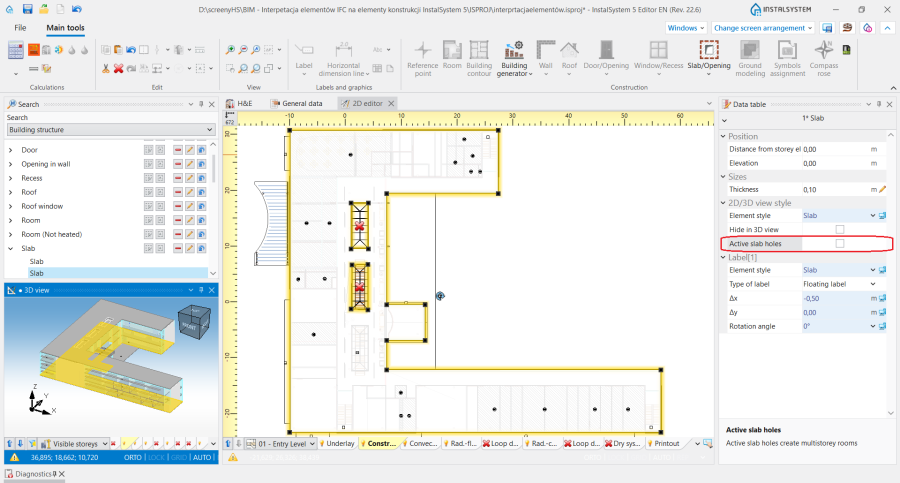
4. 所选楼板上的孔洞 in 楼板 component. - In case the slab in the IFC model has been defined with several layers of ifcSlab components, only one slab layer needs to be selected for interpretation, and after the 基于IFC文件创建楼板 operation the shape of the 楼板 component should be adjusted, if necessary, with hotpoints and its data changed in the 参数表 of the 楼层 component (fields 地板厚度 and 天花板厚度).
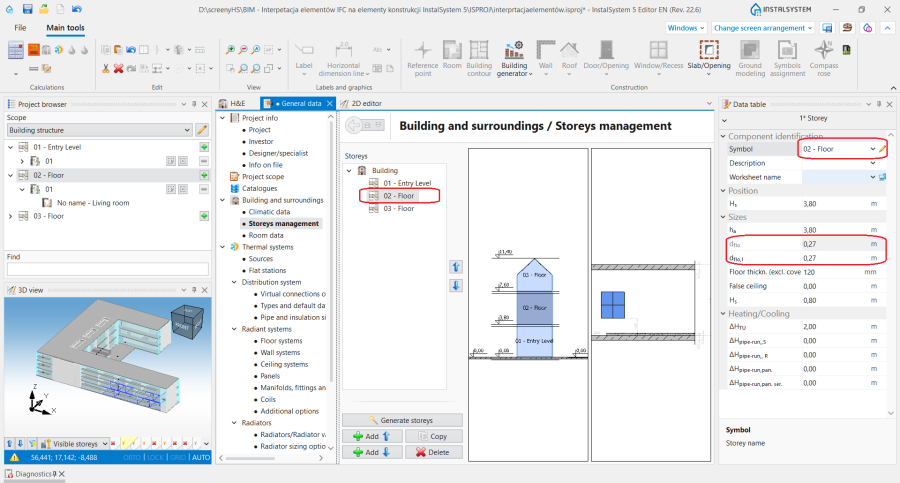
5. 楼板 thickness settings. - The slabs defined in the IFC model as tangent tie beams and proper slabs of the same thickness are interpreted as separate 楼板 components as a result of the operation. If tangency and the same slab thickness are maintained, the program will at a later stage correctly identify the component. In case the constituents of the ifcSlab component are of different thickness or are not in contact with each other, only one of the components should be selected for interpretation and afterwards its shape and data should be modified.
- After interpreting the construction components from models in which ifcSlab extends only to the inner edges of the walls, the program correctly identifies the components . However, if there are gaps between ifcWall and ifcSlab, the shape of the 楼板 component after the interpretation operation must be adjusted to follow the outline of the building.


Interpretation of roofs
- If in an IFC model 屋顶 is defined as multiple objects of the ifcRoof or ifcSlab type, of the same thickness and tangent to each other, the program will, as a result of the 基于IFC文件创建屋顶 operation, create multiple components of the 屋顶 type.
Interpretation of windows, doors and openings
- Before performing the 基于IFC文件创建窗、门和墙洞 operation, the interpretation of walls, slabs and roofs from the IFC model and 建筑结构计算 should be performed first, which should be completed with the correct creation of 房间 自动 components. Only after this step should one proceed to the interpretation of the components 窗 (including 天窗), 门 or 墙洞.
- If the elevation range of the 墙 does not match the elevation of the interpreted ifcWindow / ifcDoor object, manually modify 墙 by changing in the 参数表 window the values of the 下沿偏移 or 上沿偏移 fields.
- Objects of the 天窗 type in the IFC model are often saved as ifcBuildingElementProxy. The 基于IFC文件创建窗、门和墙洞 function will replace such an object with the proper component if it is marked appropriately.
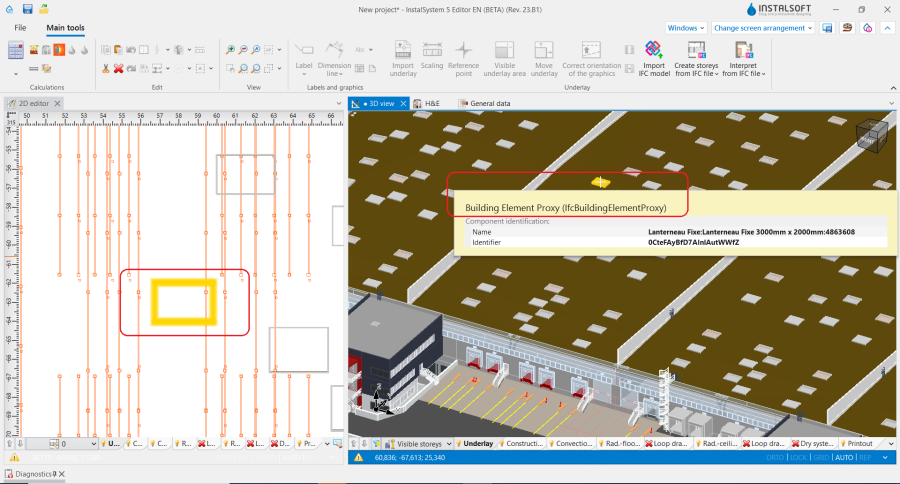
6. 天窗 as an ifcBuildingElementProxy object in an IFC model.

Additional information
Tolerance in the interpretation of components from an IFC model
- The program is protected against incorrect object mappings in the model imported into the project. If the user is aware of the target component that the IFC object symbolises, he/she can still effectively use the automated component interpretation functions.
For example: selecting an ifcSlab component and executing 基于IFC文件创建屋顶 will create a native 屋顶 component (rather than 楼板).