导入文件
跳转到导航
跳转到搜索
说明
本文介绍了使用设计底图(基本图形)的功能,既通过使用导入底图的工具,选择一要导入的外部文件,插入到项目中,然后选择适当的比例和将其定位的方法。
可导入的底图文件格式:
- DWG
- BMP
- PNG
- JPG
- GIF
- DXF
程序中的位置
- 当在2D编辑器 窗口中,开启底图 编辑范围时,就可在主工具 的底图 工具栏中发现与导入底图相关的所有功能和图标。
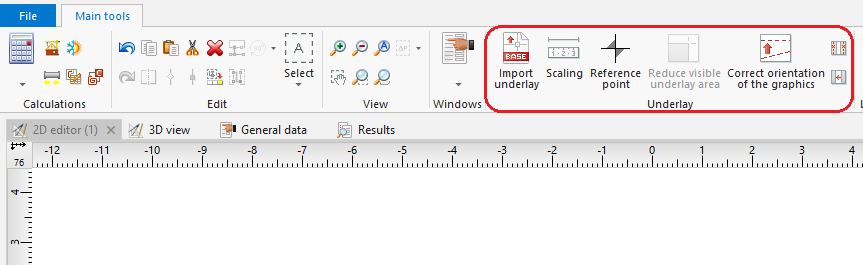
1. 导入底图

Example of use
Import underlay
- Select 导入底图.
- Select the underlay file to be imported.
- Indicate the position of the underlay in the 底图 editing scope.
- Verify that the dimensions of the underlay are adequate.
The size of the underlay can be changed in the component data table or using the 确定比例 tool, which requires drawing a line segment and specifying its real length. Additionally, in the case of a DWF/DXF file, a conversion factor between a CAD unit and a multiple or sub-multiple of a metre can be selected in the data table. - Verify the underlay save (storage) location option.
The underlay may be stored in the project file *.ISPROJ, in which case the size of that file is increased (identical underlay files placed on multiple worksheets do not inflate the project file in proportion to the number of times the underlay is used), or it may remain in a separate (original) file to which the project will refer. The latter solution requires, when the project file is handed over to another person, that the underlay files are also turned over and the access paths to the files in the computer are specified. - Verify proper mutual alignment of underlays on the individual storeys. To obtain proper structure of a multi-storey building it is advisable to use a 参考点
 , wherein one reference point is placed in each worksheet at a location having identical real coordinates X,Y.

Additional information
- It is particularly advantageous to import an underlay in the DWG format, which enables, when editing the structure, attracting the cursor to components located in the indicated layers of the underlay (snap function).
- If necessary, it is possible to confine (reduce) the visible area for underlays, e.g. underlays that include plans of several storeys on one sheet. The operation of confining the visible area may be cancelled at any stage of project creation.
- If an underlay is divided into several parts (which may, for instance, result from scanning operations), these individual parts can be imported separately and subsequently combined using the Combine base files functionality.