建筑结构的准备 - 创建不同建筑的屋顶:修订间差异
跳转到导航
跳转到搜索
(创建页面,内容为“==Description== This article describes how various roof structures cab be prepared. The roof structure comprises: * ''<IS_TS id=Roof/>'', * ''<IS_TS id=AddRoofEdge/>...”) |
|||
| 第7行: | 第7行: | ||
* ''<IS_TS id=pinNameOknoDachowe/>''. | * ''<IS_TS id=pinNameOknoDachowe/>''. | ||
In order to view the effects of changes made during editing it is necessary to invoke ''<IS_TS id=BuildingStructureCalculation/>''.<br/>{{Info}} [[Preparation of building structure|Preparation of building structure]] | In order to view the effects of changes made during editing it is necessary to invoke ''<IS_TS id=BuildingStructureCalculation/>''.<br/>{{Info}} [[Preparation of building structure|Preparation of building structure]] | ||
==Location in the program== | |||
===Building structure=== | |||
* Icons of the components and functions related to the building structure are accessible in the ''2D Editor'' window on the ''<IS_TS id=NarzedziaGlowne/>'' bar, section ''<IS_TS id=lystrFloors/>'' when ''<IS_TS id=lystrFloors/>'' editing is enabled.<br/>[[File:TB-construction-location-2.png|900 px|left|thumb|3. Building structure elements]]<br clear="all"/> | |||
===Computation of building structure=== | |||
* ''<IS_TS id=BuildingStructureCalculation/>'' is available on ''<IS_TS id=NarzedziaGlowne/>'' bar, section ''<IS_TS id=sObliczenie/>''.<br/>[[File:TB-build-calculations-location.PNG|900 px|left|thumb|4. ''<IS_TS id=BuildingStructureCalculation/>'']]<br clear="all"/> | |||
==Example of use== | |||
1. Create an outline of the roof cover using the ''<IS_TS id=Roof/>'' component. Then draw the edges of the roof using ''<IS_TS id=AddRoofEdge/>'' and specify the elevations of the characteristic points of the roof.<br/>Roof division lines can be deleted by clicking [[File:Delete-ikon.png|18 px|]].<br/>Red roof division lines indicate that the division cannot be effected and the elevations of the points or the division lines need to be adjusted. | |||
* shed roof,<br/>{{#ev:youtube|3ZAYeNR2ZvQ|900||||rel=0}} <br clear="all"/> | |||
* gable roof,<br/>{{#ev:youtube|c1Xe-0rJTHA|900||||rel=0}} <br clear="all"/> | |||
* hip roof,<br/>{{#ev:youtube|Wk4xVHWcAVM|900||||rel=0}} <br clear="all"/> | |||
* half hip roof,<br/>{{#ev:youtube|CAnthUkX3PU|900||||rel=0}} <br clear="all"/> | |||
* gambrel roof,<br/>{{#ev:youtube|RyT-DP9-954|900||||rel=0}} <br clear="all"/> | |||
* multifaceted roof.<br/>{{#ev:youtube|us6xceXY_XA|900||||rel=0}}<br/> | |||
2. Create a roof with a dormer using ''<IS_TS id=Lukarna/>'': | |||
* roof with a shed dormer,<br/>{{#ev:youtube|T3xHd_ESvmo|900||||rel=0}} <br clear="all"/> | |||
* roof with a gabled dormer.<br/>{{#ev:youtube|h53hAnTdTvw|900||||rel=0}} <br clear="all"/> | |||
[[pl:Przygotowanie struktury budynku - Utworzenie dachów różnej konstrukcji]] | |||
[[Category:InstalSystem 5]] | |||
[[Category:FUNCTIONALITY]] | |||
2017年9月10日 (日) 08:57的版本
Description
This article describes how various roof structures cab be prepared. The roof structure comprises:
- 屋顶,
- 添加屋顶边缘,
- 天窗,
- 天窗.
In order to view the effects of changes made during editing it is necessary to invoke 建筑结构计算.
更多信息,见: Preparation of building structure
Location in the program
Building structure
- Icons of the components and functions related to the building structure are accessible in the 2D Editor window on the 主工具 bar, section 建筑 when 建筑 editing is enabled.
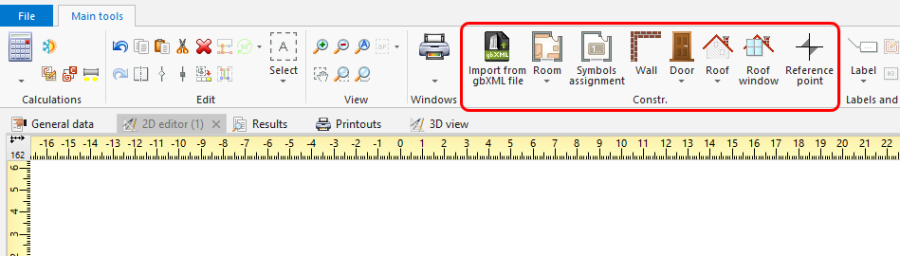
3. Building structure elements

Computation of building structure
- 建筑结构计算 is available on 主工具 bar, section 计算.
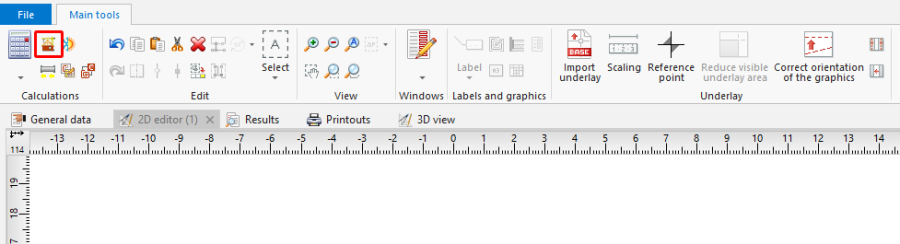
4. 建筑结构计算

Example of use
1. Create an outline of the roof cover using the 屋顶 component. Then draw the edges of the roof using 添加屋顶边缘 and specify the elevations of the characteristic points of the roof.
Roof division lines can be deleted by clicking  .
.
Red roof division lines indicate that the division cannot be effected and the elevations of the points or the division lines need to be adjusted.
- shed roof,
- gable roof,
- hip roof,
- half hip roof,
- gambrel roof,
- multifaceted roof.
2. Create a roof with a dormer using 天窗:
- roof with a shed dormer,
- roof with a gabled dormer.