屋面雨水排水系统的设计:修订间差异
| 第67行: | 第67行: | ||
#* 选择''<IS_TS id=EndOfSewerageLine/>''。<br/>[[File:立管设置.png|900 px|left|thumb|6. <IS_TS id=PionKanalizacji/> 参数]]<br clear="all"/> | #* 选择''<IS_TS id=EndOfSewerageLine/>''。<br/>[[File:立管设置.png|900 px|left|thumb|6. <IS_TS id=PionKanalizacji/> 参数]]<br clear="all"/> | ||
#** 对于''<IS_TS id=WpustPunktowyDeszcz/>'' ,如有必要,检查并更正其''<IS_TS id=stringTypElementu/>'' 和插入''<IS_TS id=strpnstrPrfPowZlewni/>'' 值; | #** 对于''<IS_TS id=WpustPunktowyDeszcz/>'' ,如有必要,检查并更正其''<IS_TS id=stringTypElementu/>'' 和插入''<IS_TS id=strpnstrPrfPowZlewni/>'' 值; | ||
#** | #** 如果选择''<IS_TS id=ZakonczeniePionuPolaczenieZPionemWyzej/>'' ,则还需指定''<IS_TS id=PolaczDoPionuOSymbolu/>'' 并设置''<IS_TS id=OdlegloscOdStropuPolaczeniaZPionemWyzej/>'' 。 | ||
# 插入''<IS_TS id=iNameSanUjscieSciekowDeszczowych/>'' 并确认其在模型中的位置。 '''''注! 在一套雨水排水装置中,只能有一个 <IS_TS id=iNameSanUjscieSciekowDeszczowych/> 部件。但一个项目中允许有多套雨水排水装置。''''' | # 插入''<IS_TS id=iNameSanUjscieSciekowDeszczowych/>'' 并确认其在模型中的位置。 '''''注! 在一套雨水排水装置中,只能有一个 <IS_TS id=iNameSanUjscieSciekowDeszczowych/> 部件。但一个项目中允许有多套雨水排水装置。''''' | ||
# 使用''<IS_TS id=strKanalizacjaWewnDeszcz/>'' 管道将''<IS_TS id=PionKanalizacji/>'' 与''<IS_TS id=iNameWpust/>'' 连接起来。 如果''<IS_TS id=iNameWpust/>'' 应连接在不同于默认高度的标高上,请将''<IS_TS id=strOdlegloscOdPodlogiWlaczeniaDoPionuMethod/>'' 更改为''<IS_TS id=sOdlegloscOdPodlogiWlaczeniaDoPionuMethodPrzezUsera/>'' ,然后手动设置所需的''<IS_TS id=sOdlegloscOdPodlogiWlaczeniaDoPionuCaption/>'' 值。<br/>[[File:Rainwater Mehod declering point of connection.png |900 px|left|thumb|7. <IS_TS id=strOdlegloscOdPodlogiWlaczeniaDoPionuMethod/>.]]<br clear="all"/> | # 使用''<IS_TS id=strKanalizacjaWewnDeszcz/>'' 管道将''<IS_TS id=PionKanalizacji/>'' 与''<IS_TS id=iNameWpust/>'' 连接起来。 如果''<IS_TS id=iNameWpust/>'' 应连接在不同于默认高度的标高上,请将''<IS_TS id=strOdlegloscOdPodlogiWlaczeniaDoPionuMethod/>'' 更改为''<IS_TS id=sOdlegloscOdPodlogiWlaczeniaDoPionuMethodPrzezUsera/>'' ,然后手动设置所需的''<IS_TS id=sOdlegloscOdPodlogiWlaczeniaDoPionuCaption/>'' 值。<br/>[[File:Rainwater Mehod declering point of connection.png |900 px|left|thumb|7. <IS_TS id=strOdlegloscOdPodlogiWlaczeniaDoPionuMethod/>.]]<br clear="all"/> | ||
2024年6月8日 (六) 06:24的版本
| 产品 | InstalSystem 5 |
| 文章类型 | 设计课程 |
| 版本的最新内容 | 2023-12-06 |
课程内容
本文介绍了重力式雨水排水装置的基本设计步骤。重力式雨水排水模块旨在设计和计算平屋顶或其他平坦区域(如露台)的排水管网。天沟不包括在内,因此倾斜屋顶不在项目设计范围内。计算基于 EN 12056-3 标准。
该模块在项目范围 中有一个单独的复选框,选择后就会出现自己的一般参数 、管材规格计算选型 和部件样式 等的设置窗口;在2D编辑器和3D视图中,还有着自己单独的编辑器。而计算 和检查连接 的按钮与生活排水模块共享。
模块和软件的配置
InstalSystem 5 需带有如下模块:
- 重力雨水系统
项目文件
本课程中使用的项目文件:Rainwater drainage installation in a multifamily building (example for the lesson).
初始状态
本项目包含有模板文件中设定的完整的默认参数,建筑结构也已根据DWG布局做了详细说明。
设计步骤
打开项目文件
- 创建新项目时,请从列表中选择包含排水系统默认参数的模板。
- (或):导入一个现有的建筑结构文件 — 至少应包括正确的坐标和楼板厚度。
如有必要,检查并更正如下对排水装置几何形状有重大影响的数据:
- 地面标高 或地形建模 。
- 特定楼层的楼板厚度 (注! 这可能会影响本文件中先前所完成或所做的其它系统的设计)- 适用于露台排水;
- 屋顶标高 和屋顶的形状(如果文件包含完整的建筑结构)
编辑项目一般参数
在一般参数 窗口中,确定项目的默认参数:
- 项目范围 - 确定项目的范围: 雨水排水系统计算.
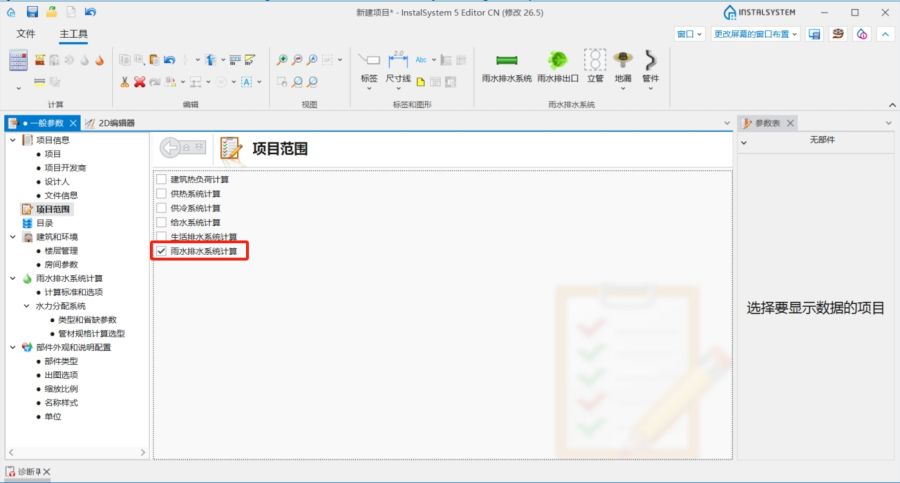
1. 项目范围. - 目录 – 选择目录并将其移至 项目可用的产品目录 中。为加快选则,可使用过滤器。更多信息,见: 项目使用的目录和目录数据.
- 计算标准和选项 – 确定如下设置,如有必要可进行更改:
- 降水强度,
- 坡度和充满度。
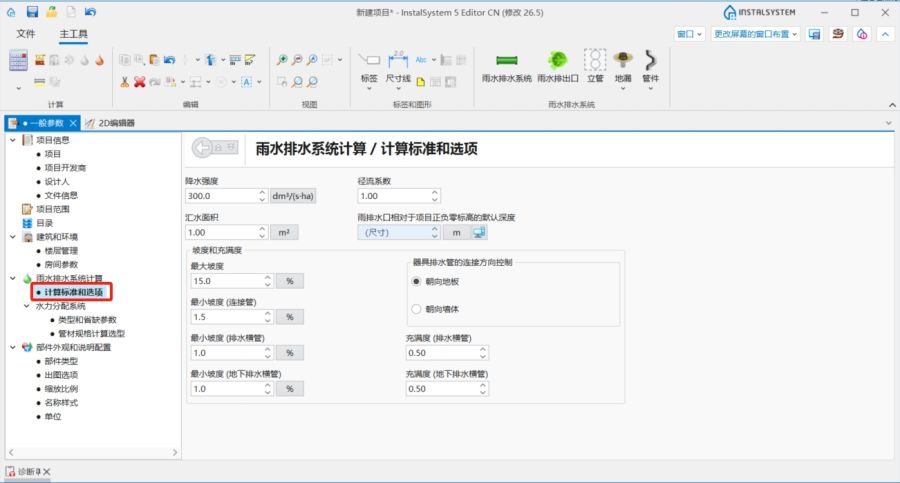
2. 计算标准和选项.
- 雨水排水系统计算 / 水力分配系统 / 默认类型和参数 – 附加默认类型:
- 默认的管材类型: 雨水排水系统,
- 管路连接的默认方式.
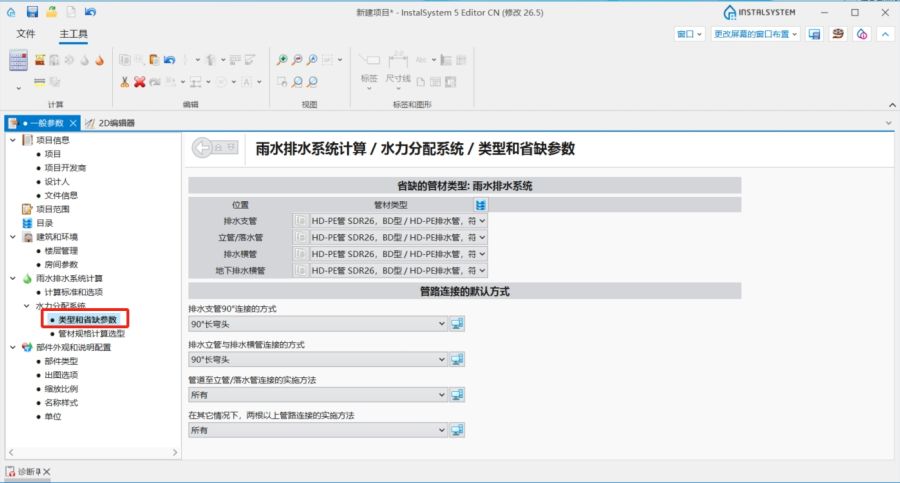
3. 默认类型和参数.
- 检查并修改管材规格计算选型 内的设置。
- 楼层管理 – 检查,如有必要并更正:
- 排水立管转成排水横管的拐点 - 指定排水立管转成排水横管的拐点与上方楼板或下方楼板的位置关系或距离(看示意图),以便在本楼层上绘制排水横管/横干管。
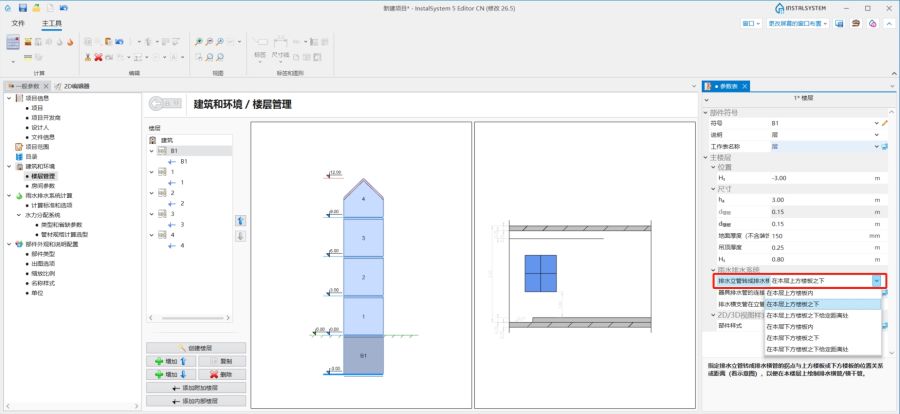
4. 排水立管转成排水横管的拐点. - 排水横支管在立管上的连接点与地面完成面的距离 - 对于所选楼层,排水横支管在立管上的连接点与地面完成面的默认距离值。对于多个连接到立管的每个排水横支管,均可在其参数表中更改此值。
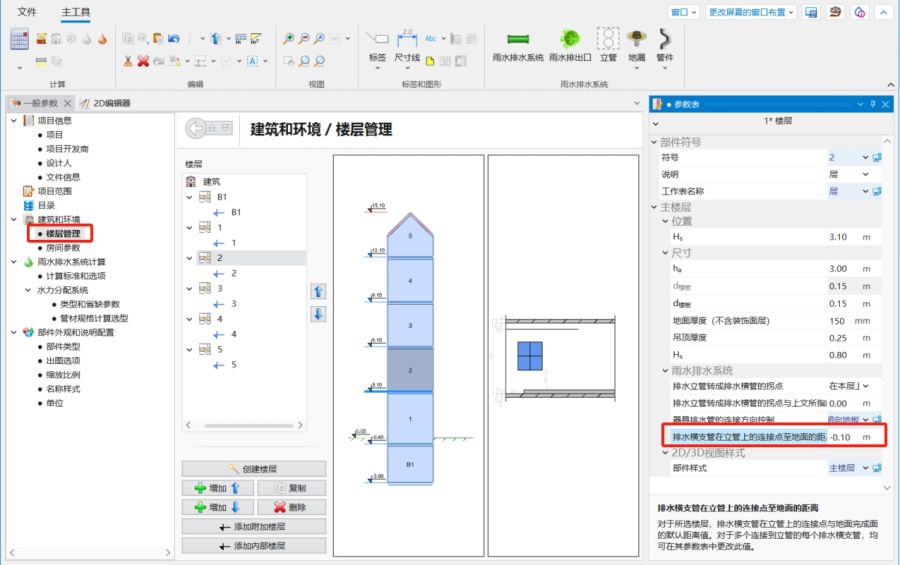
5. 排水横支管在立管上的连接点与地面完成面的距离.
- 排水立管转成排水横管的拐点 - 指定排水立管转成排水横管的拐点与上方楼板或下方楼板的位置关系或距离(看示意图),以便在本楼层上绘制排水横管/横干管。
- 如果每个楼层的布局相同,请使用将本层选中部件复制到上一层 或将选定的部件复制到多个楼层 功能将安装的重复部分复制到其它楼层。


编辑系统和其参数
在捕捉 和定向线 模式下插入部件并进行图形的编辑操作。
- 在2D编辑器中,选择雨水排水 编辑范围;
- 插入排水 部件:屋面雨水斗 和地漏 。插入时,要考虑建筑结构。根据屋面坡度将汇水区划分为多个区域;
- 使用测量面积 功能,为每个区域指定汇水面积 。
- 在 参数表 窗口,插入立管 部件并输入其参数:
- 在位置 项下, 设定立管 的起始和终止楼层范围.
- 选择立管顶端的部件。
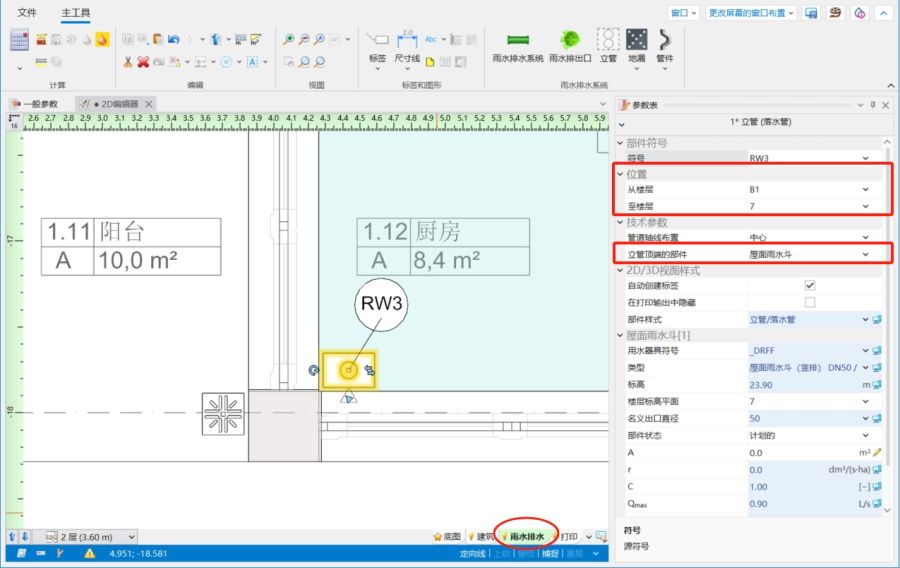
6. 立管 参数
- 对于屋面雨水斗 ,如有必要,检查并更正其类型 和插入汇水面积 值;
- 如果选择连接至上方的立管 ,则还需指定所连接的立管符号 并设置立管上方的拐点至天花板的距离 。
- 插入雨水排出口 并确认其在模型中的位置。 注! 在一套雨水排水装置中,只能有一个 雨水排出口 部件。但一个项目中允许有多套雨水排水装置。
- 使用雨水排水系统 管道将立管 与地漏 连接起来。 如果地漏 应连接在不同于默认高度的标高上,请将指定与立管连接位置的确定方式 更改为用户指定 ,然后手动设置所需的立管连接点至地面的距离 值。
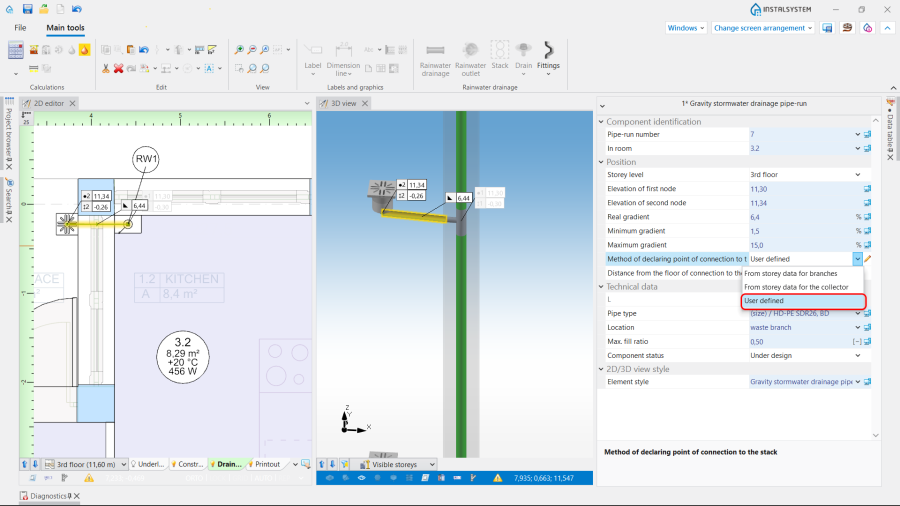
7. 指定与立管连接位置的确定方式. - 将雨水排出口 与最低楼层的立管 连接,形成排水干管逛网。该管网的配置考虑了一般参数 窗口中设置的排水立管转成排水横管的拐点 值。
- (可选) 如果需要,请将实现选定管路节点的方式更改为在常规数据中设置的默认方式以外的其他方式。可以在参数表 窗口中对于管路节点 部件执行此操作。


If needed, change the way of realizing chosen pipe-run's nodes to other than the default, set in general data. It is possible in the 参数表 window for the 管路节点 element.
- Insert necessary 管件 in the 2D编辑器 or on the 3D视图:过桥弯 and 沉积物收集器.
Choose the 类型 from available catalogues and, if necessary, adjust the 旋转角度.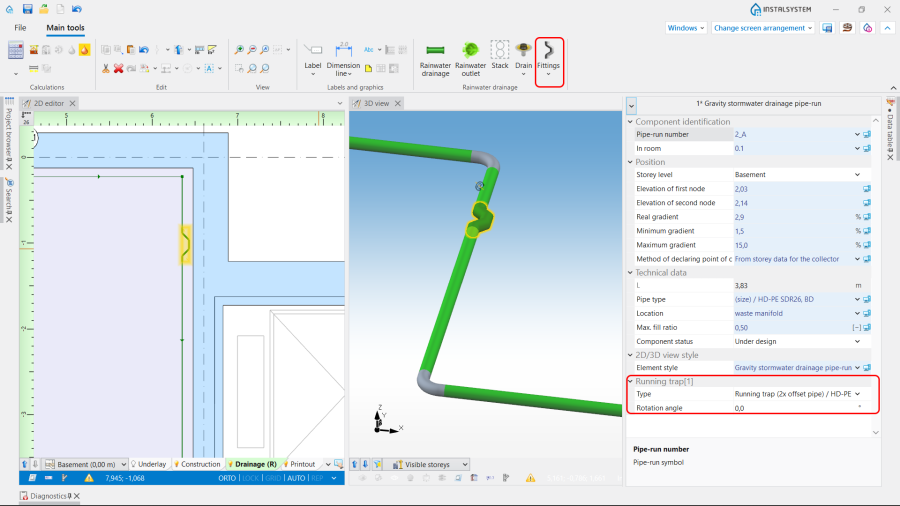
8. Insert 管件.

Verifying the correctness of the installation structure.
- Verify the correctness of the connections of the installation components using the 检查连接 function (Shortcut: Shift + F2);
- Verify the correctness of the installation structure using the 3D视图;
- Adjust the layout of the pipe-runs according to external factors, e.g. passages through walls, overlaps with other installations.
Running the calculations
- Start the calculation of the 排水系统计算 by clicking
 in the 计算 section of the toolbar;
 - Сheck messages the 诊断 window. First of all, eliminate 错误;
- Verify and adjust if necessary the layout of the installation: gradients, collisions, overlapping junctions, etc.

After the calculations, the vertical passage of the installation can be corrected by:
- imposing proper values in the 参数表 window for the 重力雨水排水管路 element in the following fields: 实际坡度, 第一个节点标高, 第二个节点标高,
- dividing the chosen pipe-runs into parts and modifying their data.
It is recommended to implement such changes gradually and to observe their influence upon the system, as the change in one node after calculations may have a significant impact on positioning of its greater part.
Note: Defining the vertical passage of pipe-runs, the program does not exceed the value imposed in the 最大坡度 field in the 一般参数 window in the 计算标准和选项 tab. This value is also automatically propagated to data of all pipe-runs. In case a difference of ordinates between the end of the calculated pipe-run and another pipe-run or a sewage outlet occurs, an additional vertical pipe-run is generated. To avoid it, allow for a greater gradient, by augmenting individually for each pipe-run a new value in the 最大坡度 field of the 参数表 and then recalculating the project.
结果的检查
- 在计算完成后,应通过3D视图 对系统布局进行视觉检查;
- 如果计算后有错误,则布局可能不可靠;
- 管材和管件的尺寸直径可以直接在图纸中进行检查

- 如果在项目中使用具有了管件(如三通、弯头等)可视化功能的目录,则有助于评估管件选择和管道节点(接头)尺寸的正确性。为此,应在出图选项 选项卡上的一般参数 窗口中打开节点可视化,或直接在3D视图 窗口中使用安装部件的可见性 图标。
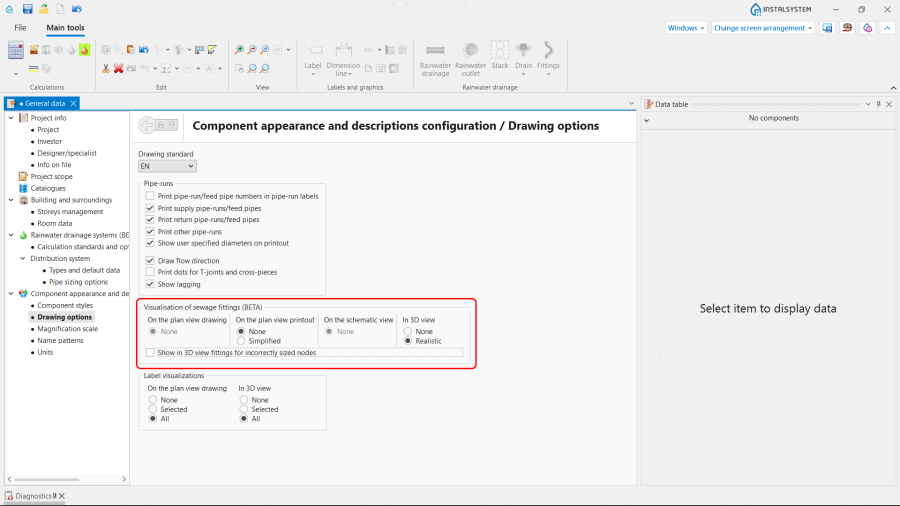
10. 排水系统管件的可视化.
Note: By default, only the nodes with correctly selected fittings, for which there are no warnings in the 诊断 window, are visualised. - Other forms of presentation of calculation results are: component labels and tables of results 更多信息,见: Presentation of the calculations result.
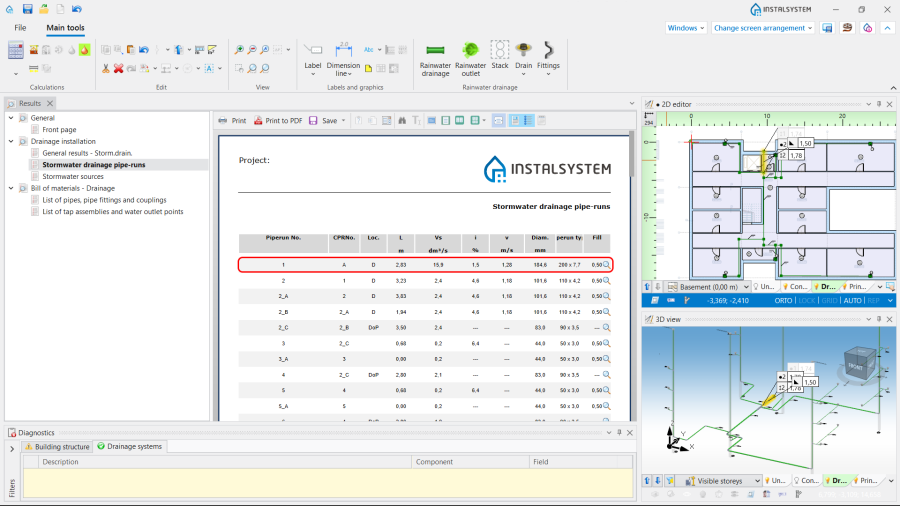
11. 管材、管件和接头清单.


Preparing drawings for export/printing
- To have the results for pipe-runs and installation nodes included in the printout of a drawing, appropriate labels must be inserted 更多信息,见: Preparation of drawings for export / printing.
- Completed drawings can be printed and/or exported 更多信息,见: Export / print results and drawings.