如何删除有关IFC模型解析过程中的诊断信息:修订间差异
(→问题说明) |
(→问题说明) |
||
| 第41行: | 第41行: | ||
** 程序无法通过解析''ifc屋顶(ifcRoof)''和''ifc楼板(ifcSlab)'' 图元或标记为其他类型的构件来创建''<IS_TS id=rpCreateRoofsFromIfc/>'' 部件。 | ** 程序无法通过解析''ifc屋顶(ifcRoof)''和''ifc楼板(ifcSlab)'' 图元或标记为其他类型的构件来创建''<IS_TS id=rpCreateRoofsFromIfc/>'' 部件。 | ||
* '''''ifcPlate(ifc板)是IfcCurtainWall(ifc幕墙)的一个组成部分,不能单独解释'''''</br>当有如下情况时,将显示此 '''错误''' 信息: | * '''''ifcPlate(ifc板)是IfcCurtainWall(ifc幕墙)的一个组成部分,不能单独解释'''''</br>当有如下情况时,将显示此 '''错误''' 信息: | ||
** | ** 在从''<IS_TS id=rpCreateWallsFromIfc/>'' 的操作过程中,程序检测到为解析所选择的''ifcPlate'' 是''IfcCurtainWall'' 中的一个部件。 | ||
* '''''<IS_TS id=BrakKondygnacjiDlaPomieszczenia/>''''' | |||
** | * '''''<IS_TS id=BrakKondygnacjiDlaPomieszczenia/>'''''</br>当有如下情况时,将显示此 '''警告''' 信息: | ||
** 在''<IS_TS id=rpCreateRoomsFromIfc/>'' 的操作过程中,程序检测到要解析的''ifcSpace'' 构件的标高与''<IS_TS id=iNameKondygnacja/>'' 构件的标高不一致。{{Info}} [[BIM - 基于导入的IFC模型参数创建楼层]]. | |||
==Solution== | ==Solution== | ||
2023年7月7日 (五) 05:07的版本
| 产品 | InstalSystem 5 |
| 文章类型 | TIP&TRICK |
| 版本的最新内容 | 2021-08-26 |
问题说明
在某些情况下,由于导入的IFC模型的质量和项目情况的复杂性,以下操作:
可能无法成功。程序在将IFC模型中的对象解析为InstalSystem 5 软件包中的部件过程中产生的有关的问题,也将诊断出来,并给出精确的错误和警告信息。
注意! 当对基于IFC模型的建筑结构进行建筑热负荷计算 时,有必要分析该模型,并考虑对哪些建筑构件应使用程序中的自动功能来进行解析。对于无需解析的部件,应以简化的方式绘制,以便获得与传热耗热量 相同(或相似)的结果。
最常见的错误和警告包括:
- 无法识别墙 - 墙所在的楼层标高范围内不包括此楼层
当有如下情况时,将显示此 错误 信息:- 在基于IFC文件创建墙体 时,程序检测到已解析的构件ifc墙(ifcWall), ifc标准墙(ifcWallStandardCase) 或ifc幕墙(ifcCurtainWall) 的高度与楼层 的高度不一致。更多信息,见: BIM - 基于导入的IFC模型参数创建楼层l。
- 无法识别窗/门/墙洞,因为没有插入此图元的墙
当有如下情况时,将显示此 错误 信息:- 在基于IFC文件创建窗、门和墙洞 时,程序检测到解析的部件ifc窗(ifcWindow), ifc门(ifcDoor) 或ifc墙洞(ifcOpeningElement) 的标高与墙 部件中所放置的窗, 门, 墙洞 部件的墙的标高不一致。
- 无效的部件类型.
当有如下情况时,将显示此 错误 信息:- 用户在调用解析操作之前标记的IFC对象属于该操作所需类型之外的其他类型。
- 无法从IFC图元生成屋顶 .
当有如下情况时,将显示此 错误 信息:- 程序无法通过解析ifc屋顶(ifcRoof)和ifc楼板(ifcSlab) 图元或标记为其他类型的构件来创建基于IFC文件创建屋顶 部件。
- ifcPlate(ifc板)是IfcCurtainWall(ifc幕墙)的一个组成部分,不能单独解释
当有如下情况时,将显示此 错误 信息:- 在从基于IFC文件创建墙体 的操作过程中,程序检测到为解析所选择的ifcPlate 是IfcCurtainWall 中的一个部件。
- 无法识别房间 - 房间所在的楼层不包括此楼层的标高范围内
当有如下情况时,将显示此 警告 信息:- 在基于IFC文件创建房间 的操作过程中,程序检测到要解析的ifcSpace 构件的标高与楼层 构件的标高不一致。更多信息,见: BIM - 基于导入的IFC模型参数创建楼层.
Solution
Upon clicking the error or warning message in the 诊断 window, the objects from the IFC model that cause problems with interpretation are highlighted in 2D编辑器, 3D视图 and Project browser. If the message applies to more than one component, then these are grouped in the 部件 field list.
Elimination of each error requires an analysis of the correctness of object definitions in the IFC model. If it is not possible to solve the identified problems and the design situation requires it, it is possible to approach the interpretation of the components in a hybrid manner, i.e. interpret the selected objects by applying the automatic functions storey by storey, component by component, and then manually supplement the created building structure with the required structural components. 更多信息,见: Preparation of building structure.
Attention! It is a good idea to interpret the structure in several turns. It is not recommended, especially for complex buildings, to perform the interpretation of a whole group of IFC elements/objects in a single operation. This approach allows for more complete control over potentially occurring problems indicated by messages in the Diagnostics window and facilitates the resolution of these problems.
无法识别墙 - 墙所在的楼层标高范围内不包括此楼层
- In the 一般参数 window, 楼层管理 tab, verify the correctness of the storeys arrangement created from an IFC model. Firstly, the data of the 楼层 component should be analysed and, if necessary, corrected with regard to 位置 and 尺寸. 更多信息,见: BIM - Creating storeys based on data from IFC model.
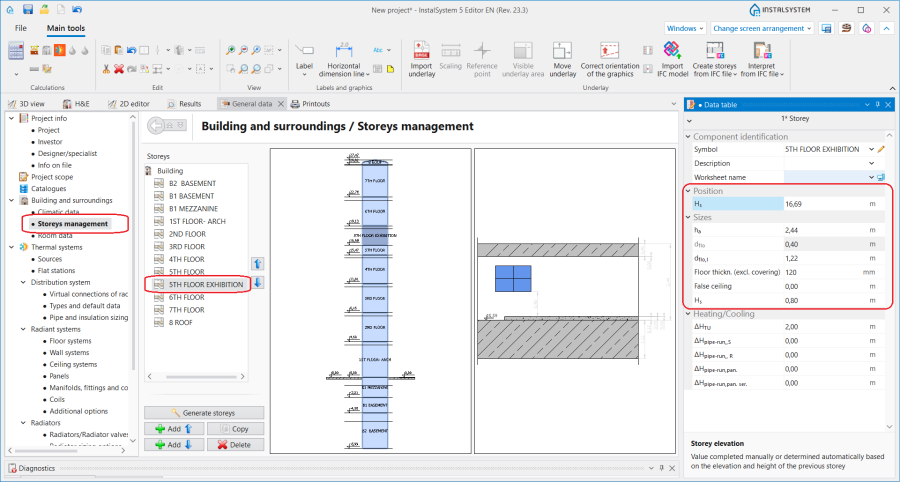
1. 位置 and 尺寸 of a 楼层.

无法识别窗/门/墙洞,因为没有插入此图元的墙
- When the elevation range of a 墙 or a Curtain wall does not agree with the elevation of an interpreted ifcWindow, ifcDoor or ifcOpeningElement, the 墙 or Curtain wall component must be modified by changing the storeys range for the component in the 参数表 window and the value in the 下沿偏移 or 上沿偏移 field.
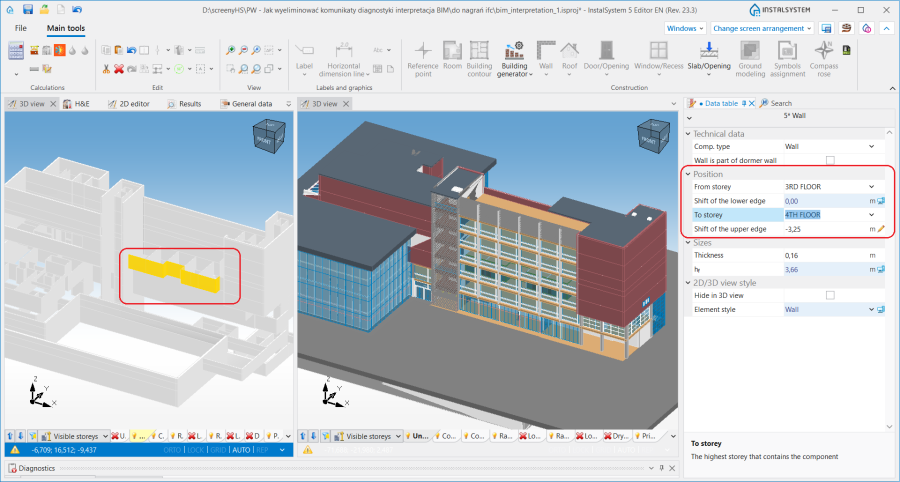
2. Changing the position of a 墙.

无效的部件类型
- Mark the IFC objects of the type appropriate for the operation carried out. 更多信息,见: Selecting components to be interpreted:
- Objects: ifcWall, ifcWallStandardCase, ifcCurtainWall (or other, see below) for the 基于IFC文件创建墙体 operation. 更多信息,见: Interpretation of walls.
- Objects: ifcWindow, ifcDoor, ifcOpeningElement for the 基于IFC文件创建窗、门和墙洞 operation. 更多信息,见: Interpretation of windows, doors and openings.
- Objects ifcRoof and ifcSlab (or other, see below) for the 基于IFC文件创建屋顶 operation. 更多信息,见: Interpretation of roofs.
- Objects ifcSlab (or other, see below) for the 基于IFC文件创建楼板 operation. 更多信息,见: Interpretation of slabs.
Attention! It is also possible to partially interpret other components from the IFC model (not listed above, and representing the building structure) into native components of InstalSystem 5 using the functions mentioned above. This applies to such components as, for instance, IfcBuildingElementProxy, IfcColumn, IfcStair, IfcStairFlight, IfcCovering. In most IFC models, they represent the complex architecture of the building, rather than the structure needed to perform 建筑热负荷计算. Such additional interpretation should therefore be preceded by a detailed analysis of the model and, if the design situation requires it, be carried out. The created construction components can be manually modified by the user in further steps, deleted if necessary and supplemented by manually inserted construction components from InstalSystem 5.
无法从IFC图元生成屋顶
- Append the project with manually inserted 屋顶 components based on 2D plan view of the IFC model and on the 捕捉 function, and then add roof edges appropriately using the 添加屋顶边缘 function. 更多信息,见: Inserting a roof.
IfcPlate is a component of a ifcCurtainWall and cannot be interpreted separately
- The parent component of the ifcCurtainWall type, which includes the indicated ifcPlate component, should be interpreted.
无法识别房间 - 房间所在的楼层不包括此楼层的标高范围内
- Verify the correctness of the storeys arrangement created from the IFC model in the 一般参数 window, 楼层管理 tab. First, the data of the 楼层 component should be analysed and, if necessary, corrected with regard to the values of 位置 and 尺寸. 更多信息,见: BIM - Creating storeys based on data from IFC model.