如何使软件运行得更快:修订间差异
跳转到导航
跳转到搜索
无编辑摘要 |
无编辑摘要 |
||
| 第43行: | 第43行: | ||
<!-- Do not write text below this tag --> | <!-- Do not write text below this tag --> | ||
<br class="iwlinks"/>[[pl:Jak przyspieszyć pracę programu|Jak przyspieszyć pracę programu]][[en:How to make the program run faster|How to make the program run faster]] | <br class="iwlinks"/>[[pl:Jak przyspieszyć pracę programu|Jak przyspieszyć pracę programu]][[en:How to make the program run faster|How to make the program run faster]][[bs:How to make the program run faster|How to make the program run faster]][[cs:How to make the program run faster|How to make the program run faster]][[da:How to make the program run faster|How to make the program run faster]][[et:How to make the program run faster|How to make the program run faster]][[es:How to make the program run faster|How to make the program run faster]][[fi:How to make the program run faster|How to make the program run faster]][[fr:How to make the program run faster|How to make the program run faster]][[hr:How to make the program run faster|How to make the program run faster]][[hu:How to make the program run faster|How to make the program run faster]][[fa:How to make the program run faster|How to make the program run faster]][[lv:How to make the program run faster|How to make the program run faster]][[nl:How to make the program run faster|How to make the program run faster]][[nb:How to make the program run faster|How to make the program run faster]][[sv:How to make the program run faster|How to make the program run faster]][[sl:How to make the program run faster|How to make the program run faster]][[sk:How to make the program run faster|How to make the program run faster]][[tr:How to make the program run faster|How to make the program run faster]][[sr-el:How to make the program run faster|How to make the program run faster]] | ||
2021年11月18日 (四) 18:35的版本
| 产品 | InstalSystem 5 |
| 文章类型 | 典型问题 |
| 版本的最新内容 | IS 5.0 Beta 22 |
问题描述
InstalSystem 5版软件要求计算机硬件的性能较高,当在低端机器上运行时往往比较慢,特别是当运行大文件或与其它应用程序同时运行时,就特别明显。运行的快慢还取决于程序的功能和所开的窗口。
解决方案
- 关闭所有不需要的窗口(尤其是资源密集型模块的3D视图 窗口)
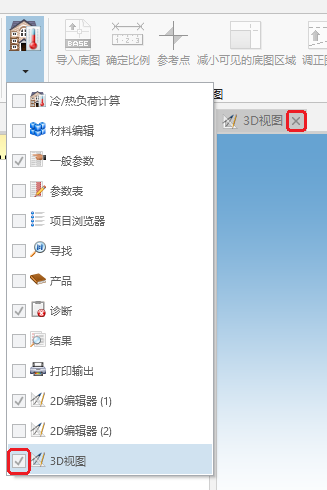
1. 3D 视图 - 隐藏不使用的编辑范围
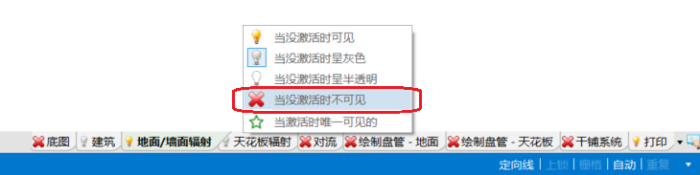
2.隐藏编辑范围 - 退出所有当前不使用的服务和应用程序
- 检查计算机是否满足硬件要求


复杂的DWG布局
(在底图中)已选DWG文件,有必要为不应使用自动模式的图层:
- 在自动捕捉图层 字段中,取消选择所选位置或
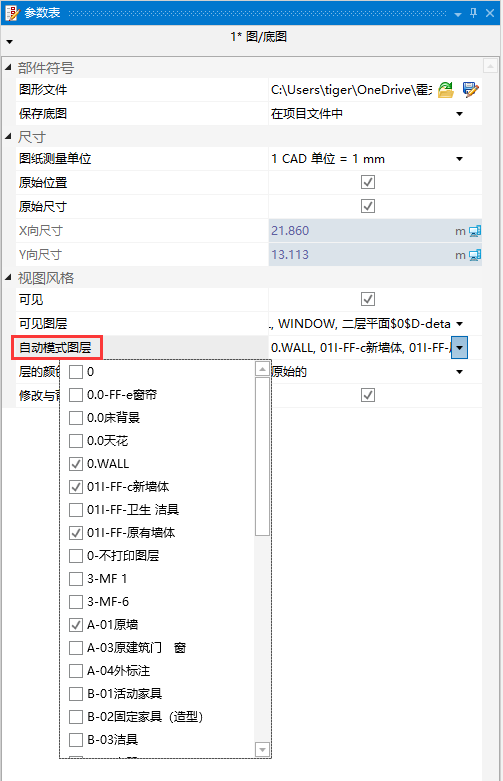
3. 自动捕捉图层 - 用鼠标右键,点击布局中的部件,然后选择对于图层:%s 关闭自动。
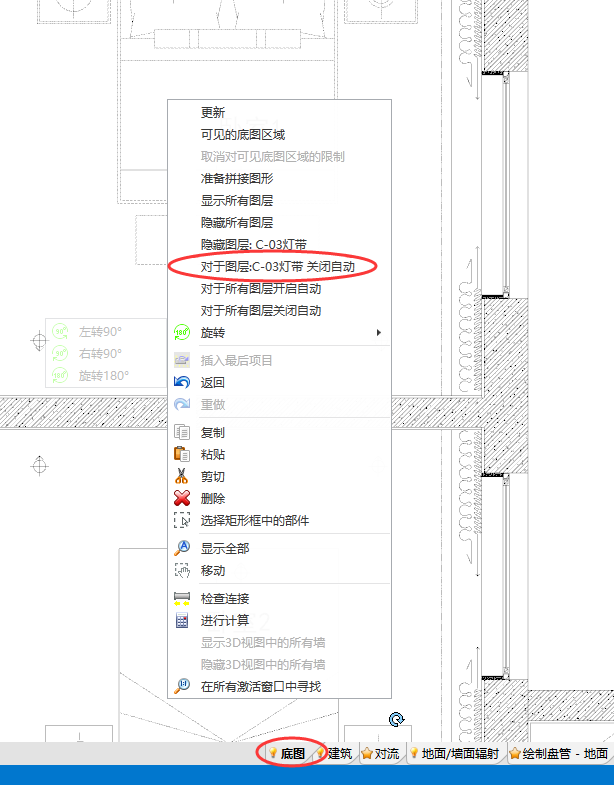
4. 对于图层:%s 关闭自动


同样,也可以选择对于所有图层关闭自动。
