安装、激活、更新InstalSystem 5 软件包:修订间差异
跳转到导航
跳转到搜索
| 第6行: | 第6行: | ||
<br/>''重要提示:''安装前,必须检查计算机是否符合硬件要求:[[InstalSystem 5 软件包技术说明#Technical requirements|技术要求]]。<br/> | <br/>''重要提示:''安装前,必须检查计算机是否符合硬件要求:[[InstalSystem 5 软件包技术说明#Technical requirements|技术要求]]。<br/> | ||
* '''<IS_TS id="strAutoryzacja"/>''' - 验证用户对软件所拥有的权利。许可证号码必须与软件包的版本相匹配。该授权可通过''InstalSystem Manager 5'' 来完成。''<IS_TS id="strAutoryzacja"/>'' 可在自动模式或手动模式下来完成。自动''<IS_TS id="strAutoryzacja"/>'' 需要接入互联网。''<IS_TS id="manualActivation"/>'' 也需要接入互联网,但在这种情况下,它可以在其它任何计算机上来完成。<br>[[File:Suf-instalakty-activation.png|700 px|left|thumb|1. ''<IS_TS id="strAutoryzacja"/>]]<br clear="all"/> | * '''<IS_TS id="strAutoryzacja"/>''' - 验证用户对软件所拥有的权利。许可证号码必须与软件包的版本相匹配。该授权可通过''InstalSystem Manager 5'' 来完成。''<IS_TS id="strAutoryzacja"/>'' 可在自动模式或手动模式下来完成。自动''<IS_TS id="strAutoryzacja"/>'' 需要接入互联网。''<IS_TS id="manualActivation"/>'' 也需要接入互联网,但在这种情况下,它可以在其它任何计算机上来完成。<br>[[File:Suf-instalakty-activation.png|700 px|left|thumb|1. ''<IS_TS id="strAutoryzacja"/>]]<br clear="all"/> | ||
* '''<IS_TS id="sAktualizacja"/>''' - | * '''<IS_TS id="sAktualizacja"/>''' - 可以下载最新版本的软件包,也可下载一些旧版本的软件包。程序和目录数据是不断地扩展和更新的,对它们的修改是以新的软件包版本的形式对外发布的。建议定期''<IS_TS id="sAktualizacja"/>'' 软件并使用最新可用的版本。''<IS_TS id="sAktualizacja"/>'' 是通过在''InstalSystem Manager 5'' 上运行更新来完成的,它也不收取任何费用。''InstalSystem Manager 5'' 有是否需要通知用户关于程序版本更新的选项。在''<IS_TS id="sAktualizacja"/>'' 期间,可以选择和下载数个程序的版本,包括存档版本。''InstalSystem 5'' 有一独特的特点,就是可下载和保存数个程序的版本,并同时使用它们来处理项目。特别是可以使用创建项目时所使用的程序版本来处理存档项目,同时也可以用最新的程序版本创建新项目。<br/>关于后续版本所做的更新信息见:[[Release notes InstalSystem 5]]。<br/>[[File:Screenshot 104.png|700 px|left|thumb|2. 更新]]<br clear="all"/> | ||
==EXAMPLE OF USE== | ==EXAMPLE OF USE== | ||
2017年2月2日 (四) 11:01的版本
说明
安装软件包、运行应用程序并执行激活 和更新 功能后,软件包安装完毕就可使用了。本文还阐述了如何使用InstalSystem Manager 5 索要许可号(此功能在选定的软件包的配置内)。
在程序中的位置
- 安装 - 在安装过程中请遵循安装助理的指示。安装分两步进行。第一步要安装InstalSystem Manager 5 。应用程序的剩余部分需在更新 期间进行下载,这也是安装过程的一部分,必须进行才能完成安装。
重要提示:安装前,必须检查计算机是否符合硬件要求:技术要求。
- 激活 - 验证用户对软件所拥有的权利。许可证号码必须与软件包的版本相匹配。该授权可通过InstalSystem Manager 5 来完成。激活 可在自动模式或手动模式下来完成。自动激活 需要接入互联网。手动激活 也需要接入互联网,但在这种情况下,它可以在其它任何计算机上来完成。
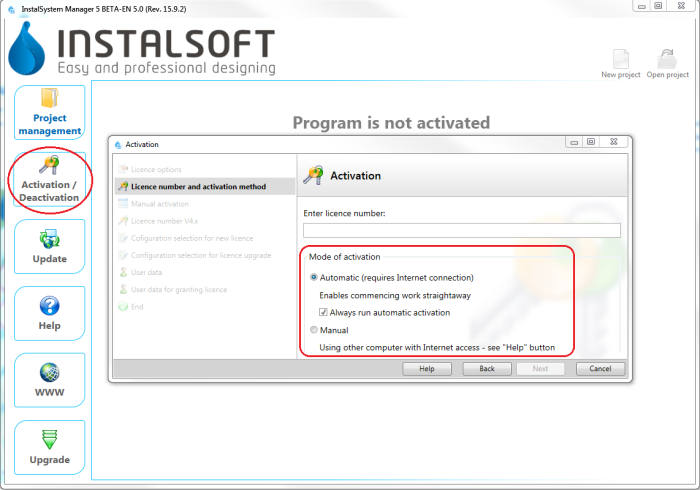
1. 激活 - 更新 - 可以下载最新版本的软件包,也可下载一些旧版本的软件包。程序和目录数据是不断地扩展和更新的,对它们的修改是以新的软件包版本的形式对外发布的。建议定期更新 软件并使用最新可用的版本。更新 是通过在InstalSystem Manager 5 上运行更新来完成的,它也不收取任何费用。InstalSystem Manager 5 有是否需要通知用户关于程序版本更新的选项。在更新 期间,可以选择和下载数个程序的版本,包括存档版本。InstalSystem 5 有一独特的特点,就是可下载和保存数个程序的版本,并同时使用它们来处理项目。特别是可以使用创建项目时所使用的程序版本来处理存档项目,同时也可以用最新的程序版本创建新项目。
关于后续版本所做的更新信息见:Release notes InstalSystem 5。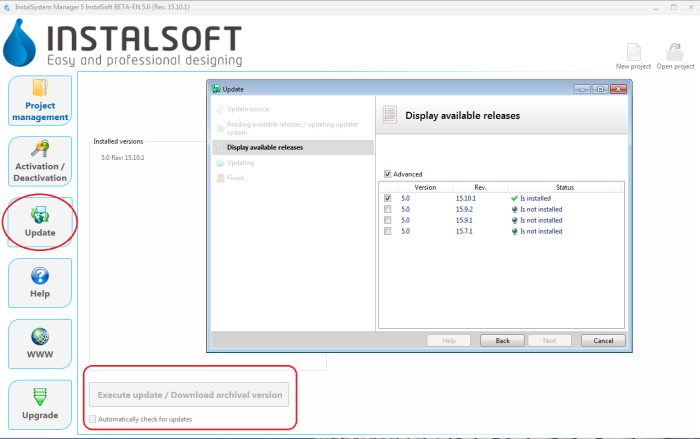
2. 更新

