如何使软件运行得更快:修订间差异
跳转到导航
跳转到搜索
X - JW edytor(讨论 | 贡献) (创建页面,内容为“{{Article table |commercial_product1=InstalSystem 5 |p2 = |p3 = |p4 = |category1 =InstalSystem 5#Typical pro...”) |
|||
| 第16行: | 第16行: | ||
}} | }} | ||
== | ==问题描述== | ||
InstalSystem | InstalSystem 5版软件要求计算机硬件的性能较高,当在低端机器上运行时往往比较慢,特别是当运行大文件或与其它应用程序同时运行时,就特别明显。运行的快慢还取决于程序的功能和所开的窗口。 | ||
==Solution== | ==Solution== | ||
2017年2月15日 (三) 07:56的版本
| 产品 | InstalSystem 5 |
| 文章类型 | TYPICAL PROBLEM |
| 版本的最新内容 | IS 5.0 Beta 22 |
问题描述
InstalSystem 5版软件要求计算机硬件的性能较高,当在低端机器上运行时往往比较慢,特别是当运行大文件或与其它应用程序同时运行时,就特别明显。运行的快慢还取决于程序的功能和所开的窗口。
Solution
- Close all windows that are not needed (particularly the resource-intensive module 3D视图).
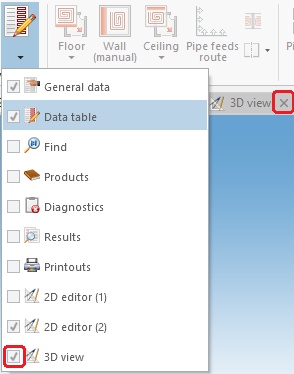
1. 3D Editor - Hide editing scopes that are not used.

2.Hide edit scopes. - Exit all applications and services running in the background that are not used at the moment.
- Verify that the computer meets Hardware requirements.

