如何删除: "超过最大空气流速"警告信息:修订间差异
跳转到导航
跳转到搜索
(→解决方法) |
|||
| 第26行: | 第26行: | ||
如果风管中的风速有超过最大限值Vmax值的消息,可以采取以下步骤来更正此问题: | 如果风管中的风速有超过最大限值Vmax值的消息,可以采取以下步骤来更正此问题: | ||
* 在''<IS_TS id=rsDanogi/>''/''<IS_TS id=strInstalacjeWentylacyjneGdm/>''/''<IS_TS id=DaneInstalacjiRozprowadzajacejCzynnikGrzewczyChlodniczy/>'' | * 在''<IS_TS id=rsDanogi/>''/''<IS_TS id=strInstalacjeWentylacyjneGdm/>''/''<IS_TS id=DaneInstalacjiRozprowadzajacejCzynnikGrzewczyChlodniczy/>'' 窗口,为特定位置的风管,选择更大口径的管材型作为默认值。 | ||
* | * 首先选择风管(双击诊断信息选择有问题的风管),然后在其'' <IS_TS id=DataEditorTable/>'' 中,为其选择更大口径的风管类型。 | ||
* | * 使用更多的风管进行输配; | ||
* | * 插入额外的空气散流器、回风口; | ||
* | * 在''<IS_TS id=rsDanogi/>''/''<IS_TS id=strInstalacjeWentylacyjneGdm/>''/''<IS_TS id=DaneInstalacjiRozprowadzajacejCzynnikGrzewczyChlodniczy/>'' 窗口,增大 ''<IS_TS id=strVmaxHint/>'', ''<IS_TS id=strWmax/>'' 中的值作为默认值或在''<IS_TS id=DataEditorTable/>'' 窗口,特定的风管。</br>[[File:Ventilation systems - Types and default data.png|900 px|left|thumb|1. <IS_TS id=rsDanogi/>/<IS_TS id=strInstalacjeWentylacyjneGdm/>/<IS_TS id=DaneInstalacjiRozprowadzajacejCzynnikGrzewczyChlodniczy/>.]]</br>[[File:Ventilation duct - data table.png|300 px|left|thumb|2. Ventilation duct - <IS_TS id=DataEditorTable/>.]]<br clear="all"/> | ||
[[Category:InstalSystem 5]] | [[Category:InstalSystem 5]] | ||
[[Category:TIP&TRICK]] | [[Category:TIP&TRICK]] | ||
2025年3月24日 (一) 16:40的版本
| 产品 | InstalSystem 5 |
| 文章类型 | 提示和技巧 |
| 版本的最新内容 | 2025-01-10 |
问题说明
在通风系统计算 范围进行项目的计算后,有可能会出现此问题,并在诊断 窗口中出现下面的警告消息:
- 超过最大空气流速(%s m/s>%s m/s)。
解决方法
如果风管中的风速有超过最大限值Vmax值的消息,可以采取以下步骤来更正此问题:
- 在一般参数/通风系统计算/默认类型和参数 窗口,为特定位置的风管,选择更大口径的管材型作为默认值。
- 首先选择风管(双击诊断信息选择有问题的风管),然后在其 参数表 中,为其选择更大口径的风管类型。
- 使用更多的风管进行输配;
- 插入额外的空气散流器、回风口;
- 在一般参数/通风系统计算/默认类型和参数 窗口,增大 最大气流速度, V最大 中的值作为默认值或在参数表 窗口,特定的风管。
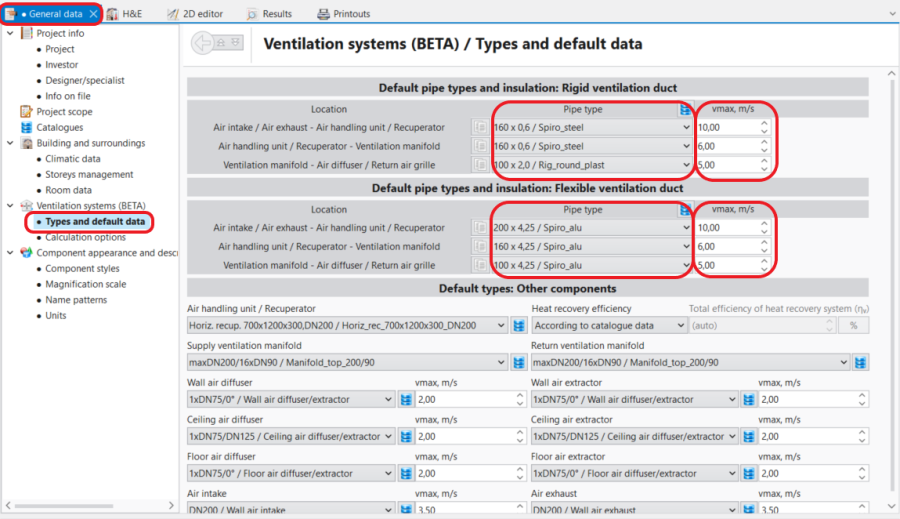
1. 一般参数/通风系统计算/默认类型和参数. 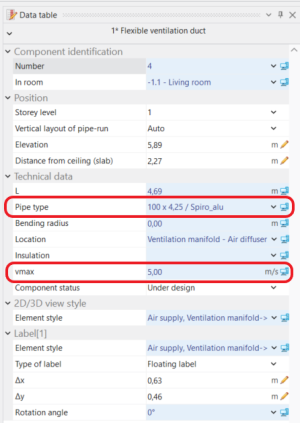
2. Ventilation duct - 参数表.

