项目和应用管理:修订间差异
跳转到导航
跳转到搜索
| 第16行: | 第16行: | ||
{{#ev:youtube|txjsy7C-mNo|900||||rel=0}} | {{#ev:youtube|txjsy7C-mNo|900||||rel=0}} | ||
=== | ===管理项目文件和其它文件=== | ||
* ''' | * '''最近编辑的文件''' - 该列表是自动创建的,它可快速找到最近编辑的文件,无论它们在什么位置。<br clear="all"/> 如果想让某一项目文件始终在列表的上方显示,而不管编辑的日期如何,则可使用''图钉'' - 点击所选项目文件的边上的[[File:Pin-off-pl.png|32 px]],就可让文件始终保持在列表的顶部[[File:Pin-on-pl.png|32 px]]。 | ||
* ''' | * '''项目管理''' - 当安装程序时,可选择程序省缺的位置。建议每个项目(所设计的对象)有一个专门的子文件夹,用于各种 InstalSystem 项目文件版本(带有.isproj后缀的文件)和其它文件,如所用的底图的存储。优点是,对于*.isproj文件,会显示文件创建时所使用的软件包的版本号。<br clear="all"/> | ||
{{#ev:youtube|hg-86Lse_eQ|900||||rel=0}} | {{#ev:youtube|hg-86Lse_eQ|900||||rel=0}} | ||
[[Category:InstalSystem 5]] | [[Category:InstalSystem 5]] | ||
[[Category: | [[Category:功能]] | ||
[[pl:Zarządzanie projektami i aplikacją]] | [[pl:Zarządzanie projektami i aplikacją]] | ||
2017年2月5日 (日) 09:18的版本
说明
本文介绍了借助于InstalSystem Manager 管理项目的方法,还展示了如何根据用户需求在不同程序版本中打开和创建项目。
在程序中的位置
创建一新项目和打开一现有项目
- 可在InstalSystem Manager 5 CN 窗口中创建一新项目和打开一现有项目。
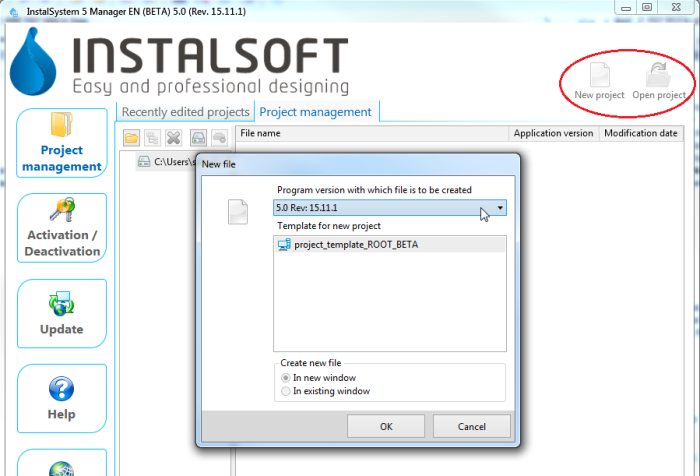
1. InstalSystem Manager 5 CN 中新项目/打开项目 和在InstalSystem 5 Editor 中:
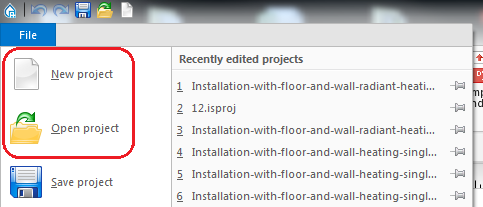
2. InstalSystem 5 Editor 中新项目/打开项目


管理项目文件和其它文件
- 在InstalSystem 5 Manager 窗口中列出最近编辑的项目。
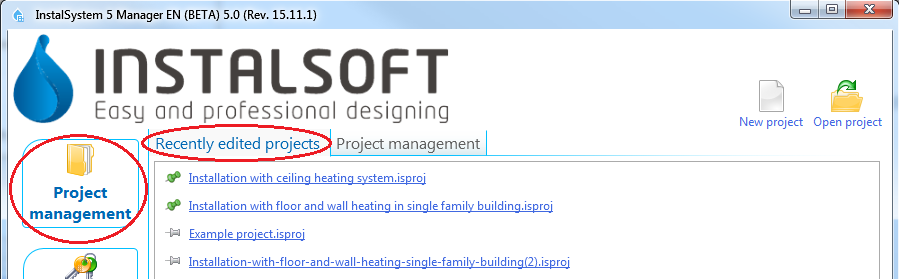
3. InstalSystem 5 Manager 中最近编辑的项目
和在InstalSystem 5 Editor 中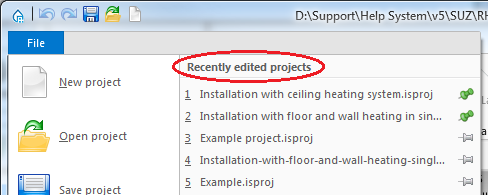
4. InstalSystem 5 Editor 中最近编辑的项目 - 在InstalSystem Manager 5 窗口的项目管理 标签中有项目管理。
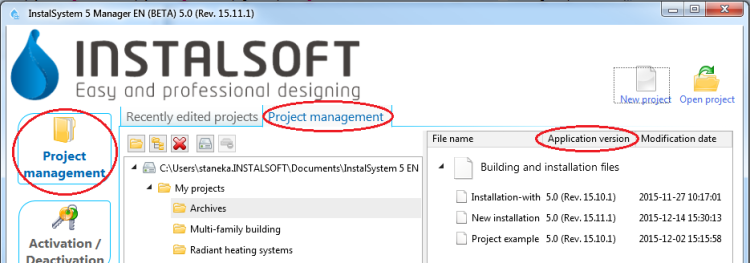
5. InstalSystem 5 Manager 中项目管理


应用举例
创建新项目和打开现有项目
- 新建项目 - 当创建一新项目时,有可能会指出下载的程序版本。省缺情况下会指出最新的版本号。当创建一新文件时,用户需选择项目要使用的某一模板。
更多信息,见: 模板文件。 - 现有文件 - 当打开一现有项目时,需选择进一步处理项目所要使用的程序版本。这就可使用文件创建时所使用的版本继续项目的设计。
InstalSystem 5 软件包可导入 InstalSystem 4 所创建的文件。
管理项目文件和其它文件
- 最近编辑的文件 - 该列表是自动创建的,它可快速找到最近编辑的文件,无论它们在什么位置。
如果想让某一项目文件始终在列表的上方显示,而不管编辑的日期如何,则可使用图钉 - 点击所选项目文件的边上的 ,就可让文件始终保持在列表的顶部
 。
。 - 项目管理 - 当安装程序时,可选择程序省缺的位置。建议每个项目(所设计的对象)有一个专门的子文件夹,用于各种 InstalSystem 项目文件版本(带有.isproj后缀的文件)和其它文件,如所用的底图的存储。优点是,对于*.isproj文件,会显示文件创建时所使用的软件包的版本号。

