安装、激活、更新InstalSystem 5 软件包:修订间差异
跳转到导航
跳转到搜索
| 第4行: | 第4行: | ||
==在程序中的位置== | ==在程序中的位置== | ||
* '''安装''' - 在安装过程中请遵循安装助理的指示。安装分两步进行。第一步要安装''InstalSystem Manager 5'' 。应用程序的剩余部分需在''<IS_TS id="sAktualizacja"/>'' 期间进行下载,这也是安装过程的一部分,必须进行才能完成安装。 | * '''安装''' - 在安装过程中请遵循安装助理的指示。安装分两步进行。第一步要安装''InstalSystem Manager 5'' 。应用程序的剩余部分需在''<IS_TS id="sAktualizacja"/>'' 期间进行下载,这也是安装过程的一部分,必须进行才能完成安装。 | ||
<br/>''重要提示:''安装前,必须检查计算机是否符合硬件要求:[[InstalSystem 5 | <br/>''重要提示:''安装前,必须检查计算机是否符合硬件要求:[[InstalSystem 5 软件包技术说明#Technical requirements|技术要求]]。<br/> | ||
* '''<IS_TS id="strAutoryzacja"/>''' - verifies the user's right to the software. The licence number must match the version of the package. Authorization can be done with ''InstalSystem Manager 5''. ''<IS_TS id="strAutoryzacja"/>'' may be performed in either automatic or manual mode. Automatic ''<IS_TS id="strAutoryzacja"/>'' requires Internet access. ''<IS_TS id="manualActivation"/>'' also requires Internet access, but in this case it may be done on any computer.<br>[[File:Suf-instalakty-activation.png|700 px|left|thumb|1. ''<IS_TS id="strAutoryzacja"/>]]<br clear="all"/> | * '''<IS_TS id="strAutoryzacja"/>''' - verifies the user's right to the software. The licence number must match the version of the package. Authorization can be done with ''InstalSystem Manager 5''. ''<IS_TS id="strAutoryzacja"/>'' may be performed in either automatic or manual mode. Automatic ''<IS_TS id="strAutoryzacja"/>'' requires Internet access. ''<IS_TS id="manualActivation"/>'' also requires Internet access, but in this case it may be done on any computer.<br>[[File:Suf-instalakty-activation.png|700 px|left|thumb|1. ''<IS_TS id="strAutoryzacja"/>]]<br clear="all"/> | ||
* '''<IS_TS id="sAktualizacja"/>''' - enables downloading the most recent version of the package, as well as some older versions. Programs and data catalogues are being constantly expanded and updated, and the modifications are published in the form of new package versions. It is recommended to regularly ''<IS_TS id="sAktualizacja"/>'' the software and use the most recent available version. ''<IS_TS id="sAktualizacja"/>'' is run from ''InstalSystem Manager 5'' and is free of charge. ''InstalSystem Manager 5'' has an option to notify the user about availabity of a newer program version. During ''<IS_TS id="sAktualizacja"/>'' ii is possible to select and download several program versions, including archived versions. ''InstalSystem 5'' has the unique feature of downloading and saving several versions of the program and using them simultaneously to process the projects. In particular it is possible to process archived projects using that program version which was used to create the project, and at the same time new projects can be created with the most recent program version.<br/>Information on changes made in subsequent versions is provided in [[Release notes InstalSystem 5]].<br/>[[File:Screenshot 104.png|700 px|left|thumb|2. Update]]<br clear="all"/> | * '''<IS_TS id="sAktualizacja"/>''' - enables downloading the most recent version of the package, as well as some older versions. Programs and data catalogues are being constantly expanded and updated, and the modifications are published in the form of new package versions. It is recommended to regularly ''<IS_TS id="sAktualizacja"/>'' the software and use the most recent available version. ''<IS_TS id="sAktualizacja"/>'' is run from ''InstalSystem Manager 5'' and is free of charge. ''InstalSystem Manager 5'' has an option to notify the user about availabity of a newer program version. During ''<IS_TS id="sAktualizacja"/>'' ii is possible to select and download several program versions, including archived versions. ''InstalSystem 5'' has the unique feature of downloading and saving several versions of the program and using them simultaneously to process the projects. In particular it is possible to process archived projects using that program version which was used to create the project, and at the same time new projects can be created with the most recent program version.<br/>Information on changes made in subsequent versions is provided in [[Release notes InstalSystem 5]].<br/>[[File:Screenshot 104.png|700 px|left|thumb|2. Update]]<br clear="all"/> | ||
2017年2月1日 (三) 06:11的版本
说明
安装软件包、运行应用程序并执行激活 和更新 功能后,软件包安装完毕就可使用了。本文还阐述了如何使用InstalSystem Manager 5 索要许可号(此功能在选定的软件包的配置内)。
在程序中的位置
- 安装 - 在安装过程中请遵循安装助理的指示。安装分两步进行。第一步要安装InstalSystem Manager 5 。应用程序的剩余部分需在更新 期间进行下载,这也是安装过程的一部分,必须进行才能完成安装。
重要提示:安装前,必须检查计算机是否符合硬件要求:技术要求。
- 激活 - verifies the user's right to the software. The licence number must match the version of the package. Authorization can be done with InstalSystem Manager 5. 激活 may be performed in either automatic or manual mode. Automatic 激活 requires Internet access. 手动激活 also requires Internet access, but in this case it may be done on any computer.
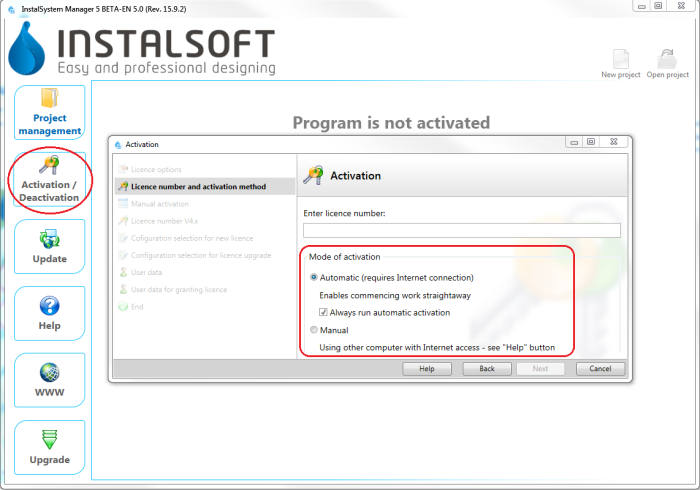
1. 激活 - 更新 - enables downloading the most recent version of the package, as well as some older versions. Programs and data catalogues are being constantly expanded and updated, and the modifications are published in the form of new package versions. It is recommended to regularly 更新 the software and use the most recent available version. 更新 is run from InstalSystem Manager 5 and is free of charge. InstalSystem Manager 5 has an option to notify the user about availabity of a newer program version. During 更新 ii is possible to select and download several program versions, including archived versions. InstalSystem 5 has the unique feature of downloading and saving several versions of the program and using them simultaneously to process the projects. In particular it is possible to process archived projects using that program version which was used to create the project, and at the same time new projects can be created with the most recent program version.
Information on changes made in subsequent versions is provided in Release notes InstalSystem 5.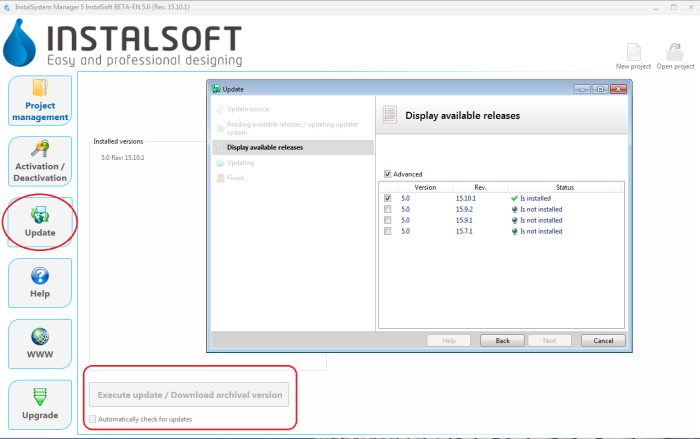
2. Update

