安装、激活、更新InstalSystem 5 软件包:修订间差异
跳转到导航
跳转到搜索
| 第5行: | 第5行: | ||
* '''<IS_TS id="strAutoryzacja"/>''' - verifies the user's right to the software. The licence number must match the version of the package. Authorization can be done with ''InstalSystem Manager 5''. ''<IS_TS id="strAutoryzacja"/>'' may be performed in either automatic or manual mode. Automatic ''<IS_TS id="strAutoryzacja"/>'' requires Internet access. ''<IS_TS id="manualActivation"/>'' also requires Internet access, but in this case it may be done on any computer.<br>[[File:Suf-instalakty-activation.png|700 px|left|thumb|1. ''<IS_TS id="strAutoryzacja"/>]]<br clear="all"/> | * '''<IS_TS id="strAutoryzacja"/>''' - verifies the user's right to the software. The licence number must match the version of the package. Authorization can be done with ''InstalSystem Manager 5''. ''<IS_TS id="strAutoryzacja"/>'' may be performed in either automatic or manual mode. Automatic ''<IS_TS id="strAutoryzacja"/>'' requires Internet access. ''<IS_TS id="manualActivation"/>'' also requires Internet access, but in this case it may be done on any computer.<br>[[File:Suf-instalakty-activation.png|700 px|left|thumb|1. ''<IS_TS id="strAutoryzacja"/>]]<br clear="all"/> | ||
* '''<IS_TS id="sAktualizacja"/>''' - enables downloading the most recent version of the package, as well as some older versions. Programs and data catalogues are being constantly expanded and updated, and the modifications are published in the form of new package versions. It is recommended to regularly ''<IS_TS id="sAktualizacja"/>'' the software and use the most recent available version. ''<IS_TS id="sAktualizacja"/>'' is run from ''InstalSystem Manager 5'' and is free of charge. ''InstalSystem Manager 5'' has an option to notify the user about availabity of a newer program version. During ''<IS_TS id="sAktualizacja"/>'' ii is possible to select and download several program versions, including archived versions. ''InstalSystem 5'' has the unique feature of downloading and saving several versions of the program and using them simultaneously to process the projects. In particular it is possible to process archived projects using that program version which was used to create the project, and at the same time new projects can be created with the most recent program version.<br/>Information on changes made in subsequent versions is provided in [[Release notes InstalSystem 5]].<br/>[[File:Screenshot 104.png|700 px|left|thumb|2. Update]]<br clear="all"/> | * '''<IS_TS id="sAktualizacja"/>''' - enables downloading the most recent version of the package, as well as some older versions. Programs and data catalogues are being constantly expanded and updated, and the modifications are published in the form of new package versions. It is recommended to regularly ''<IS_TS id="sAktualizacja"/>'' the software and use the most recent available version. ''<IS_TS id="sAktualizacja"/>'' is run from ''InstalSystem Manager 5'' and is free of charge. ''InstalSystem Manager 5'' has an option to notify the user about availabity of a newer program version. During ''<IS_TS id="sAktualizacja"/>'' ii is possible to select and download several program versions, including archived versions. ''InstalSystem 5'' has the unique feature of downloading and saving several versions of the program and using them simultaneously to process the projects. In particular it is possible to process archived projects using that program version which was used to create the project, and at the same time new projects can be created with the most recent program version.<br/>Information on changes made in subsequent versions is provided in [[Release notes InstalSystem 5]].<br/>[[File:Screenshot 104.png|700 px|left|thumb|2. Update]]<br clear="all"/> | ||
==EXAMPLE OF USE== | |||
===Installation=== | |||
{{#ev:youtube|baOfbE_ODtU|900||||rel=0}} | |||
<!--# Run the installer. | |||
# Accept the licence agreement. | |||
# Perform installation by following the installation assistant's instructions.--> | |||
===Acquiring a licence number=== | |||
{{#ev:youtube|YpCu7MzUklk|900||||rel=0}} | |||
<!--# Run the ''InstalSystem Manager 5''. | |||
# Select ''<IS_TS id="strAutoryzacja"/>/Dezaktywacja''. | |||
# Select ''Activate program''. | |||
# Select ''I have no licence number and I wish to acquire one''. | |||
# Enter the required data. | |||
# Send the request for the licence number.--> | |||
===Automatic <IS_TS id="strAutoryzacja"/>=== | |||
{{#ev:youtube|JHbsQMCNXKM|900||||rel=0}} | |||
<!--# Run the ''InstalSystem Manager 5''. | |||
# Select ''<IS_TS id="strAutoryzacja"/>/Dezaktywacja''. | |||
# Select ''Activate program''/''Deactivate program''. In case of deactivating, skip to point 6. | |||
# Select ''I have a licence number - activate program''. | |||
# Enter the licence number. | |||
# Select the mode of activation/deactivation: ''Automatic - requires Internet access'' and confirm by clicking ''Continue''.--> | |||
===<IS_TS id="sAktualizacja"/>=== | |||
{{#ev:youtube|HUreqXPY0to|900||||rel=0}} | |||
{{#ev:youtube|t03jEc4Sl_g|900||||rel=0}} | |||
<!--# Run the ''InstalSystem Manager 5''. | |||
# Select ''<IS_TS id="sAktualizacja"/>''. | |||
# Select the source: ''Internet'' or ''Disk''. When updating from disk, indicate the folder with update files. Confirm by clicking ''Continue''. | |||
# Check the ''Advanced'' box to display the available versions for update/revert. | |||
# Select the version to which the program is to be updated or uncheck the box in case of reverting to an older version and confirm by clicking ''Continue''.--> | |||
===Manual <IS_TS id="strAutoryzacja"/>=== | |||
{{#ev:youtube|l7hF7gjbhvs|900||||rel=0}} | |||
<!--# Run the ''InstalSystem Manager 5''. | |||
# Select ''<IS_TS id="strAutoryzacja"/>/Dezaktywacja''. | |||
# Select ''Activate program''/''Deactivate program''. In case of deactivating, skip to point 6. | |||
# Select ''I have a licence number - activate program''. | |||
# Enter the licence number. | |||
# Select the mode of activation/deactivation: ''Manual'' and confirm by clicking ''Continue''. | |||
# Copy the activation/deactivation code by clicking ''Copy to clipboard''. | |||
# Go to Web page: [http://activationv5.instalsoft.com/ Manual activation/deactivation v5]. | |||
# Paste the copied activation/deactivation code and confirm by clicking ''Continue''. In case of deactivation this completes the operation. Activation requires proceeding to the next point. | |||
# Save the generated code in a file. | |||
# In the activation window of the program bering activated open the activation file generated on the Web page and confirm.--> | |||
[[Category:InstalSystem 5]] | |||
[[Category:FUNCTIONALITY]] | |||
[[pl:Instalacja, aktywacja i aktualizacja pakietu InstalSystem 5]] | |||
2017年2月1日 (三) 05:40的版本
DESCRIPTION
Installing the package, running the application and performing the functions 激活 and 更新 enable preparing the working environment. This article also describes how to ask for the licence number using the InstalSystem Manager 5 (this feature is available in selected package configurations).
LOCATION IN THE PROGRAM
- Installation - during installation follow the indications of the installation assistant. Installation is performed in two steps. InstalSystem Manager 5 is installed in the first step. The remaining part of the application is downloaded during 更新, which is part of the installation process and which must be carried out to complete the installation.
Important: Prior to installing, it is necessary to verify that the computer meets the hardware requirements: Technical requirements. - 激活 - verifies the user's right to the software. The licence number must match the version of the package. Authorization can be done with InstalSystem Manager 5. 激活 may be performed in either automatic or manual mode. Automatic 激活 requires Internet access. 手动激活 also requires Internet access, but in this case it may be done on any computer.
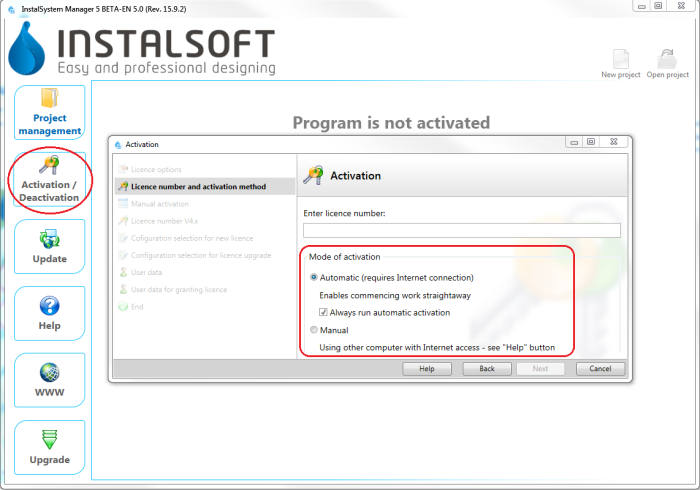
1. 激活 - 更新 - enables downloading the most recent version of the package, as well as some older versions. Programs and data catalogues are being constantly expanded and updated, and the modifications are published in the form of new package versions. It is recommended to regularly 更新 the software and use the most recent available version. 更新 is run from InstalSystem Manager 5 and is free of charge. InstalSystem Manager 5 has an option to notify the user about availabity of a newer program version. During 更新 ii is possible to select and download several program versions, including archived versions. InstalSystem 5 has the unique feature of downloading and saving several versions of the program and using them simultaneously to process the projects. In particular it is possible to process archived projects using that program version which was used to create the project, and at the same time new projects can be created with the most recent program version.
Information on changes made in subsequent versions is provided in Release notes InstalSystem 5.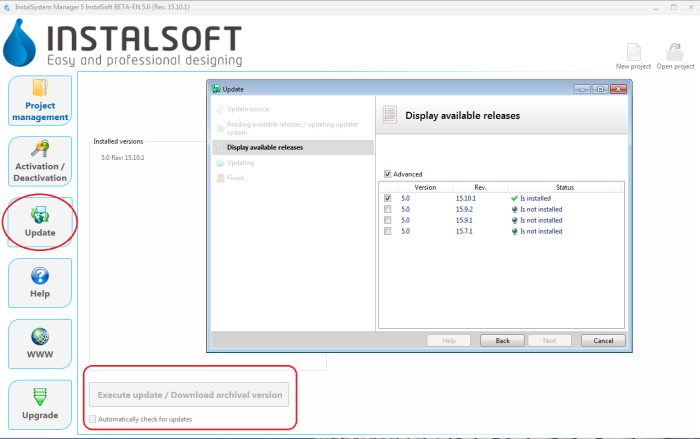
2. Update

