安装、激活、更新InstalSystem 5 软件包:修订间差异
无编辑摘要 标签:手工回退 |
|||
| (未显示4个用户的124个中间版本) | |||
| 第1行: | 第1行: | ||
<IS_HELP id="HS156"/> | |||
<!--Case 116857--> | |||
{{Article table | |||
|commercial_product1=InstalSystem 5 | |||
|p2 =<!--gdy jest kolejny produkt handlowy, zamienić na->"produkt_handlowy2="--> | |||
|p3 =<!--gdy jest kolejny produkt handlowy, zamienić na->"produkt_handlowy3="--> | |||
|p4 =<!--gdy jest kolejny produkt handlowy, zamienić na->"produkt_handlowy3="--> | |||
|category1 =InstalSystem 5#Functionalities | |||
|category_name1 =功能 | |||
|c2 =<!--Jest kategoria -> zamienić na: "category2=" i uzupełnić link do sekcji kategorii na stronie głównej produktu--> | |||
|category_name2 =<!--podać nazwę kategorii "ZASTOSOWANIE"/"FUNKCJONALNOŚĆ"/...--> | |||
|c3 =<!--Jest kategoria -> zamienić na: "category3=" i uzupełnić link do sekcji kategorii na stronie głównej produktu--> | |||
|category_name3 =<!--podać nazwę kategorii "ZASTOSOWANIE"/"FUNKCJONALNOŚĆ"/...--> | |||
|version1 =[[Release notes InstalSystem 5#Version BETA 26 Rev. 16.2.1|IS 5.5 28.0 ]] | |||
|v2 =<!--Jest wersja -> zamienić na: "version2=" i uzupełnić link do sekcji RN danego produktu--> | |||
|v3 =<!--Jest wersja -> zamienić na: "version2=" i uzupełnić link do sekcji RN danego produktu--> | |||
|v4 =<!--Jest wersja -> zamienić na: "version2=" i uzupełnić link do sekcji RN danego produktu--> | |||
}} | |||
==软件安装包下载== | |||
'''5.5通用标准版:'''<br/> | |||
https://download.instalsoft.com/public/official/v5/Gold/ADISFCN_InstalSystem_5_5_CN_V5_5.msi<br/>'''5.5正康定制版:'''<br/>https://download.instalsoft.com/public/official/v5/Gold/ADZHNCN_CHNCON_SYSTEM_5_5_V5_5.msi<br/>'''5.5小沃定制版:'''<br/>https://download.instalsoft.com/public/official/v5/Gold/ADCIACN_InstalSystem_-_CIAOWARM_5_5_CN_V5_5.msi<br/>'''5.5GF定制版:'''<br/>https://download.instalsoft.com/public/official/v5/Gold/ADAOCCN_GF_DESIGN_SYSTEM_V5_5.msi<br/><br/> | |||
==说明== | ==说明== | ||
在安装完软件包、运行应用程序并执行''<IS_TS id="strAutoryzacja"/>'' 和''<IS_TS id="sAktualizacja"/>'' 功能后,就可使用了。本文还介绍了如何使用''InstalSystem Manager 5'' 索要许可号(此功能仅限定在选定的软件包的配置内)。 | |||
== | ==视频教程== | ||
'''欢迎观看我们的视频教程,视频中有对本文所述的功能进行讲解和介绍的内容''' <br/>[[File:软件包管理器.png|500 px|left|thumb|'''[[视频:软件包管理器使用教程]]'''|link=https://www.bilibili.com/video/BV1sJ4m1e7c6/]]<br clear="all"/> | |||
=== | ==在程序中的位置== | ||
* '''安装''' - 在安装过程中请遵循安装导航的指示。安装分两步进行。第一步要安装''InstalSystem Manager 5'' 启动部分。应用程序的剩余部分需在''<IS_TS id="sAktualizacja"/>'' 期间进行下载安装,这也是安装过程的一部分,必须安装完这部分之后软件包才能正常运行。<br/>''重要提示:''安装前,必须检查计算机是否符合硬件要求:[[InstalSystem 5 软件包技术说明#技术要求|技术要求]]。<br/>''重要提示:''软件必须安装在计算机硬盘上(该程序不适用于网络安装)。<br/> | |||
< | * '''<IS_TS id="strAutoryzacja"/>''' - 检查用户对软件所拥有的权限。许可号必须与软件包的版本相匹配。该授权可通过''InstalSystem Manager 5'' 来完成。''<IS_TS id="strAutoryzacja"/>'' 可在自动模式或手动模式下来完成。自动''<IS_TS id="strAutoryzacja"/>'' 需要接入互联网。''<IS_TS id="manualActivation"/>'' 也需要接入互联网,但在这种情况下,它可以在其它任何计算机上来完成。<br>[[File:激活.png|700 px|left|thumb|1. ''<IS_TS id="strAutoryzacja"/>]]<br clear="all"/> | ||
* '''<IS_TS id="sAktualizacja"/>''' - 可以下载最新版本的软件包,也可下载一些旧版本的软件包。程序和目录数据是不断地扩展和更新的,对它们的修改是以新的软件包版本的形式对外发布的。建议定期''<IS_TS id="sAktualizacja"/>'' 软件并使用最新可用的版本。''<IS_TS id="sAktualizacja"/>'' 是通过在''InstalSystem Manager 5'' 上运行更新来完成的,它也不收取任何费用。<br/>''InstalSystem Manager 5'' 有一个是否接收需要通知用户关于程序版本更新的选项,若要自动接收更新通知,则需勾选''<IS_TS id="AutoCheckUpdates"/>'' 。勾选后一旦有更新,''<IS_TS id=cWarningString/>'' [[File:Diagnostics-warnings-ikon.png|18 px|]] 就将出现在在''<IS_TS id="Update"/>'' 选项卡上。<br/>[[File:更新程序.png|700 px|left|thumb|2. 更新]]<br clear="all"/>'''注''':在''<IS_TS id="sAktualizacja"/>'' 期间,可以选择下载数个程序的版本,包括存档版本。''InstalSystem 5'' 有一独特的特点,就是可下载和保存数个程序的版本,并同时使用它们来处理项目。特别是可以使用创建项目时所使用的程序版本来处理存档项目,同时也可以用最新的程序版本创建新项目。<br/>关于后续版本所做的更新信息见:[http://cn.help.instalsoft.com/InstalSystem_5_版本发布说明 InstalSystem 5 版本发布说明]。<br/> | |||
=== | ==应用举例== | ||
{{#ev: | ===安装=== | ||
< | # 从我们的网站下载程序安装文件:[[InstalSystem 5/5.5 安装包下载]] | ||
# | # 运行安装程序; | ||
# | # 接受许可协议 | ||
# | # 根据下面的安装指南完成安装。 | ||
# | 安装完成 ''InstalSystem Manager 5 ''后,将自动进入''安装'' 程序的剩余部分 (继续安装''InstalSystem Editor'') : | ||
# | # 在''<IS_TS id=StepUpdateSource/>'' 窗口中选择''<IS_TS id=FromInternet/>'' ; | ||
# ''<IS_TS id=sManageVersions/>'' 并选择安装的版本; | |||
# 完成安装过程。<br/>{{#ev:youku|id_XMjY0MjcwNDA2MA|900||||rel=0}} | |||
===索要一许可号=== | |||
# 运行 ''InstalSystem Manager 5'' ; | |||
# 在''<IS_TS id=strAutoryzacja/> / <IS_TS id=strDeaktywacja/>'' 中选择''<IS_TS id=Aktywuj/>'' ; | |||
# 选择''<IS_TS id=NowaLicencja/>'' ; | |||
# 从''<IS_TS id=PossibleUpgradeToConfiguration/>'' 列表中选择想要的配置; | |||
# 填写''<IS_TS id=DaneUzytkownikaDlaNowejLicencji/>'' ; | |||
# 点击''<IS_TS id=rsNext/>'' ,发送许可申请。<br/>{{#ev:youku|id_XMjY0MjcwNjE3Mg|900||||rel=0}} | |||
'''注:'''提交申请后,将自动发送确认邮件至用户的邮箱,我们收到付款后,就会在1-2个工作日内将许可证号发送到用户的邮箱,许可证有效期自激活之日起计算。 | |||
===自动 <IS_TS id=strAutoryzacja/> / <IS_TS id=strDeaktywacja/>=== | |||
# 运行''InstalSystem Manager 5'' ; | |||
# 在''<IS_TS id=strAutoryzacja/> / <IS_TS id=strDeaktywacja/>'' 选项中选择''<IS_TS id=Aktywuj/>'' 或''<IS_TS id=Dezaktywuj/>''。 如果''<IS_TS id=strDeaktywacja/>'' ,跳至5; | |||
# 选择 ''<IS_TS id=AktywujProgram/>'' ; | |||
# ''<IS_TS id=PodajNrLicencji/>'' | |||
# 选择''<IS_TS id=strAutoryzacja/> / <IS_TS id=strDeaktywacja/>'' : ''<IS_TS id=strAutoryzacjaBezposrednia/>'' 模式并点击''<IS_TS id=rsNext/>'' 确认 。<br/>{{#ev:youku|id_XMjY0Mjg4OTcxMg|900||||rel=0}} | |||
===<IS_TS id=manualActivation/> / <IS_TS id=strDeaktywacja/>=== | |||
当要安装或已安装该程序的计算机没有互联网连接时,就需要''<IS_TS id=manualActivation/> / <IS_TS id=strDeaktywacja/>'' ,在这种情况下,就需要使用另一台具互联网接入和网页浏览器的电脑。 | |||
# 在安装了''InstalSystem Manager 5'' 软件的计算机上运行''InstalSystem Manager 5'' ; | |||
# 在''<IS_TS id=strAutoryzacja/> / <IS_TS id=strDeaktywacja/>'' 选项中选择''<IS_TS id=Aktywuj/>'' 或''<IS_TS id=Dezaktywuj/>'' 。如果''<IS_TS id=strDeaktywacja/>'' ,则跳到5; | |||
# 选择''<IS_TS id=AktywujProgram/>''; | |||
# ''<IS_TS id=PodajNrLicencji/>'' | |||
# 选择''<IS_TS id=strAutoryzacja/> / <IS_TS id=strDeaktywacja/>'' :''<IS_TS id=strAutoryzacjaReczna/>'' 模式,并点击''<IS_TS id=rsNext/>'' 确认; | |||
# 将''<IS_TS id=activationCode/> / <IS_TS id=deactivationCode/>'' ''<IS_TS id=CopyToClipboard/>'' ; | |||
# 在有网络连接的设备上,点击链接 https://activationv5.instalsoft.com/, 粘贴代码,并通过点击''Continue'' 确认。若需''<IS_TS id=strDeaktywacja/>'' ,则操作完成。若需激活,需要进行下一步; | |||
# 将''<IS_TS id=activationCode/>'' 保存在文件中; | |||
# 在安装了软件的电脑上,在''<IS_TS id=manualActivation/>'' 窗口,''<IS_TS id=stractOpenCaption/>'' 网页生成的激活文件并点击''<IS_TS id=rsNext/>'' 确认。<br/>{{#ev:youku|id_XMjY0Mjg5MTA4NA|900||||rel=0}} | |||
<br/> | |||
===<IS_TS id="sAktualizacja"/>=== | ===<IS_TS id="sAktualizacja"/>=== | ||
{{#ev: | 在线更新 | ||
{{#ev: | {{#ev:youku|id_XMjY0Mjg4ODUyOA|900||||rel=0}} | ||
<!--# | 磁盘更新 | ||
# | {{#ev:youku|id_XMjUxMTQ0NzAyOA|900||||rel=0}} | ||
# | <!--# 运行''InstalSystem Manager 5'' | ||
# | # 选择''<IS_TS id="sAktualizacja"/>''. | ||
# | # 选择源: ''互联网'' 或''磁盘'' 。当从磁盘更新时,要指定更新文件所在的文件夹。点击''继续'' 确认 | ||
# 检查''高级'' 对话框所显示的更新/恢复的可用版本 | |||
# 选择要更新的程序的版本,可不选择较老的版本,然后点击''继续'' 确认。--> | |||
== | ==其它信息== | ||
{{ | {{Info}} [[如何删除有关激活问题的信息]]。 | ||
< | <br/> | ||
'''注!''' 建议在更新BIOS前,先击毙许可号,避免后续无法再次激活许可号。 | |||
[[Category:InstalSystem 5]] | [[Category:InstalSystem 5]] | ||
[[Category: | [[Category:功能和工具]] | ||
[[pl:Instalacja, aktywacja i aktualizacja pakietu InstalSystem 5]] | |||
<!-- Do not write text below this tag --> | |||
<br class="iwlinks"/>[[pl:Instalacja, aktywacja i aktualizacja pakietu InstalSystem 5|Instalacja, aktywacja i aktualizacja pakietu InstalSystem 5]][[en:Installation, activation and update InstalSystem 5 package|Installation, activation and update InstalSystem 5 package]] | |||
2026年9月4日 (五) 23:11的最新版本
| 产品 | InstalSystem 5 |
| 文章类型 | 功能 |
| 版本的最新内容 | IS 5.5 28.0 |
软件安装包下载
5.5通用标准版:
https://download.instalsoft.com/public/official/v5/Gold/ADISFCN_InstalSystem_5_5_CN_V5_5.msi
5.5正康定制版:
https://download.instalsoft.com/public/official/v5/Gold/ADZHNCN_CHNCON_SYSTEM_5_5_V5_5.msi
5.5小沃定制版:
https://download.instalsoft.com/public/official/v5/Gold/ADCIACN_InstalSystem_-_CIAOWARM_5_5_CN_V5_5.msi
5.5GF定制版:
https://download.instalsoft.com/public/official/v5/Gold/ADAOCCN_GF_DESIGN_SYSTEM_V5_5.msi
说明
在安装完软件包、运行应用程序并执行激活 和更新 功能后,就可使用了。本文还介绍了如何使用InstalSystem Manager 5 索要许可号(此功能仅限定在选定的软件包的配置内)。
视频教程
欢迎观看我们的视频教程,视频中有对本文所述的功能进行讲解和介绍的内容
在程序中的位置
- 安装 - 在安装过程中请遵循安装导航的指示。安装分两步进行。第一步要安装InstalSystem Manager 5 启动部分。应用程序的剩余部分需在更新 期间进行下载安装,这也是安装过程的一部分,必须安装完这部分之后软件包才能正常运行。
重要提示:安装前,必须检查计算机是否符合硬件要求:技术要求。
重要提示:软件必须安装在计算机硬盘上(该程序不适用于网络安装)。 - 激活 - 检查用户对软件所拥有的权限。许可号必须与软件包的版本相匹配。该授权可通过InstalSystem Manager 5 来完成。激活 可在自动模式或手动模式下来完成。自动激活 需要接入互联网。手动激活 也需要接入互联网,但在这种情况下,它可以在其它任何计算机上来完成。
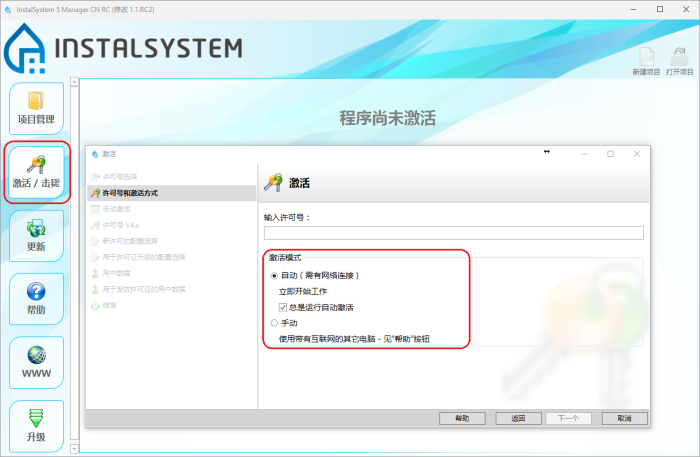
1. 激活 - 更新 - 可以下载最新版本的软件包,也可下载一些旧版本的软件包。程序和目录数据是不断地扩展和更新的,对它们的修改是以新的软件包版本的形式对外发布的。建议定期更新 软件并使用最新可用的版本。更新 是通过在InstalSystem Manager 5 上运行更新来完成的,它也不收取任何费用。
InstalSystem Manager 5 有一个是否接收需要通知用户关于程序版本更新的选项,若要自动接收更新通知,则需勾选自动检查更新 。勾选后一旦有更新,警告 就将出现在在更新 选项卡上。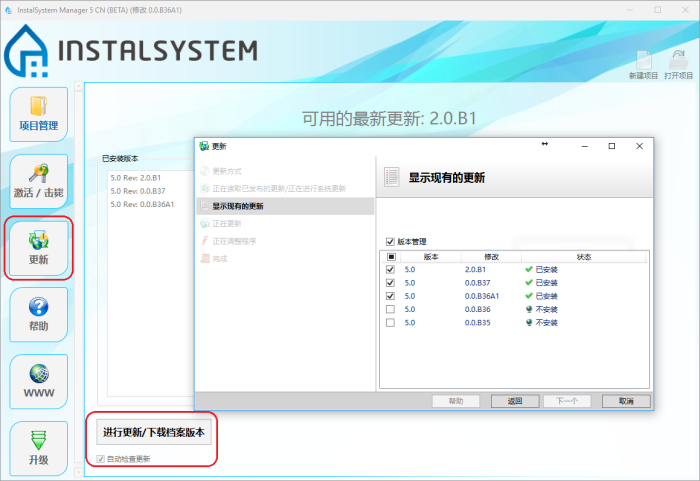
2. 更新
注:在更新 期间,可以选择下载数个程序的版本,包括存档版本。InstalSystem 5 有一独特的特点,就是可下载和保存数个程序的版本,并同时使用它们来处理项目。特别是可以使用创建项目时所使用的程序版本来处理存档项目,同时也可以用最新的程序版本创建新项目。
关于后续版本所做的更新信息见:InstalSystem 5 版本发布说明。


应用举例
安装
- 从我们的网站下载程序安装文件:InstalSystem 5/5.5 安装包下载
- 运行安装程序;
- 接受许可协议
- 根据下面的安装指南完成安装。
安装完成 InstalSystem Manager 5 后,将自动进入安装 程序的剩余部分 (继续安装InstalSystem Editor) :
- 在更新方式 窗口中选择通过互联网 ;
- 版本管理 并选择安装的版本;
- 完成安装过程。
索要一许可号
- 运行 InstalSystem Manager 5 ;
- 在激活 / 击毙 中选择激活程序 ;
- 选择我没有许可号 - 我想订购一新许可号 ;
- 从本软件包可用的许可配置: 列表中选择想要的配置;
- 填写用于发放许可证的用户数据 ;
- 点击下一步 ,发送许可申请。
注:提交申请后,将自动发送确认邮件至用户的邮箱,我们收到付款后,就会在1-2个工作日内将许可证号发送到用户的邮箱,许可证有效期自激活之日起计算。
自动 激活 / 击毙
- 运行InstalSystem Manager 5 ;
- 在激活 / 击毙 选项中选择激活程序 或击毙程序。 如果击毙 ,跳至5;
- 选择 我有一许可号 - 激活程序 ;
- 输入许可号:
- 选择激活 / 击毙 : 自动(需有网络连接) 模式并点击下一步 确认 。
手动激活 / 击毙
当要安装或已安装该程序的计算机没有互联网连接时,就需要手动激活 / 击毙 ,在这种情况下,就需要使用另一台具互联网接入和网页浏览器的电脑。
- 在安装了InstalSystem Manager 5 软件的计算机上运行InstalSystem Manager 5 ;
- 在激活 / 击毙 选项中选择激活程序 或击毙程序 。如果击毙 ,则跳到5;
- 选择我有一许可号 - 激活程序;
- 输入许可号:
- 选择激活 / 击毙 :手动 模式,并点击下一步 确认;
- 将激活码 / 击毙码 复制到剪贴板 ;
- 在有网络连接的设备上,点击链接 https://activationv5.instalsoft.com/, 粘贴代码,并通过点击Continue 确认。若需击毙 ,则操作完成。若需激活,需要进行下一步;
- 将激活码 保存在文件中;
- 在安装了软件的电脑上,在手动激活 窗口,打开 网页生成的激活文件并点击下一步 确认。
更新
在线更新
磁盘更新
其它信息
更多信息,见: 如何删除有关激活问题的信息。
注! 建议在更新BIOS前,先击毙许可号,避免后续无法再次激活许可号。