地面建模:修订间差异
跳转到导航
跳转到搜索
无编辑摘要 标签:手工回退 |
|||
| (未显示2个用户的19个中间版本) | |||
| 第6行: | 第6行: | ||
|p4 =<!--gdy jest kolejny produkt handlowy, zamienić na->"produkt_handlowy3="--> | |p4 =<!--gdy jest kolejny produkt handlowy, zamienić na->"produkt_handlowy3="--> | ||
|category1 =InstalSystem 5#Funkcjonalności | |category1 =InstalSystem 5#Funkcjonalności | ||
|category_name1 = | |category_name1 =功能和工具 | ||
|c2 =<!--Jest kategoria -> zamienić na: "category2=" i uzupełnić link do sekcji kategorii na stronie głównej produktu--> | |c2 =<!--Jest kategoria -> zamienić na: "category2=" i uzupełnić link do sekcji kategorii na stronie głównej produktu--> | ||
|category_name2 =<!--podać nazwę kategorii "ZASTOSOWANIE"/"FUNKCJONALNOŚĆ"/...--> | |category_name2 =<!--podać nazwę kategorii "ZASTOSOWANIE"/"FUNKCJONALNOŚĆ"/...--> | ||
| 第18行: | 第18行: | ||
==说明== | ==说明== | ||
当在''<IS_TS id=StoreyManagement/>'' | 当在''<IS_TS id=StoreyManagement/>'' 窗口中创建建筑结构时,可以通过降低楼层和指定地面标高两种方式定义地面表面的地形。该程序使用此方法以高度自动化的方式计算整个项目中''<IS_TS id=rsTypKonstrukcjiPrzegrodyScianaPrzyGruncie/>'' 。 | ||
新功能''<IS_TS id=rpCreateGround/>'' 能够以建筑物轮廓的形式对各种形状的地面表面进行建模和图形可视化,并可呈现地面与外墙接触处的曲线。 | 新功能''<IS_TS id=rpCreateGround/>'' 能够以建筑物轮廓的形式对各种形状的地面表面进行建模和图形可视化,并可呈现地面与外墙接触处的曲线。 | ||
==应用举例== | ==应用举例== | ||
通过表示地面与''<IS_TS id=rsTypKonstrukcjiPrzegrodyScianaZewnetrzna/>'' | 通过表示地面与''<IS_TS id=rsTypKonstrukcjiPrzegrodyScianaZewnetrzna/>'' 接触轮廓的可用编辑器,可以为位于非平坦地面上的项目的地形单独或成组地定义坐标。 | ||
''<IS_TS id=BuildingStructureCalculation/>'' | 通过''<IS_TS id=BuildingStructureCalculation/>'' 和''<IS_TS id=ObliczeniaCieplneBudynku/>'' ,考虑地面轮廓及其子隔断,如''<IS_TS id=pinNameOkno/>'' 和''<IS_TS id=pinNameDrzwi/>'' ,墙体的围护结构就会被自动分为: | ||
* ''<IS_TS id=rsTypKonstrukcjiPrzegrodyScianaZewnetrzna/>'', | * ''<IS_TS id=rsTypKonstrukcjiPrzegrodyScianaZewnetrzna/>'', | ||
* ''<IS_TS id=rsTypKonstrukcjiPrzegrodyScianaPrzyGruncie/>'', | * ''<IS_TS id=rsTypKonstrukcjiPrzegrodyScianaPrzyGruncie/>'', | ||
程序允许对地面进行更精确的建模,通过''<IS_TS id=InsertEndPoint/>'' 到图元, 就可以创建可单独编辑的附加点。 | |||
随着该部件在''<IS_TS id=rpWindowsLayout2D/>'' 和''<IS_TS id=View3D/>'' 的集成,可以在两个窗口中通过更改的直接可视化来检查和编辑地形。 | |||
在''<IS_TS id=ConfigurationElementsAppereance/>'' 窗口中,可以根据您自己的需要和设计阶段调整地面图形的样式。<br/>[[File:地面建模视频封面.png|900 px|left|thumb|'''[[视频:InstalSystem 5 - 地面建模]]'''|link=https://www.bilibili.com/video/BV1oW4y1Y7j3/]] <br clear="all"/> <br clear="all"/> | |||
<br/> | |||
<!-- Do not write text below this tag --> | <!-- Do not write text below this tag --> | ||
<br class="iwlinks"/>[[pl:Modelowanie gruntu|Modelowanie gruntu]][[ | <br class="iwlinks"/>[[pl:Modelowanie gruntu|Modelowanie gruntu]][[en:Terrain modelling|Terrain modelling]][[bg:Моделиране на терен|Моделиране на терен]] | ||
2026年6月12日 (五) 23:13的最新版本
| 产品 | InstalSystem 5 |
| 文章类型 | 功能和工具 |
| 版本的最新内容 | 2021-04-14 |
说明
当在楼层管理 窗口中创建建筑结构时,可以通过降低楼层和指定地面标高两种方式定义地面表面的地形。该程序使用此方法以高度自动化的方式计算整个项目中地下部分墙体 。
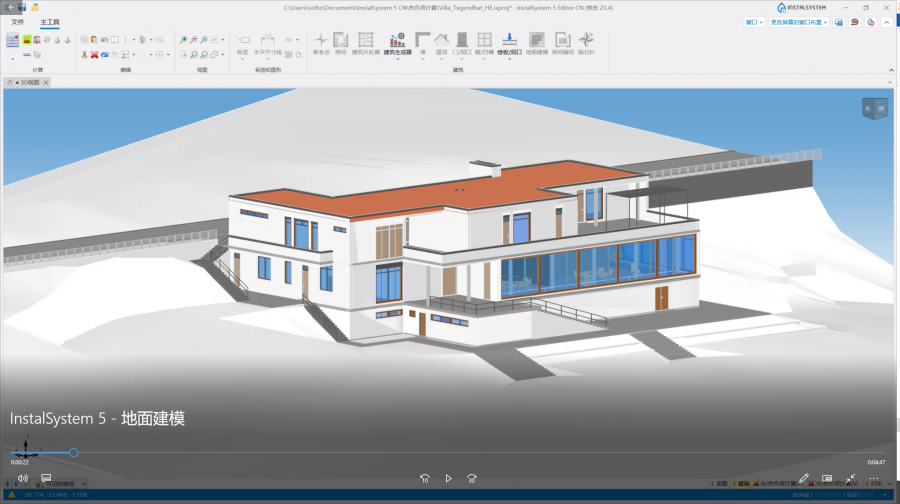
新功能地形建模 能够以建筑物轮廓的形式对各种形状的地面表面进行建模和图形可视化,并可呈现地面与外墙接触处的曲线。
应用举例
通过表示地面与外墙 接触轮廓的可用编辑器,可以为位于非平坦地面上的项目的地形单独或成组地定义坐标。
通过建筑结构计算 和建筑热负荷计算 ,考虑地面轮廓及其子隔断,如窗 和门 ,墙体的围护结构就会被自动分为:
- 外墙,
- 地下部分墙体,
程序允许对地面进行更精确的建模,通过插入分割点 到图元, 就可以创建可单独编辑的附加点。
随着该部件在2D编辑器 和3D视图 的集成,可以在两个窗口中通过更改的直接可视化来检查和编辑地形。
在部件外观和说明配置 窗口中,可以根据您自己的需要和设计阶段调整地面图形的样式。