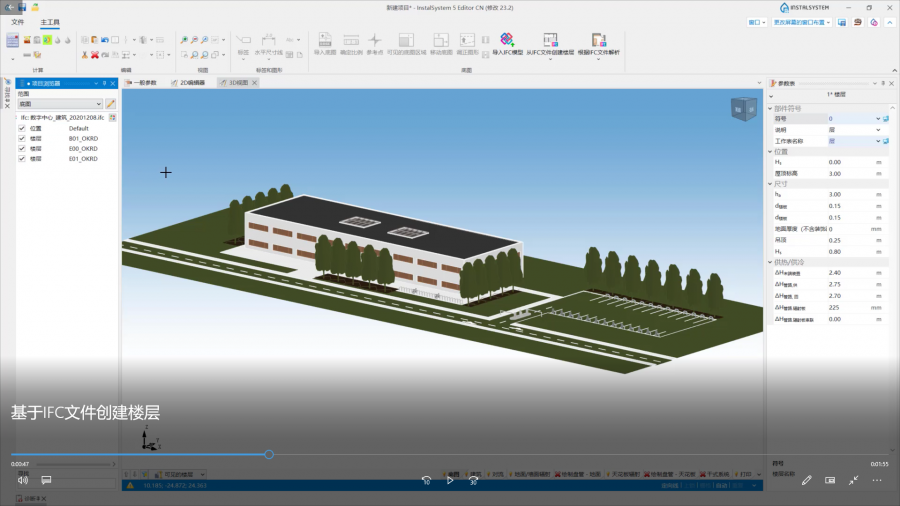
'''We encourage you to see the video from our webinars presenting the possibilities of using the function described in this article:''' <br/>{{#ev:youtube|EOz9GTvBFYc|450||||rel=0}} <br clear="all"/>
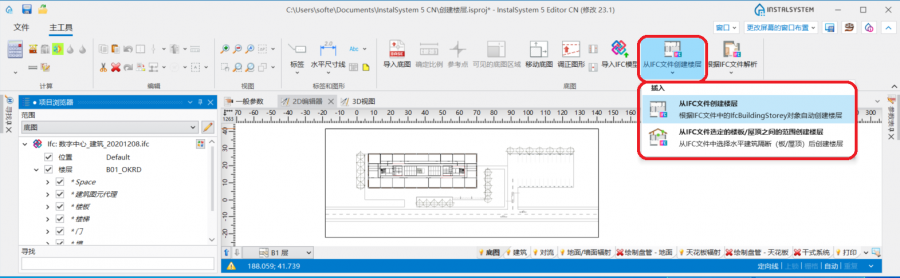
The icons of the ''<IS_TS id=rpCreateStoreysFromIfcK/>'' and ''<IS_TS id=rpCreateStoreysFromIfcS/>'' functions are accessible in the ''<IS_TS id=GraphicalEdit/>'' window on the ''<IS_TS id=NarzedziaGlowne/>'' bar in the ''<IS_TS id=lystrGraphicBackground/>'' section for the enabled ''<IS_TS id=lystrGraphicBackground/>'' editing scope.<br/>[[File:IFC_createstoreys_toolbar.png|900 px|left|thumb|1. Creating a storey from an IFC model]]<br clear="all"/>
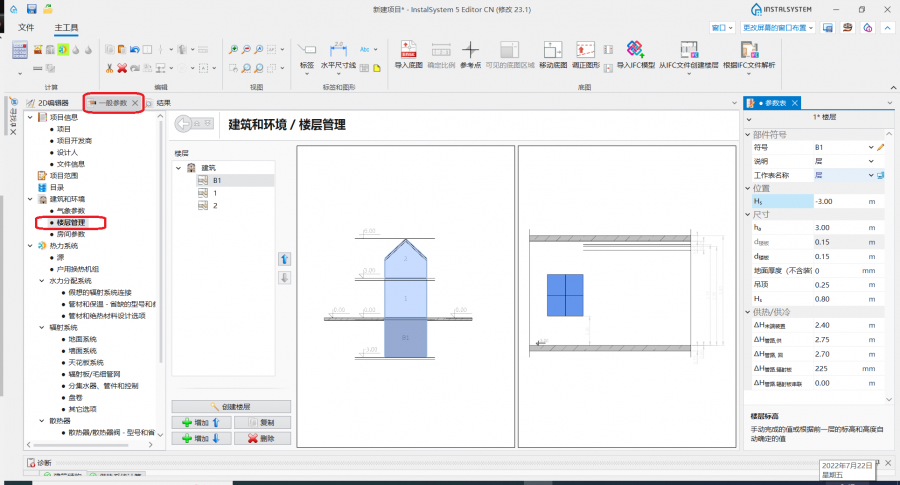
* ''<IS_TS id=StoreyManagement/>'' is accessible in the ''<IS_TS id=rsDanogi/>'' window in the ''<IS_TS id=btDaneBudynku/>'' section. [[File:Storeys_management.png|900 px|left|thumb|2. <IS_TS id=StoreyManagement/>.]]<br clear="all"/>
==Examples of use==
===IFC文件中的楼层===
===Analysis of the structure of model from an IFC file===
The choice of the manner of storey interpretation on the basis of the IFC model loaded into the program should be preceded by an analysis of its structure. For this purpose it is necessary to use the ''<IS_TS id=ProjectBrowser/>'' window for the enabled ''<IS_TS id=lystrGraphicBackground/>'' scope and review the model in respect of the number of storeys and structure of the components assigned to subsequent ifcBuildingStoreys. At this stage, it is also worth considering whether all storeys visible in the IFC model are relevant from the point of view of the thermal calculation or the system under design. {{info}} [[BIM_-_Import_i_zarz%C4%85dzanie_modelami_IFC_w_pakiecie_InstalSystem_5#Podgl.C4.85d_struktury_IFC_za_pomoc.C4.85_przegl.C4.85darki_projektu|Viewing the IFC structure using the project browser]].</br>[[File:IFC_projectbrowser_new.png|900 px|left|thumb|3. IFC model structure in the <IS_TS id=ProjectBrowser/> window.]]<br clear="all"/>
For IFC models, in which the storey structure and the assignment of construction components follow the logic of '''InstalSystem 5''' packages, it is recommended to use the ''<IS_TS id=rpCreateStoreysFromIfcK/>'' function, which ''<IS_TS id=rpCreateStoreysFromIfcKDesc/>''. As a result of the operation, for each ''ifcBuildingStorey'' one ''<IS_TS id=iNameKondygnacja/>'' component is created in the project. All storeys created using the function are displayed in the ''<IS_TS id=StoreyManagement/>'' window and their data (i.e. ''<IS_TS id=strLblRzednaKondCaption/>'' or ''<IS_TS id=strLblWysokoscKondygnacjiCaption/>'') comes from the IFC file. </br> ''<IS_TS id=rpCreateStoreysFromIfcK/>'' will work properly when:
* The storeys from the IFC format have the same logic as the ''<IS_TS id=iNameKondygnacja/>'' components in '''InstalSystem 5''', i.e. they are created one above the other and the building components are assigned to the storey accordingly.
* In the IFC file the roof is created on a separate dedicated ifcBuildingStorey.
* 已将具有定义了楼层的多个IFC模型导入到项目中
* In the model derived from the IFC there are construction components assigned to a particular ''ifcBuildingStorey'', but they extend beyond its scope, e.g. walls spanning multiple storeys. <br/> {{#ev:youtube|p2vnivYFSz0|900||||rel=0}} <br clear="all"/>
If storeys structure in IFC model is not coherent with the logic of a building in '''InstalSystem 5''', it is necessary to create storeys by means of the ''<IS_TS id=rpCreateStoreysFromIfcS/>''. </br>In the first step in the ''<IS_TS id=ProjectBrowser/>'' window for the enabled scope of ''<IS_TS id=lystrGraphicBackground/>'' it is necessary to select horizontal structural partitions (slabs and roofs) from IFC model imported into the program and then to invoke the operation. For the worksheets corresponding to successive storeys to be created correctly, all ''ifcSlab/ifcRoof'' construction components that form upper and lower boundaries for the individual storeys must be indicated. <br/> ''<IS_TS id=rpCreateStoreysFromIfcS/>'' will work properly when:
* Multiple IFC models with defined storeys have been imported into the project.
'''提示''': 创建楼层时,也可使用其它软件,如免费工具BIMVision,来检索楼层的组成。
*
In the IFC model, storeys are defined to which only minor architectural components or other storeys not needed for the thermal model or system design have been assigned.
* In the IFC model there are storey offsets (half-storeys).</br>{{#ev:youtube|7FotAA5hHsQ|900||||rel=0}} <br clear="all"/>
After the operation, the data of the ''<IS_TS id=iNameKondygnacja/>'' components created in the project are inherited from the IFC model:
* ''<IS_TS id=strLblRzednaKondCaption/>'' ''<IS_TS id=strLblRzednaKondSymbol/>'' - elevation of the upper edge of the ''ifcSlab'' component constituting the lower boundary of the storey
* ''<IS_TS id=strLblWysokoscKondygnacjiCaption/>'' ''<IS_TS id=strs_expidISFKondygnacjaWysokoscWOsiach/>'' - distance between top and bottom edge of ifc components delimiting a given storey
* ''<IS_TS id=strl_expidISFKondygnacjaGruboscGornegoStropu/>'' ''<IS_TS id=strs_expidISFKondygnacjaGruboscGornegoStropu/>'' - thickness of the ''ifcSlab/ifcRoof'' component constituting the upper boundary of the storey
* ''<IS_TS id=strl_expidISFKondygnacjaGruboscDolnegoStropu/>'' ''<IS_TS id=strs_expidISFKondygnacjaGruboscDolnegoStropu/>'' - thickness of the ''ifcSlab'' component constituting the lower boundary of the storey
* ''<IS_TS id=RzednaSzczytuDachuCaption/>'' - for the last storey in the sequence, the elevation of the upper edge of the ''ifcSlab/ifcRoof'' component. </br>
===Manual creation of storeys in the Storeys management window based on an IFC model===
==其它信息==
If the above-mentioned operations do not produce ''<IS_TS id=iNameKondygnacja/>'' components correctly, the solution is to create storeys manually in the ''<IS_TS id=StoreyManagement/>'' window. </br>{{Info}} [[Przygotowanie_struktury_budynku#Tworzenie_kondygnacji|Creating storeys]]. </br>
===在一个项目中载入多个IFC模型===
'''Hint''': When creating storeys, alternative software can be used to retrieve the storey constituents, e.g. with the free tool BIMVision.
If multiple IFC models need to be loaded into the project, the main/basic IFC model containing the building structure should be loaded first and the necessary ''<IS_TS id=iNameKondygnacja/>'' components should be interpreted based on this, before loading further IFC models (e.g. containing services or minor architectural features).
===Limiting the IFC model view===
===控制IFC模型视图显示的范围===
After interpreting the storey from the IFC model before continuing with the project, it is helpful to use the function: ''<IS_TS id=Limit2DViewForIfc/>'', which is available in the ''<IS_TS id=DataEditorTable/>'' window for the IFC model selected in the ''<IS_TS id=ProjectBrowser/>'' window. When the function is enabled, only the IFC components within the elevation range of the storeys are presented in the worksheet. </br>[[File:2Dview_elementsfromstoreyrange.png|900 px|left|thumb|1. <IS_TS id=StoreyManagement/>.]]<br clear="all"/>
===Modifying storeys created based on an IFC model===
===修改基于IFC模型创建的楼层===
The data of the ''<IS_TS id=iNameKondygnacja/>'' components interpreted from the IFC model can be edited. After creating a storey, go to the ''<IS_TS id=StoreyManagement/>'' window, verify and, if necessary, change the data for each ''<IS_TS id=iNameKondygnacja/>''. </br>
Due to the nature and complexity of IFC projects/models created in architectural programs, storeys or slabs may not be the same as our intended design goals. For instance, when in an IFC model the ''ifcSlab'' components delimiting the storey range consist of several component layers, select one ''ifcSlab'' layer (e.g. the top one), and after launching the operation: ''<IS_TS id=rpCreateStoreysFromIfcS/>'', go to the ''<IS_TS id=StoreyManagement/>'' window and change the value in ''<IS_TS id=strl_expidISFKondygnacjaGruboscGornegoStropu/>''/''<IS_TS id=strl_expidISFKondygnacjaGruboscDolnegoStropu/>'' to the sum of the thicknesses of all layers of the ''ifcSlab'' components.
===Repeated use of the storey-creating functions===
While working with a project it is possible to run again the functions that create storeys based on the imported IFC model:
*''<IS_TS id=rpCreateStoreysFromIfcK/>'' - each re-call of the operation will overwrite the storeys displayed in the ''<IS_TS id=StoreyManagement/>'' window with storeys created from the IFC model loaded into the project.
*''<IS_TS id=rpCreateStoreysFromIfcS/>'' - each time the operation is executed again, a dialog box opens with the question: ''<IS_TS id=CzyUsunacCiagiKondygnacjiPrzedGeneracjaNowych/>'':
** Selecting ''<IS_TS id=rsBtnYes/>'' causes the storeys displayed in the ''<IS_TS id=StoreyManagement/>'' window to be overwritten with storeys interpreted on the basis of the IFC model loaded into the project.
** Selecting ''<IS_TS id=rsBtnNo/>'' creates another ''<IS_TS id=iNameCiagKondygnacji/>'' component without affecting the arrangement of existing series in the project.
[[Category:InstalSystem 5]]
[[Category:InstalSystem 5]]
[[Category:FUNCTION AND TOOL]]
[[Category:功能和工具]]
<!-- Do not write text below this tag -->
<!-- Do not write text below this tag -->
<br class="iwlinks"/>[[pl:BIM - Tworzenie kondygnacji na podstawie danych z modelu IFC|BIM - Tworzenie kondygnacji na podstawie danych z modelu IFC]]
<br class="iwlinks"/>[[pl:BIM - Tworzenie kondygnacji na podstawie danych z modelu IFC|BIM - Tworzenie kondygnacji na podstawie danych z modelu IFC]][[en:BIM - Creating storeys based on data from IFC model|BIM - Creating storeys based on data from IFC model]][[fa:BIM - ساخت طبقات براساس داده های ورودی از یک مدل IFC|BIM - ساخت طبقات براساس داده های ورودی از یک مدل IFC]][[bg:BIM – създаване на етажи от сграден модел с неутрален формат IFC|BIM – създаване на етажи от сграден модел с неутрален формат IFC]]